Most advice on employee experience strategy is still stuck in the perks era. It treats EX like a culture campaign, a benefits refresh, or a nicer onboarding deck. That’s why so many programs look polished in the boardroom and feel irrelevant on the shop floor, in the field, or across a distributed team trying to get real work done.
A 2026 EX strategy still has to reach deskless teams, not just knowledge workers, so many operators evaluate a unified employee experience platform when they need communications, engagement, and operations in one place.
A modern employee experience strategy starts somewhere less glamorous. It starts with friction. Can people find the right information without hunting through five systems? Do managers know what to act on after a survey closes? Can a frontline employee swap a shift, complete a task, and get a policy answer from a phone without calling three people? Those are employee experience questions. They’re also communications, technology, and operations questions.
That’s the lens that matters now. Employee experience sits at the intersection of engagement, internal communications, HR technology, AI, frontline enablement, and workforce operations. If those functions aren’t connected, employees feel the gaps immediately. Work slows down. Managers absorb admin. Important messages miss the people who need them most.
The old model asked whether employees were happy. The better model asks whether work is clear, usable, and worth the effort. That’s where workforce experience and strong internal communications stop being support functions and become operating disciplines.
Key Takeaways
- Employee experience strategy is an operating model, not an HR campaign. It works when communications, tools, managers, and workflows are designed together.
- Frontline reality has to be built in from day one. If your strategy only works for laptop-based employees, it isn’t complete.
- Measurement needs to go beyond sentiment. Track friction in task completion, support, adoption, and manager follow-through.
- Governance matters more than slogans. A clear owner, shared outcomes, and cross-functional execution beat broad culture statements.
- A strong internal communications strategy is part of EX infrastructure. If people can’t access or trust information, the experience breaks.
The End of the Perks Era
Employee experience got sidetracked when companies treated it like a branding exercise. The playbook became familiar. Add perks, launch a wellbeing campaign, refresh the office, run a survey, publish a few culture messages, then wonder why daily work still feels harder than it should.
Employees can tell when the company is improving work and when it is dressing up avoidable friction. Frontline teams usually spot it first. They feel it in clunky shift swaps, missing updates, broken handoffs, slow approvals, and tools that only work well if you sit behind a laptop.
The business stakes are high because poor experience is rarely just a morale issue. It shows up in missed productivity, preventable turnover, manager rework, support volume, slower onboarding, and inconsistent execution across locations. That is why serious organizations now treat EX as part of workforce operations, not a side program owned by HR alone.
A useful strategy starts with the mechanics of work. It lines up communication, technology, manager habits, and process so employees can get information, complete tasks, and solve problems without wasting time. For a broader operational view, see this guide to workforce experience strategy and design.
EX programs break down when they improve the surface of work but leave the operating friction in place.
The old perks model also assumed an office-heavy workforce. That assumption misses how work happens in retail, healthcare, logistics, manufacturing, hospitality, and field service. Roughly 70% of workers are deskless or frontline in many economies, and their experience is shaped less by office perks than by schedules, supervisors, devices, training access, and whether key information reaches them at the right moment.
What replaces perks-led thinking is more demanding, and more useful:
- From atmosphere to execution
- From campaign activity to operational follow-through
- From office defaults to workforce segmentation
- From HR ownership alone to shared accountability across HR, ops, IT, and internal comms
Culture still matters. Belonging still matters. But neither holds up for long when employees cannot find answers, complete basic tasks, or trust the systems that run their day.
What Is an Employee Experience Strategy Really
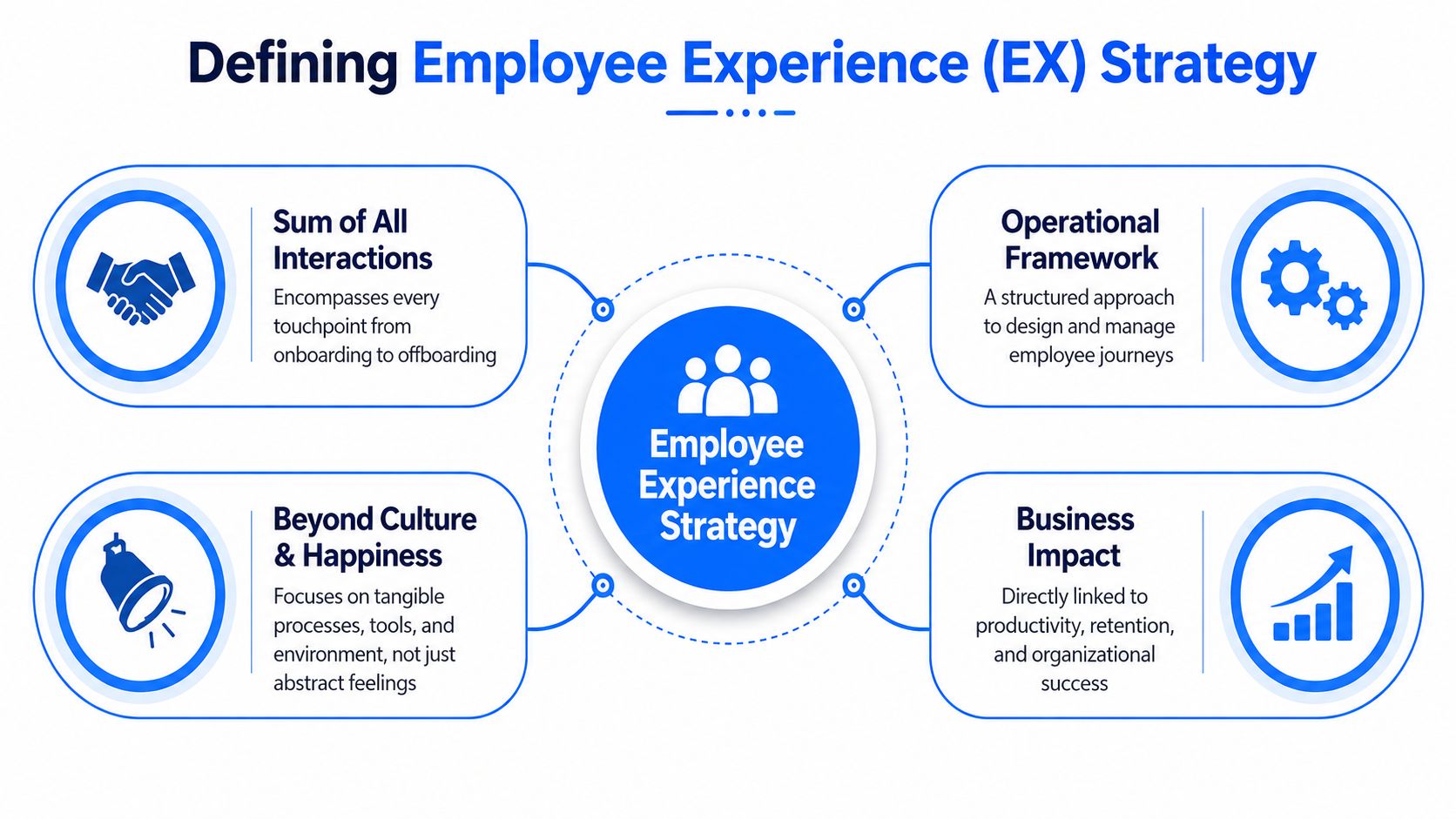
Most definitions of employee experience are too vague to be useful. They talk about feelings, culture, and lifecycle moments, but they stop short of operational design. In practice, an employee experience strategy is the deliberate design of how people interact with your organization’s communication channels, managers, policies, technologies, and workflows from entry to exit.
That broader definition exists for a reason. The old engagement-only playbook isn’t enough. Gallup’s 2023 data showed that 59% of the world’s employees were not engaged and 18% were actively disengaged, leaving only 23% engaged, as summarized by AIHR’s employee experience statistics. That’s one reason many organizations moved from generic sentiment programs to journey mapping and “moments that matter” approaches.
A practical strategy has to answer basic questions. Where does work break down? Which employee groups face the most friction? Which moments have the biggest operational and emotional weight, such as onboarding, schedule changes, manager check-ins, learning access, or internal mobility?
For a broader view of the discipline, see workforce experience.
The strategy is bigger than engagement
Engagement matters, but it’s an outcome. The inputs are more concrete.
| Element | What leaders need to design |
|---|---|
| Communication | Clear channels, usable messages, and reach across shifts, sites, and devices |
| Technology | Tools that support task completion instead of adding clicks and confusion |
| Management | Consistent coaching, expectations, and follow-up on employee feedback |
| Operations | Scheduling, approvals, support, and knowledge flows that don’t waste time |
That’s where a lot of teams get stuck. They run surveys, publish a few action themes, and call it a strategy. That’s not a strategy. That’s reporting.
Start with listening, then act on friction
Gallup’s strongest contribution here is the listen-learn-act loop. The idea is simple. Gather baseline feedback, identify patterns, equip managers to interpret the signals, then hold them accountable for one improvement goal that people can feel in their day-to-day work.
Practical rule: If employees give feedback and can’t name what changed afterward, the strategy is still performative.
The most effective employee experience strategy isn’t a standalone document. It becomes the operating logic for how communications, technology, management, and process design improve work together.
A Unified Framework for Workforce Experience
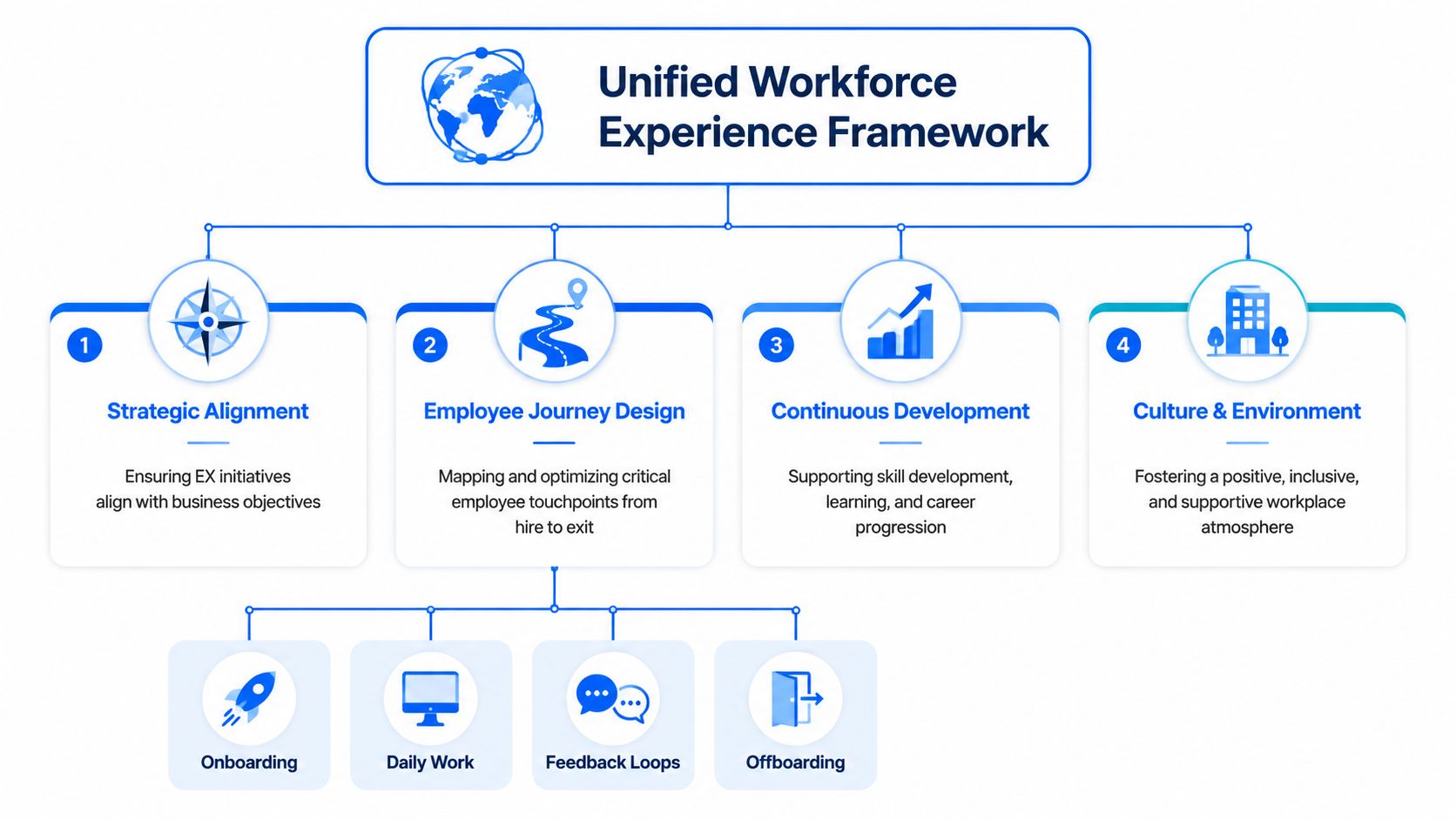
Employee experience falls apart when every function optimizes its own piece. HR runs engagement. Internal comms pushes messages. IT tracks uptime. Operations chases throughput. Nobody owns the employee’s actual journey across all of it.
That’s why a unified framework matters. The model has to connect business priorities with employee outcomes, and it has to do it across segments, not just headquarters. Gartner’s guidance is useful here. It states that EX goals should include both business outcomes such as cost reduction and employee outcomes such as work satisfaction, while surveying key talent segments to identify friction themes that harm both, as outlined in Gartner’s employee experience framework.
For teams evaluating the system layer behind that model, a workforce experience platform should be judged by how well it connects communication, task execution, support, and insight, not by feature count alone.
The five parts that have to work together
A unified employee experience strategy usually needs these components in the same room:
-
Employee engagement
Feedback, sentiment, lifecycle listening, and manager follow-up. -
Internal communications
Channel strategy, message targeting, frontline reach, and content governance. -
HR technology
Core systems, service delivery, onboarding flows, knowledge access, and workflow design. -
AI at work
Search, self-service, drafting, support assistance, and routing. Useful when it reduces effort, not when it adds novelty. -
Workforce operations
Scheduling, approvals, shift coverage, task execution, escalation, and field-level coordination.
If one of those pieces is absent, the strategy gets distorted. A comms-led model can improve awareness but still leave process pain untouched. A tech-led model can automate workflows while ignoring trust, manager behavior, and message clarity. An HR-only model often misses where work breaks in the day.
Governance is where serious strategies separate themselves
Good EX work needs structure. One of the most practical operating moves is to build a cross-functional squad with enough authority to diagnose and pilot improvements quickly. The Employee Experience Operating Model recommends forming a cross-functional squad and piloting targeted process improvements within a strict 90-day window rather than launching vague multi-year programs, as described by Wowledge’s operating model overview.
That governance model works because it forces trade-offs. Teams have to choose one or two friction themes that matter. Slow approvals. Meeting overload. Broken onboarding handoffs. Unclear frontline communications. Those are solvable.
If your EX roadmap has twelve priorities, you don’t have a roadmap. You have an archive of complaints.
Why office-first frameworks keep failing
The biggest weakness in many employee experience strategy templates is who they assume the employee is. Most still picture someone with a laptop, a corporate inbox, and easy access to internal systems.
That assumption breaks the model. Frontline, deskless, and distributed workforces live inside schedule changes, mobile tasks, shift coverage issues, fragmented communication, and uneven access to tools. A unified framework has to start there, not add it later as a special case.
How to Design and Implement Your EX Strategy
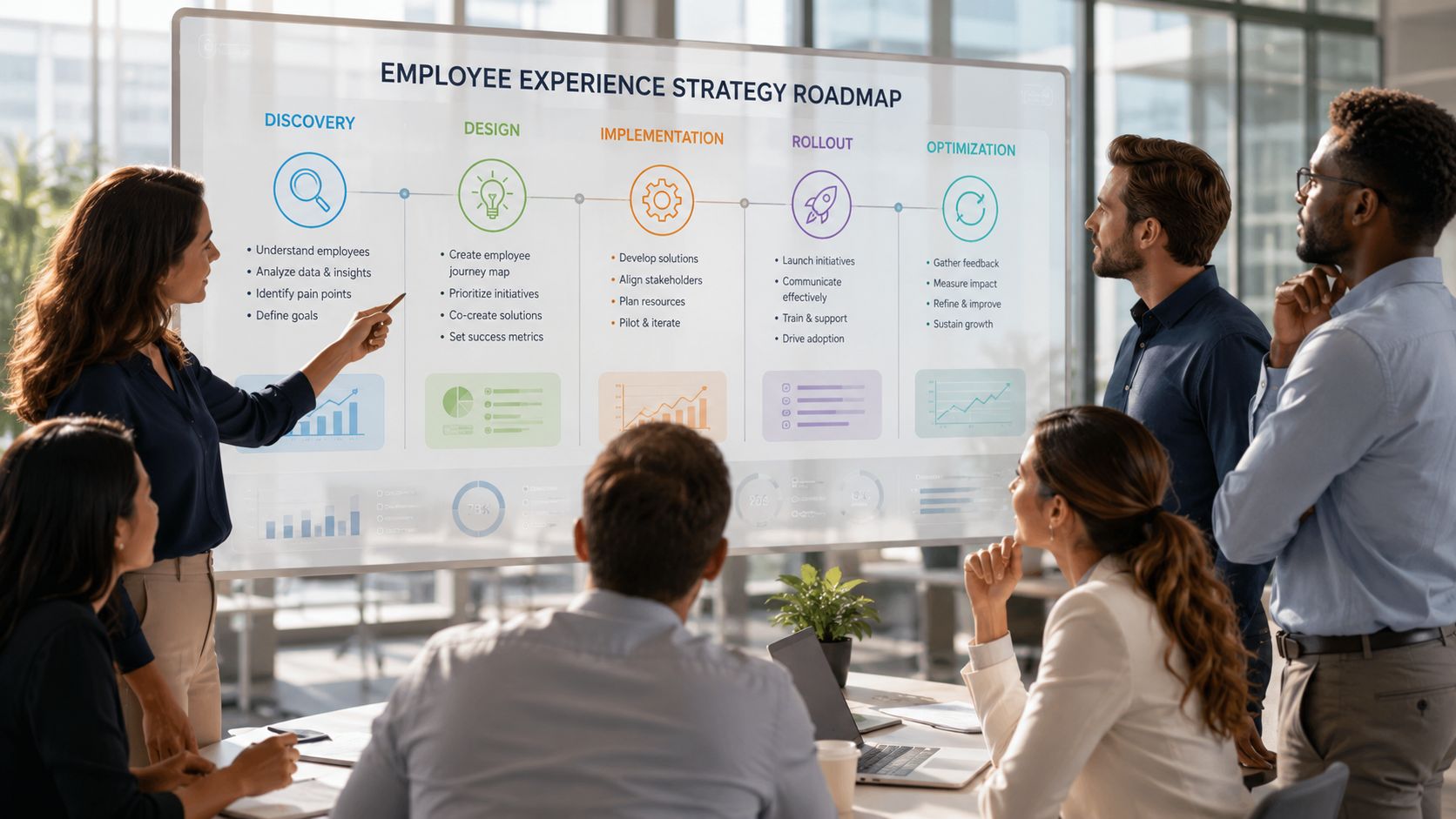
Most employee experience strategies go wrong in execution, not intent. Leaders usually know the experience isn’t where it should be. They just attack it with disconnected projects. A survey here. A recognition platform there. A new channel launch with no governance. The better route is to treat EX like an operating improvement program with clear sequencing.
Gallup’s research points to the right loop. The listen-learn-act cycle works when managers get actionable dashboards, understand what the data means, and are expected to improve one team-level issue with visible follow-up, as explained in Gallup’s employee experience and workplace culture research.
For leaders trying to connect this work to execution on the ground, workforce operations is usually the missing layer.
A practical implementation sequence
Start small, but not casually. Use a sequence like this.
-
Diagnose friction by segment
Don’t begin with a generic company-wide persona. Separate office-based teams, hybrid groups, frontline roles, field service workers, and site-based managers. Their pain points won’t be the same. -
Map moments that matter
Focus on moments where communication, tools, and workflow collide. Onboarding is a classic one. So are schedule changes, leave requests, escalation paths, promotion processes, policy lookups, and issue resolution. -
Review system and channel sprawl
Ask where employees need to switch apps, wait on approvals, or chase answers. Slack, Teams, Workday, ServiceNow, UKG, SharePoint, email, and local messaging apps can either create a coherent experience or a maze. -
Set one pilot theme
Pick a friction theme with visible operational impact. Slow manager approvals. Poor new-hire ramp. Fragmented frontline updates. Don’t pilot “culture.” -
Define manager action
Every pilot needs a manager behavior change, not just a system change. Better check-ins, clearer team updates, tighter escalation, or faster response expectations.
Measure what employees actually feel in the workflow
Often, many strategies become too soft to manage. Digital employee experience teams increasingly use Experience Level Agreements, or XLAs, to define success by employee outcomes rather than just technical uptime. That includes measures such as tool adoption, time-to-completion for common tasks, support ticket resolution time, and a calculated digital friction score, as described in Gable’s digital employee experience guide.
That approach is more useful than “the platform is available.” Employees don’t care that a system was up if a simple process still took too long and required multiple handoffs.
What works and what doesn’t
Here’s the blunt version.
| What works | What usually fails |
|---|---|
| Segmented listening tied to real workflows | One annual survey treated as the whole truth |
| Pilots with one friction theme | Enterprise-wide launches with no proof of value |
| Manager follow-through on one action goal | Executive messaging with no local behavior change |
| Integrated channels and systems | New tools layered onto old fragmentation |
| Operational metrics plus sentiment | Vanity metrics with no link to work |
A strong employee experience strategy doesn’t promise to remove every annoyance. It identifies the highest-friction points and fixes them in the order employees feel them.
Prioritizing the Frontline and Distributed Workforce
Generic EX advice usually falters. It assumes employees sit at desks, read long emails, attend calendar-based meetings, and can manage a stack of internal systems without much effort. That’s not most of the workforce.
Stratrix highlights the gap clearly. Much employee experience strategy content fails to address the 70% of the workforce that is frontline, deskless, or hybrid-mobile, with too much emphasis on office-based knowledge workers, as noted in Stratrix’s employee experience strategy discussion. That matters because the friction points in manufacturing, healthcare, retail, hospitality, transportation, and field operations are different by design.
For leaders focused on this segment, frontline employee engagement has to be treated as a core design requirement, not a downstream adaptation.
One-size-fits-all design is the wrong default
Compare the experience needs of two employees:
| Employee type | Typical friction | Better design choice |
|---|---|---|
| Office-based knowledge worker | Too many channels, meeting overload, unclear ownership | Channel governance, async norms, better search, approval cleanup |
| Frontline or deskless worker | No easy access to schedules, tasks, policies, or updates during the shift | Mobile-first workflows, shift-aware communication, simple self-service, embedded knowledge |
Those differences should shape both tooling and communication design. An intranet article may be fine for corporate policy context. It’s a weak primary channel for a store associate who needs a schedule update or a task change from a phone.
Build the stack around access and action
The wrong way to build a frontline EX stack is to buy separate tools for comms, task management, scheduling, and service requests without thinking about the employee journey. That creates more app switching and more confusion.
The better way is to judge each category by one question: does it reduce the number of steps between the employee and the action they need to take?
Consider the trade-offs:
- Enterprise suites can reduce sprawl, but they may be clunky for frontline use if the mobile experience is weak.
- Best-of-breed apps can solve specific problems well, but they often create authentication, integration, and governance headaches.
- Chat-based access can simplify questions and routing, but only if the knowledge behind it is current and the handoff path is clear.
- Scheduling tools improve shift coordination, but the experience still breaks if policy, support, and communication live somewhere else.
A strong employee experience strategy for distributed teams usually favors mobile-first access, fewer channels, tighter integrations, and messages designed for shift context rather than office reading habits.
Frontline EX improves when people can complete the task, not when headquarters publishes another polished update about the task.
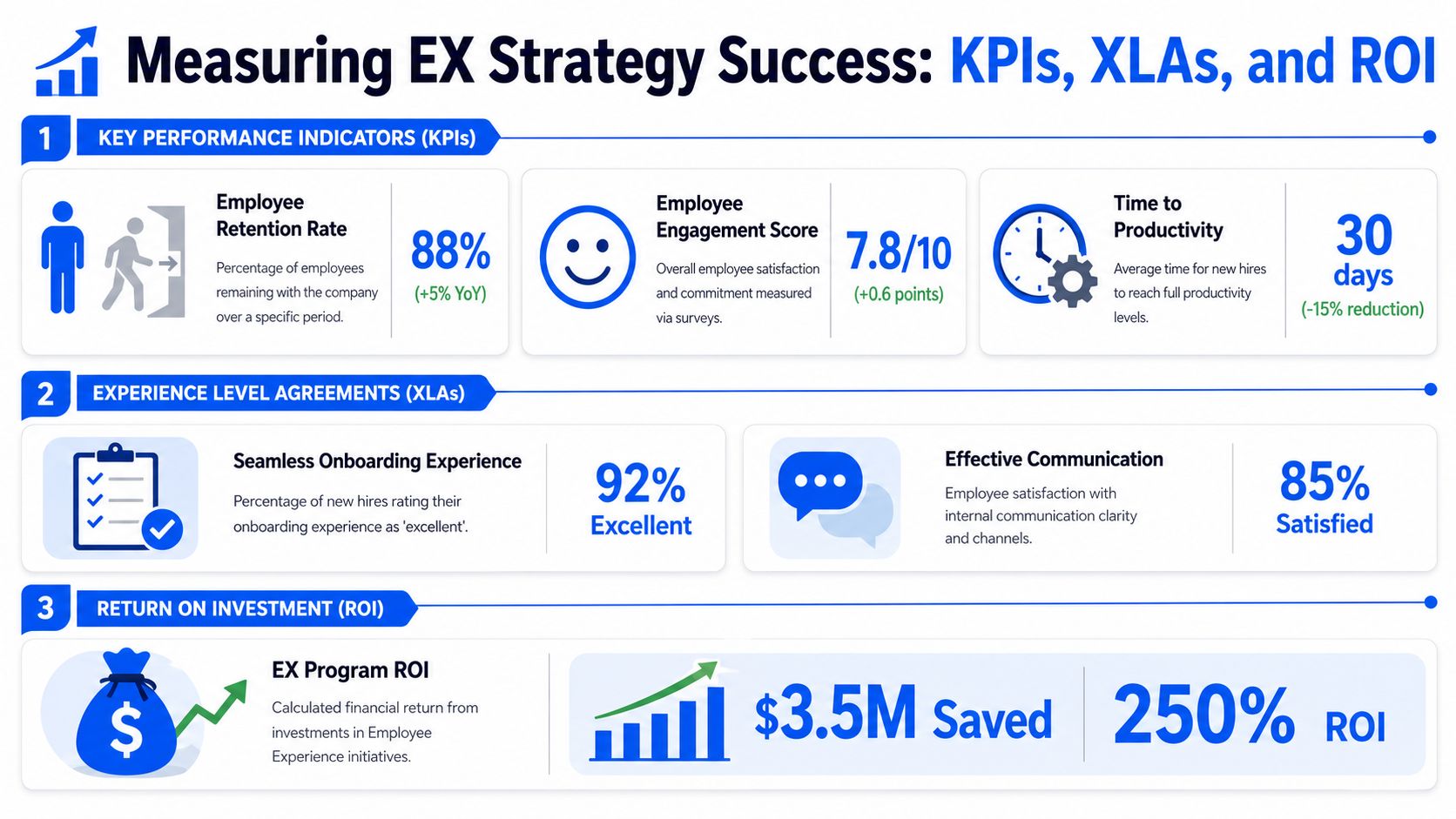
Measuring Success KPIs XLAs and ROI
Employee experience strategies usually fail at the measurement stage. Teams collect sentiment, publish a dashboard, and still cannot explain what changed in the day-to-day operation. If the score looks better but shift coverage, onboarding, support demand, or manager follow-through stay flat, finance will treat EX as a soft initiative.
Measurement needs to connect three things: what employees are trying to get done, how much friction they hit, and what that friction costs the business. That standard matters even more for frontline and distributed teams, where poor experience shows up in missed handoffs, extra supervisor calls, delayed starts, and policy confusion, not just survey comments.
What to measure instead of just sentiment
A useful measurement model has three layers. KPIs show business movement. XLAs show whether work feels easier to complete. ROI shows whether the improvement was worth the investment.
KPIs tied to real work
Start with outcomes employees feel directly and leaders can verify operationally:
- Task completion speed
- Support ticket resolution time
- Adoption of core internal tools
- Onboarding completion quality
- Manager follow-up on team action plans
- Absenteeism, turnover, or time-to-resolution where relevant
These measures work because they sit close to the workflow. If leave requests become easier to submit and track, support volume often drops. If schedule access improves for store or field employees, supervisor interruptions usually fall. If onboarding is better sequenced across HR, IT, and operations, new hires reach useful productivity faster.
That is a stronger case than saying people feel better about work.
XLAs that reflect employee outcomes
Traditional service levels focus on whether a system was available or whether a ticket met a response target. XLAs test whether the employee completed the task with reasonable effort.
Useful XLA-style views often include:
| Measurement area | What it reveals |
|---|---|
| Time to complete common tasks | Where workflows create avoidable delay |
| Technology satisfaction pulses | Which systems create friction even when technically available |
| Resolution quality | Whether support closes issues or just closes tickets |
| Adoption patterns | Whether tools are actually becoming part of work |
This distinction matters. A password reset portal can hit its uptime target and still waste ten minutes per attempt on a shared mobile device. A knowledge base can be live and searchable and still fail a field technician who needs one clear answer on-site. XLAs help expose that gap.
ROI has to be segmented
One company-wide ROI model is usually too blunt to be useful. The cost of friction is different for a nurse, a warehouse associate, a store manager, and a corporate analyst. The intervention is different too. That is why generic EX business cases often sound persuasive in steering meetings and fall apart during budget review.
Moveworks’ article on building an employee experience strategy notes that HR leaders often struggle to justify EX investment when they lack segment-specific ROI models. That lines up with what happens in practice. Broad averages hide where the value is created.
Build ROI by employee segment and by journey. For example:
- Frontline scheduling fix linked to fewer support contacts, fewer missed updates, and smoother shift coverage
- Manager enablement pilot linked to better local follow-up on feedback and fewer unresolved team issues
- Onboarding redesign linked to faster system access, fewer early-stage support requests, and quicker ramp to role readiness
- AI-enabled internal support linked to faster answer retrieval and less administrative time spent chasing basic information
This approach also forces honest trade-offs. Some fixes improve experience but take longer to pay back. Others show fast savings but only for one group. That is normal. The point is to show where the intervention changed work, for whom, and with what operational result.
Your first 90 days of measurement
Skip the giant dashboard at the start. Prove one value chain end to end.
- Pick one friction theme
- Define the employee outcome
- Define the business outcome
- Track both before and after the pilot
- Report back in plain language
A good readout sounds like this: schedule changes now reach associates in one step, missed shift acknowledgments dropped, store managers spend less time relaying updates manually, and support tickets on access questions fell. That is the level of proof that keeps an EX strategy funded.
Employee experience earns credibility when better communication, better tools, and better process design remove friction people feel every day.
Conclusion Your First 90 Days
The best employee experience strategy isn’t the one with the most pillars. It’s the one employees can feel in how work happens.
In your first 90 days, build a cross-functional group with HR, internal communications, operations, IT, and a frontline or field representative. Pick one friction point that affects both employees and the business. Define a small pilot. Set measures for employee outcome and business outcome. Give managers a visible role. Then report what changed.
If you’re a smaller company, the same logic applies. You just need fewer layers. If you’re a larger enterprise, resist the temptation to launch a broad transformation before fixing one high-friction journey well.
AI will increasingly matter in this space, but only where it reduces search time, simplifies support, and helps employees complete work faster. It won’t rescue a fragmented operating model.
The organizations that win here won’t treat EX as a campaign. They’ll run it as a discipline.
Employee Experience Strategy FAQs
What is the difference between employee experience and employee engagement
Employee experience is the full reality of how work feels and functions across tools, communication, management, and process. Employee engagement is one outcome of that experience. If employees face confusing systems, poor manager follow-through, and constant friction, engagement usually suffers downstream.
How can a small company start an employee experience strategy without a big budget
Start with one workflow, not a broad program. Onboarding, internal support, scheduling, or manager communication are good places to begin. Use the tools you already have, reduce channel clutter, document one better process, and create a visible feedback loop. Small companies often move faster because they can solve problems without waiting for enterprise-scale governance.
What role should AI play in an employee experience strategy
AI is most useful when it removes effort. Good use cases include better internal search, support triage, policy question handling, and drafting assistance for managers or communicators. Weak use cases are novelty bots with poor knowledge behind them or AI layers added to already confusing processes.
How do you get leadership buy-in for employee experience work
Tie the strategy to an operational problem leaders already care about. Don’t pitch EX as culture improvement alone. Show where friction is slowing onboarding, increasing admin, fragmenting communication, or creating avoidable support demand. Leaders usually support EX once they see it as a business execution issue.
How often should you measure employee experience
Use a mix. A broad baseline can help establish priorities, but you also need lighter feedback at key moments such as onboarding, manager effectiveness, support interactions, or after process changes. The point isn’t constant surveying. It’s building a rhythm where listening leads to action employees can recognize.
For more practical guidance on workforce experience, internal communications, HR tech, AI at work, and frontline operations, explore Turn On Work.