63% of employees feel overwhelmed by the number of communication channels, yet only 28% of companies have clear channel usage policies tied to job roles, according to Harvard Business Review Analytic Services coverage cited here. That changes the buying question. The problem usually isn’t whether a company has enough employee communication tools. It’s whether anyone has defined which tool should be used, by whom, for what, and under what operating conditions.
When you score vendors against those criteria, include at least one employee communications hub that can reach deskless workers on mobile, not only email and Slack.
That distinction matters because workforce experience isn’t just an engagement issue. It sits at the intersection of internal communications, HR technology, AI, frontline enablement, and day-to-day operations. A polished intranet won’t help a nurse between shifts if alerts only land in email. A chat platform won’t reduce confusion if policy updates still arrive through five separate channels. Analytics won’t prove value if they measure clicks but never connect communication to execution.
The strongest communication stacks don’t chase one platform to do everything. They combine channels deliberately. They govern them tightly. They design for deskless and hybrid realities instead of assuming every employee sits at a laptop. That’s the same broader challenge behind workforce experience: people experience work through the systems, messages, decisions, and operating routines that shape their day.
Introduction
Most discussions of employee communication tools stay too close to feature lists. They compare Slack with Teams, intranets with employee apps, or newsletters with social feeds. Those comparisons matter, but they miss the harder operational question: how a company turns a collection of channels into a system that reduces confusion.
That gap is getting more expensive. Organizations now run a mix of email, chat, video, scheduling, intranet, signage, survey, and workflow tools. Some support office staff well but fail in plants, stores, hospitals, depots, and field environments. Others work for urgent updates but are weak for policy retention, multilingual delivery, or auditability. The result is fragmentation dressed up as modernization.
A useful evaluation model starts with three questions:
- What kind of message is this? Urgent alert, policy update, team coordination, recognition, or feedback request.
- Who needs to receive it? Frontline staff, mobile workers, office teams, managers, or all employees.
- What action should follow? Read, acknowledge, discuss, complete a task, or change behavior.
Better workforce experience comes from linking communication to execution, not from adding more channels.
The rest of the market is finally catching up to that idea. AI can personalize delivery and analyze sentiment. Mobile-first design is reshaping frontline communication. Security and governance requirements are rising. But the companies that get the most value from employee communication tools still do one thing differently: they treat channel strategy as part of operating design, not just internal comms.
Communication Tool Categories
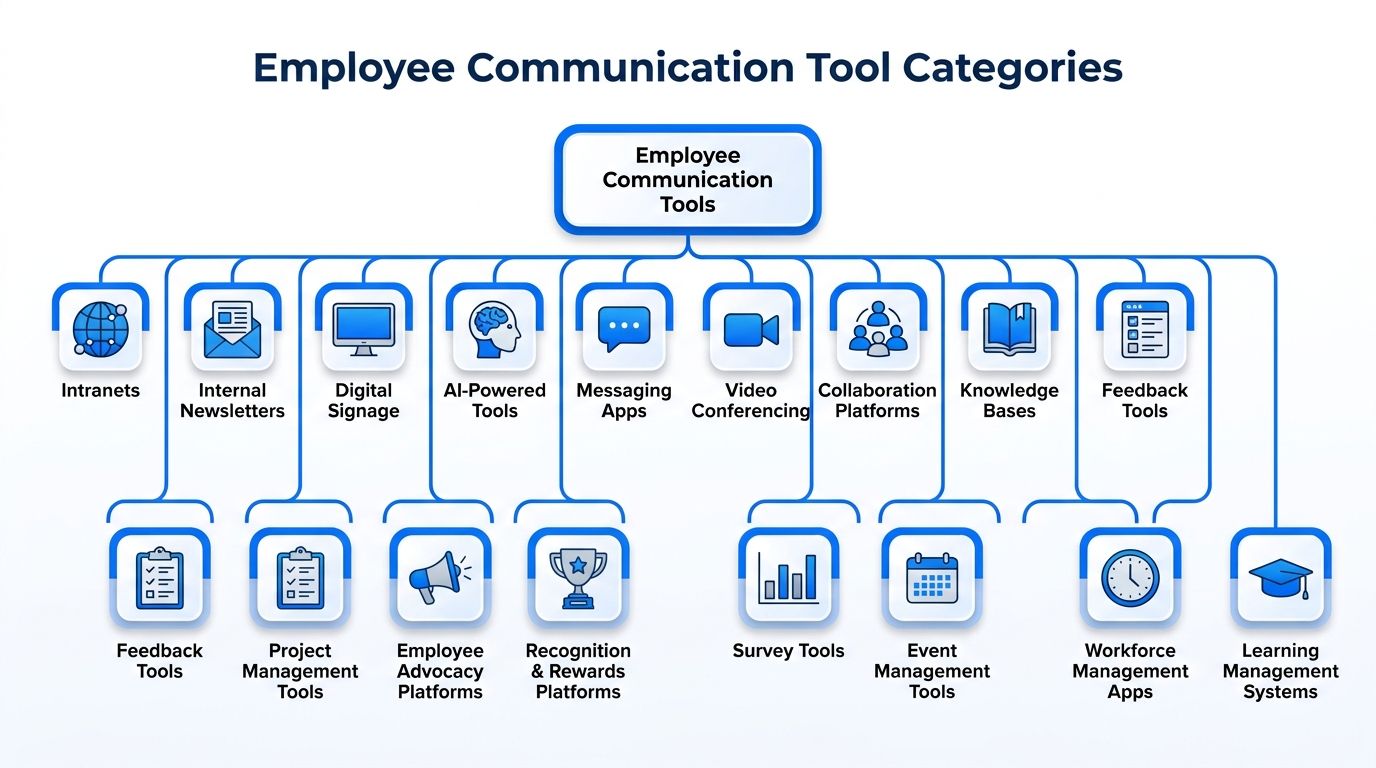
The current market is too broad to evaluate as one software category. Poppulo’s breakdown of internal communication tools identifies 16 communication categories in 2026: employee experience platforms, internal email/newsletters, digital signage, intranets, instant messaging, video conferencing, collaboration, recognition, feedback, project management, cloud storage, scheduling, social intranets, AI communication tools, multilingual tools, and analytics. That list tells buyers something important: no single product covers every communication need well.
For teams assessing the category through a wider employee tech lens, a workforce experience platform view is often more useful than a simple “best tools” roundup.
Core channels for distribution
Some tools exist primarily to push information outward.
Internal email and newsletters handle formal updates, leadership communication, and recurring campaigns. Products in this orbit include internal newsletter software and enterprise email tooling.
Intranets act as persistent knowledge hubs. They work best for policies, resources, onboarding content, and searchable reference material.
Digital signage reaches employees in shared physical spaces. It’s especially useful where workers don’t regularly log into desktops.
Multilingual tools support translation and localization, which matters when a company needs one message adapted across languages and regions without creating separate manual workflows.
Real-time and workflow tools
Another cluster supports speed, coordination, and task movement.
Instant messaging tools such as Slack or Microsoft Teams work well for quick decisions, clarifications, and team discussion. They’re weak when information needs long-term visibility or formal retention.
Video conferencing platforms support meetings, town halls, training, and manager communication where tone and visibility matter.
Collaboration and project management tools connect communication to work. They’re useful when updates must turn directly into tracked actions, approvals, or deadlines.
Scheduling tools matter more than many HR buyers assume. In frontline settings, schedule visibility is often one of the most trusted communication surfaces employees check.
Experience, listening, and intelligence layers
The final group focuses on engagement and optimization.
- Recognition platforms reinforce culture and values in visible ways.
- Feedback tools capture employee input through polls, surveys, and comment mechanisms.
- Social intranets support community, peer interaction, and internal storytelling.
- Cloud storage provides access to files tied to communication and collaboration flows.
- Analytics tools help teams understand reach, engagement, and usage patterns.
- AI communication tools automate routine messages, personalize delivery, analyze sentiment in real time, and track engagement, as summarized in this internal communications trends analysis.
- Employee experience platforms try to unify several of these layers into a more coherent employee-facing environment.
Analyst view: Tool categories matter less than role clarity. Buyers get better results when they define the job of each category before comparing vendors within it.
Features Mapped to Use Cases
Feature checklists become useful only when tied to work context. A feature that feels optional for office staff can be decisive for field service teams. A capability that looks impressive in a demo can be irrelevant if employees never open the channel where it lives.
One fact keeps this grounded: email remains the primary internal communication channel for 36% of employees as of late 2024, according to workplace communication statistics compiled here. That doesn’t mean email should dominate every workflow. It means any realistic channel strategy has to account for email’s staying power while deciding where other tools are better.
Feature Fit Matrix for Workplace Contexts
| Feature | Frontline | Hybrid | Office |
|---|---|---|---|
| Segmentation | Critical for site, shift, role, and manager targeting | Important for location, function, and work pattern targeting | Important for department and level targeting |
| Mobile access | Essential | Important | Useful, but less decisive |
| Push notifications | Essential for urgent alerts and time-sensitive updates | Useful for timely nudges | Useful selectively, often less central |
| Multilingual support | High priority in distributed operations | Important in global teams | Important where offices span regions |
| Feedback tools | Best kept lightweight and quick to complete | Useful for pulse checks and team listening | Useful for broader engagement and program input |
| Analytics | Should connect communication to execution and acknowledgement | Should connect reach to adoption and collaboration patterns | Often focused on readership, engagement, and campaign performance |
| Integrations | Must connect with scheduling, tasking, and workforce systems | Must connect with HR, collaboration, and calendar systems | Must connect with email, HRIS, and document systems |
| Offline tolerance | Often necessary | Occasionally useful | Rarely a major requirement |
Frontline use cases
Frontline environments punish desktop-centric assumptions. Naboo’s guidance on HR communication best practices notes that deskless workers often need mobile-optimized channels such as SMS for urgent alerts, digital signage in common areas, and manager-led briefings on shift lines because they may not have reliable access to intranets or email.
That creates a different feature hierarchy:
- Mobile parity: The app can’t be a stripped-down companion to the desktop product.
- Fast alerting: Urgent information has to reach people without requiring them to check a portal.
- Shared-environment visibility: Signage and supervisor briefings still matter in manufacturing, retail, and healthcare.
- Simple acknowledgement paths: If action is required, the response flow has to be short.
A common buying mistake is selecting an elegant intranet and then assuming frontline employees will somehow use it as a daily destination.
Hybrid and office use cases
Hybrid and office teams usually need a different balance. Searchability, document persistence, asynchronous collaboration, and meeting integration become more valuable. Chat works for quick back-and-forth. Intranets hold durable knowledge. Email carries formal updates. Collaboration tools turn decisions into tracked work.
AI is useful here when it reduces noise rather than adding another interface. In practical AI in HR use cases, the most promising pattern isn’t novelty. It’s better targeting, message timing, summarization, and insight extraction.
If a feature doesn’t help the employee receive, understand, or act on the message in their actual working conditions, it’s not a useful feature. It’s demo theater.
How to Choose the Right Tools
Most buying teams over-index on visible features and underweight operating fit. The better evaluation sequence starts with risk, access, and governance. Only then should teams compare user experience and vendor packaging.
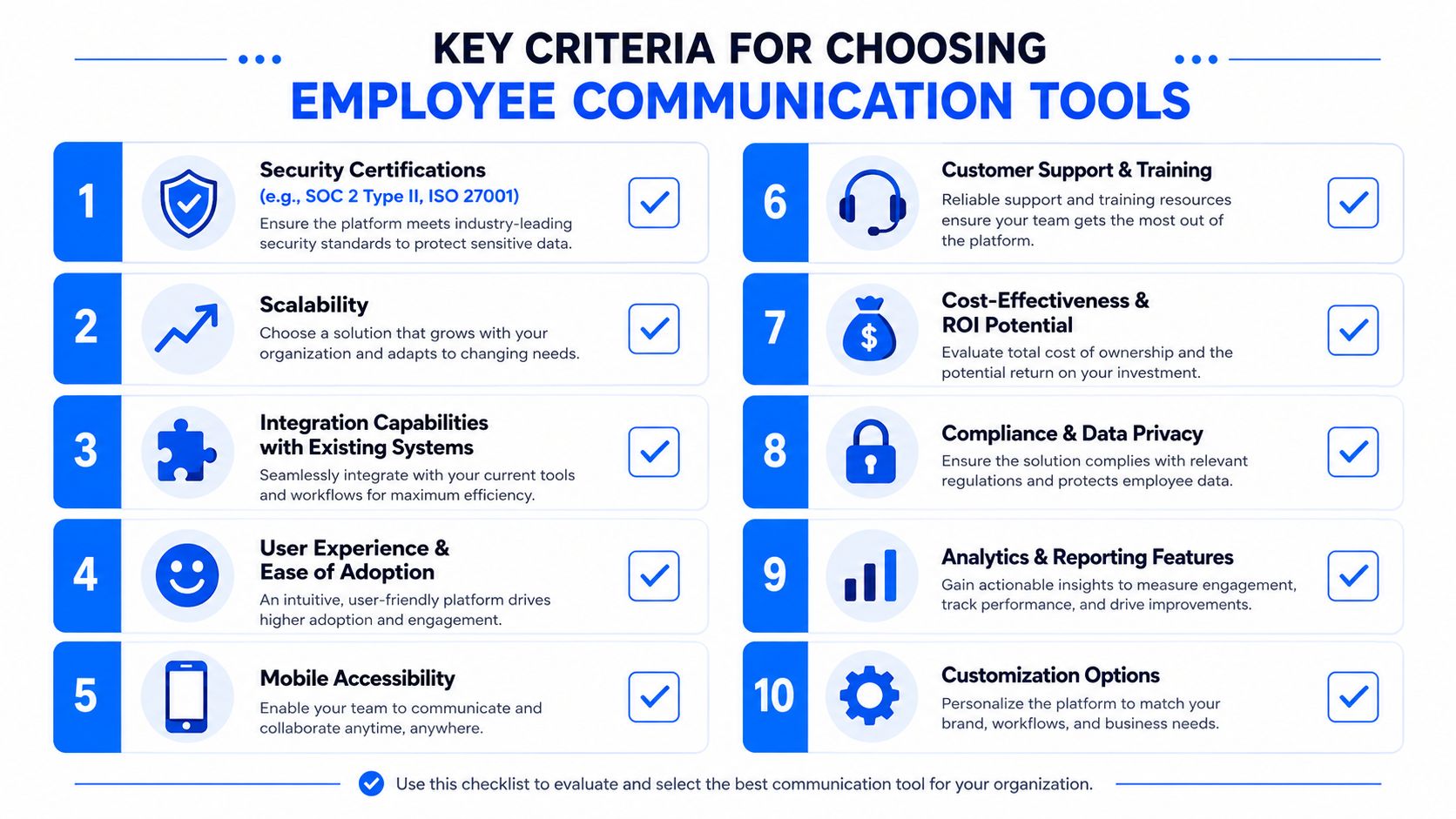
Pickcel’s review of team communication tool requirements makes the minimum enterprise standard clear: employee communication tools should meet SOC 2 Type II, and ISO 27001 becomes especially important in regulated industries such as healthcare, finance, and government.
The shortlist criteria that matter most
-
Security first
Check certification status early. Then confirm whether the product supports role-based access controls, audit trails, and the administrative controls your compliance team expects. -
Mobile parity, not mobile presence
A mobile app icon isn’t enough. Frontline workers need the same critical functions that office workers get on desktop, including access to updates, tasks, files, and acknowledgements. -
Offline tolerance
In field, warehouse, and transport contexts, connectivity can be inconsistent. Tools should handle that reality without breaking the employee experience. -
Segmentation and targeting
Buyers should test whether communications can be targeted by role, location, shift, language, and manager structure. If targeting is weak, noise rises quickly. -
Multilingual support
This isn’t just about translation. It’s about making sure the same message can be distributed accurately across a mixed workforce without multiplying manual work.
The criteria buyers often skip
A second layer tends to separate strong decisions from expensive mistakes:
- Data residency options for regional privacy requirements
- Integration depth with HRIS, scheduling, identity, and collaboration systems
- Governance controls for channel ownership and approval workflows
- Administrative usability so internal comms and operations teams can run the platform
- Frontline access models such as shared devices, BYOD support, kiosk access, or signage extensions
Buying rule: If the product can’t work for your hardest-to-reach employees, it probably won’t create a coherent employee experience for everyone else either.
The best stack isn’t the one with the most modules. It’s the one that fits your communication model without creating another layer of fragmentation.
Integration and Adoption Considerations
Integration isn’t only technical. It’s behavioral. A platform can connect cleanly to an HRIS, collaboration suite, and identity provider, then still fail because managers keep defaulting to old habits and teams never learn when the new channel should be used.
That’s why implementation plans need both systems work and operating routines. Technical leaders usually focus on single sign-on, user provisioning, APIs, and content sync. Internal comms and operations leaders need to focus just as hard on ownership, rollout sequencing, and local reinforcement.
Integration patterns that usually work
Most organizations end up with a practical set of patterns rather than a perfect architecture:
- HRIS sync for identity and segmentation so role, location, department, and manager data stay current.
- Single sign-on to remove one more login barrier.
- Suite integrations with Microsoft 365, Google Workspace, Slack, or Teams where those tools already anchor daily work.
- Operational system links to scheduling, learning, tasking, or service workflows when communication needs to trigger action.
The hidden issue is often content duplication. If policy content lives in email attachments, intranet pages, shared drives, and chat pins at the same time, employees stop trusting any of them as the source of truth.
Adoption depends on line managers
Software launches rarely succeed through top-down announcements alone. Manager behavior shapes adoption faster than global campaign messaging does. In plants, stores, hospitals, and depots, the shift briefing still acts as a communications layer. In office settings, team leads decide whether knowledge stays in searchable systems or vanishes into chat.
That’s why internal communications strategy has to include local operating practices, not just channel definitions.
A phased rollout usually beats a company-wide switch. Start with a representative mix of user groups, define a small number of high-value use cases, and tighten the workflow before broad expansion. Teams should also train administrators differently from employees. The people publishing, targeting, and governing communication need a deeper skill set than the people receiving it.
Governance Framework and Checklist
Gallup found that only 13% of employees strongly agree the leadership of their organization communicates effectively with the rest of the organization, according to its State of the Global Workplace reporting. In large organizations, that shortfall is often a governance problem before it is a technology problem. Teams add channels faster than they define authority, retention rules, acknowledgement requirements, and operational ownership.
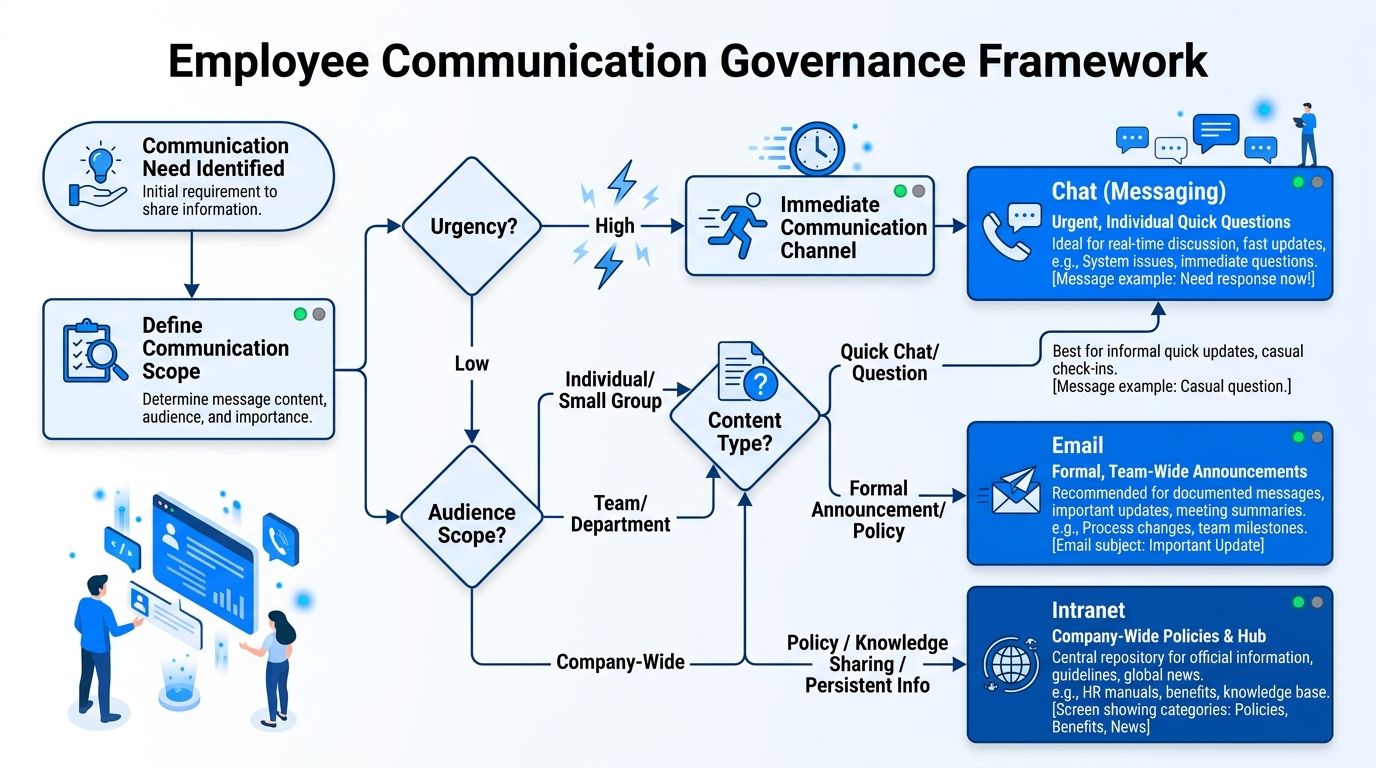
A useful framework starts with one question: which system is authoritative for which type of message? Without that decision, organizations create a fragmentation gap. Policy lives in the intranet, exceptions are posted in chat, urgent updates are buried in email, and frontline teams rely on manager relay because no channel is clearly designated for shift-critical information. The result is not only confusion. It is weak auditability and poor operational measurement.
A role-based governance model
Governance works best when it assigns channel purpose, owner, audience, and control standard together.
Chat fits fast coordination, local problem-solving, and short-lived discussion. It usually should not serve as the final record for policy or compliance communication.
Email fits formal notices, manager cascades, and communications that require broad reach across mixed employee populations.
Intranet or knowledge hub fits durable reference content, policies, procedures, and version-controlled updates.
Digital signage and mobile alerts fit urgent, time-bound communication for deskless groups who may not check inboxes during a shift.
Scheduling and operational apps fit messages tied to work execution, such as shift changes, task updates, safety exceptions, and location-specific instructions.
This model matters most in complex environments. A hospital, manufacturer, retailer, or field service organization rarely succeeds with a single universal channel policy because communication and execution are tightly linked. Governance has to define not only where messages are sent, but where proof of receipt, escalation, and follow-through are recorded.
Governance checklist
Use a checklist that turns communication standards into operating rules:
- Define channel authority for each message type, including policy, alerts, manager updates, collaboration, and local shift communication.
- Assign accountable owners for every channel, with clear responsibility for publishing standards, permissions, retention, and periodic review.
- Map channels to workforce segments such as frontline, office, field, hybrid, contractor, and manager populations.
- Set urgency and escalation rules so critical alerts have one approved path and a backup path if the first channel fails.
- Separate temporary discussion from durable knowledge so policies, SOPs, and regulated content remain in controlled systems.
- Document acknowledgement requirements for safety, compliance, and operational changes that need traceable confirmation.
- Create approval paths for legal, regulatory, labor, or sensitive employee communications.
- Define measurement points that connect communication to execution, such as acknowledgement by role, completion by shift, or exception rates after a change.
- Audit duplication and shadow channels to identify where teams are recreating the same message in multiple places because official workflows are too slow or unclear.
Clear governance reduces ambiguity. It also exposes gaps that product comparisons miss, especially in frontline environments where communication may be read, relayed verbally, or acted on without any measurable system event.
The overlooked governance question
The strongest governance policy does not aim to reduce the number of tools at any cost. It aims to reduce uncertainty about where action starts, where records live, and how leaders verify that communication changed behavior. That distinction matters. In complex operating environments, some overlap is reasonable. Unmanaged overlap is expensive.
A practical test is simple. For every high-risk message category, leaders should be able to answer five questions without debate: Who owns the message? Which channel is authoritative? Who must acknowledge it? Where is the permanent record stored? How is execution measured afterward? If those answers vary by department, the communication stack is still being governed informally.
Measuring ROI and Metrics
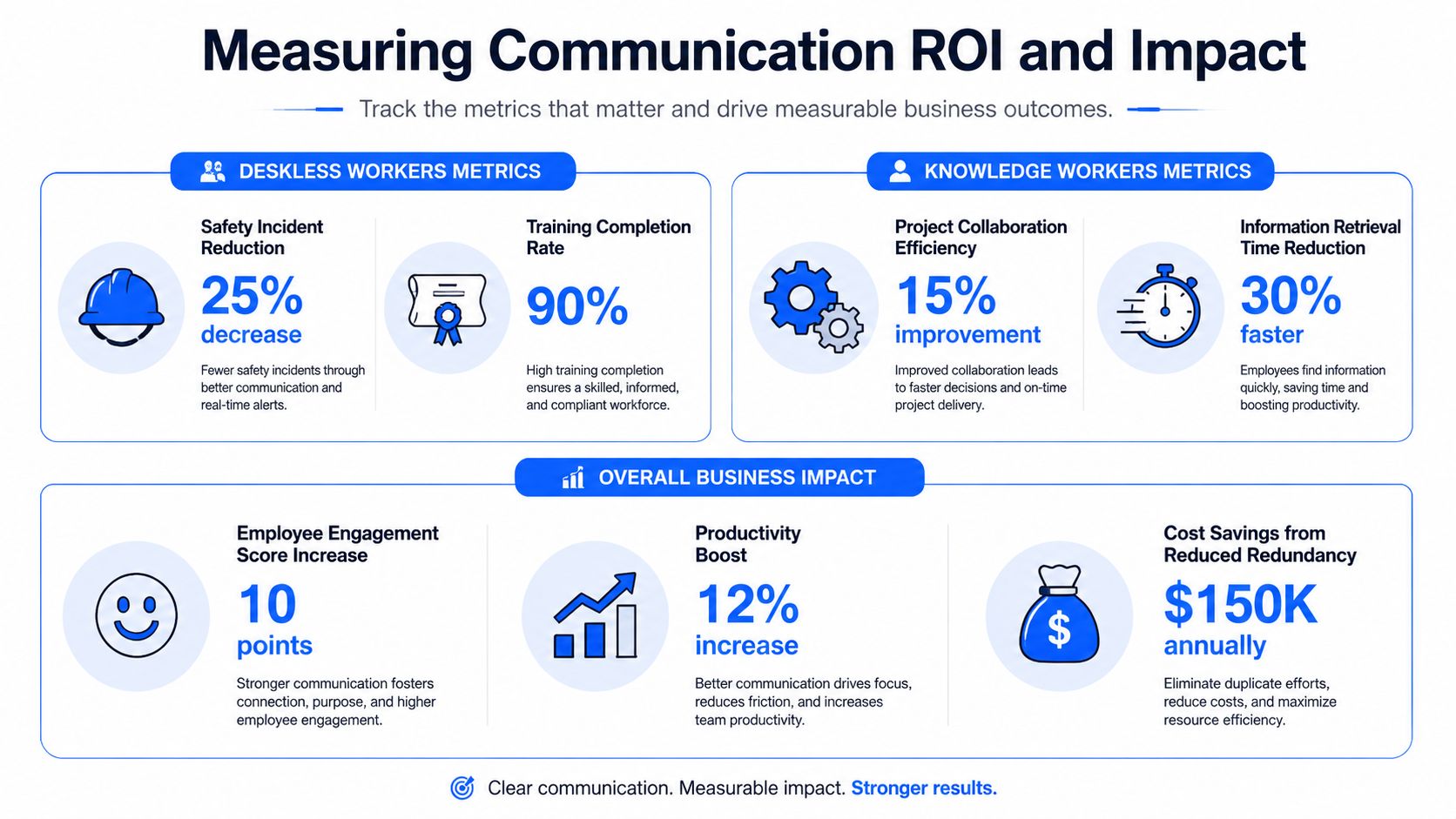
Most communication measurement still reflects office habits. Teams track opens, clicks, attendance, comments, and survey responses. Those metrics are useful, but they don’t answer the harder question: did communication improve execution?
That gap is largest in frontline environments. Many HR leaders now prioritize mobile-first design, but far fewer can show whether communication changed frontline task execution or error rates. Without this measurable impact, many communication business cases weaken. Leaders can justify the need for better access, but they struggle to prove operational impact.
What to measure for deskless work
For deskless teams, the right metrics usually sit closer to operations than internal comms.
Look for connections between communication and:
- Task completion quality
- Policy acknowledgement rates
- Time to readiness in onboarding
- Supervisor follow-through
- Escalation speed for urgent issues
- Training completion tied to role or shift
- Error patterns after major updates
- Search or access behavior for critical content
The key is pairing communication events with downstream actions. If a safety change was announced, can managers tell whether teams received it, understood it, and applied it? If a new process launched, can operations track whether compliance improved after targeted communication and reinforcement?
What to measure for hybrid and office teams
For knowledge workers, communication ROI is broader. Standard measures still matter, including readership trends, pulse feedback, sentiment, and reach by audience segment. But the more useful measures sit one step deeper:
| Metric area | Better question |
|---|---|
| Reach | Did the right audience receive the message? |
| Engagement | Did employees interact in a way that suggests comprehension, not just exposure? |
| Search and findability | Could employees retrieve the information later without asking someone in chat? |
| Collaboration impact | Did the message reduce duplicate questions or unblock work? |
| Manager reinforcement | Did local leaders translate the communication into team action? |
AI can help here if used carefully. As discussed in internal communications trends for 2026, the practical value comes from sentiment analysis, pattern detection, targeting optimization, and identifying where messages fail to land. AI should support measurement discipline, not replace it.
Measure communication like an operational system. Track whether it changed behavior, reduced uncertainty, or improved execution.
A better ROI model
A strong ROI model has three layers:
-
Delivery metrics
Was the message delivered and viewed by the intended audience? -
Comprehension metrics
Did employees understand what changed, what matters, and what they need to do next? -
Execution metrics
Did behavior, task completion, compliance, or workflow outcomes improve after communication?
That structure forces a more mature conversation. It moves the organization away from vanity metrics and toward business relevance.
Practical Next Steps
Start with a channel audit. List every communication tool employees encounter across email, chat, intranet, mobile apps, signage, scheduling systems, and manager briefings. Then document what each one is used for, not what the vendor says it should be used for.
Next, choose a small number of high-friction use cases. Good pilot candidates include urgent alerts for deskless workers, policy updates that currently get lost in chat, multilingual communications, or manager cascades that vary too much by location. Pick one representative employee group from frontline, hybrid, and office settings if your workforce spans all three.
Then build a pilot with clear operating rules:
- Set a narrow objective such as improving acknowledgement of urgent updates or reducing confusion around policy changes.
- Define the authoritative channel for that use case before rollout begins.
- Collect baseline evidence from current workflow pain points, employee feedback, and operational observations.
- Train managers first because they translate tools into routine behavior.
- Review outcomes quickly and remove friction before wider deployment.
Scaling comes after governance, not before it. Once a pilot proves that the right channel, audience logic, and manager behaviors are in place, teams can expand integrations, automate targeting, and tighten measurement. The goal isn’t a bigger stack. It’s a clearer communication system that employees can trust.
FAQs on employee communication tools
How do you support a multilingual workforce without creating tool sprawl
Use fewer core channels, not separate parallel systems for each language group. Choose tools that support multilingual delivery within the same governance model, then standardize where formal updates, urgent alerts, and durable knowledge live. Translation should adapt the message, but channel purpose should stay consistent.
What’s the best way to reduce channel fatigue in large enterprises
Start by defining authority. Employees need to know which channel to check for urgent alerts, which one stores policy, and which one is only for informal discussion. Channel fatigue usually comes from overlap, duplicate posting, and unclear ownership, not only from having several tools.
How do you get executive buy-in for frontline-focused communication tools
Tie the case to operational risk and execution quality. Show where desktop-first communication breaks down for frontline staff, then frame the investment around access, acknowledgement, consistency, and manager reinforcement. Executives usually respond faster when communication is presented as an operating control, not as a softer engagement initiative alone.
For more analysis on workforce experience, internal communications, HR tech, and frontline operations, explore Turn On Work.