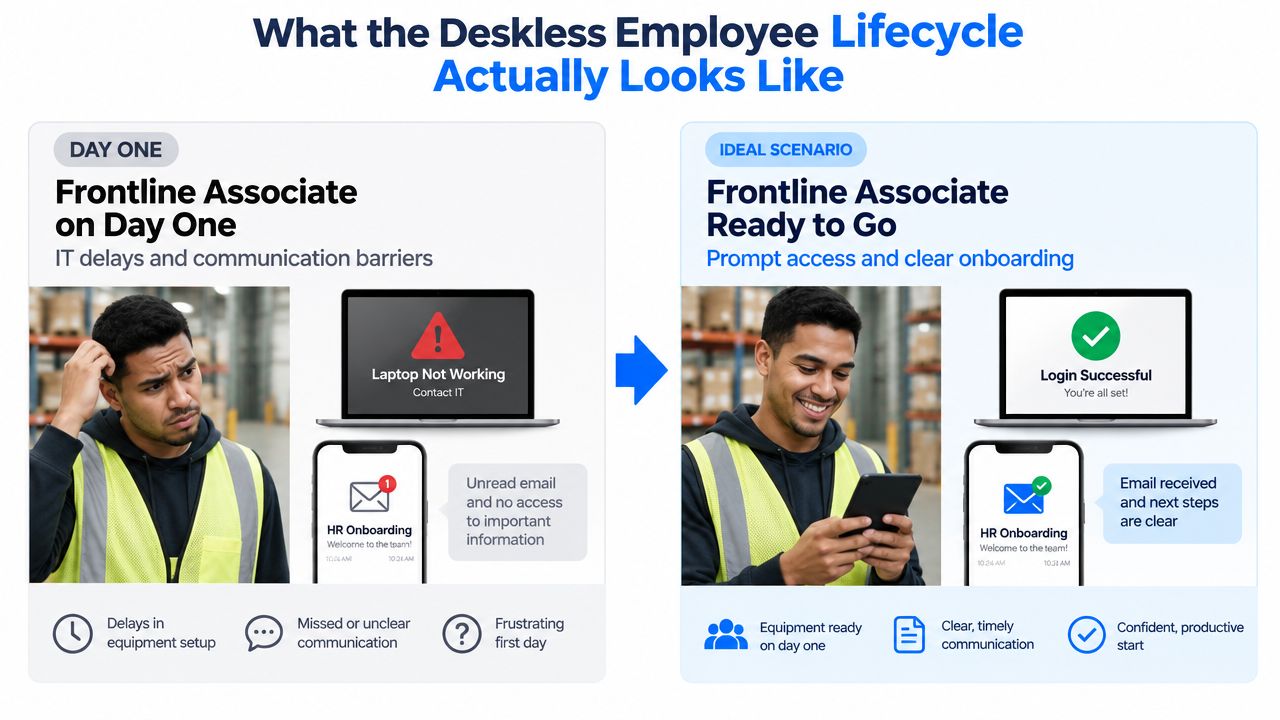
A new warehouse associate arrives for her first shift, but her credentials haven’t arrived, the laptop won’t accept her login, and the benefits email is sitting unread in an inbox she never checks. That’s the employee lifecycle deskless in practice: a mobile-first, shift-aware, manager-supported employee journey from recruitment through exit. It works when communication, HR technology, training, scheduling, and daily operations meet workers where they work.
Key takeaways
- The deskless employee lifecycle is an operational system, not an HR email campaign.
- The highest-risk moments cluster around hiring, preboarding, day one, and the first year.
- Mobile-first channels, shared devices, QR codes, SMS, and manager-led communication outperform email-only workflows for frontline teams.
- Each stage needs an accountable owner, an operational readiness signal, and a business metric.
- Retention improves when workforce experience connects communication, engagement, technology, AI, and execution.
What the Deskless Employee Lifecycle Actually Looks Like
The employee lifecycle for deskless workers begins before a person clocks in and continues after their final shift. It includes attraction, frontline recruitment, deskless hiring, candidate communication, preboarding, onboarding, employee training, development, recognition, retention, internal mobility, offboarding, exit interviews, and employee alumni relationships.
A traditional employee lifecycle assumes a personal workstation, a corporate login, a predictable schedule, and enough uninterrupted time to complete HR tasks. Those assumptions fail for warehouse associates, production workers, retail teams, home health aides, drivers, hospitality staff, and field employees. BCG identifies about 2.7 billion workers who lack a traditional office and must be physically present for their jobs, making the deskless workforce foundational rather than niche. BCG’s research on deskless workers also reported that 43% were at risk of quitting in 2022, with newer workers particularly ready to leave.
Four realities reshape the employee life cycle
- Shared devices: A kiosk, badge terminal, or supervisor tablet may be the only workplace technology available.
- Fragmented shifts: Night, weekend, split, and rotating schedules make fixed onboarding sessions unreliable.
- Supervisor bandwidth: Frontline managers must run readiness tasks while also meeting safety, service, and production requirements.
- Limited quiet time: A worker may have only a short break to read, sign, learn, or respond.
That’s why the employee experience lifecycle for deskless teams needs multiple touchpoints. SMS can confirm a start time, a QR code can open a short form, a kiosk can provide self-service, and a shift huddle can establish context that a portal cannot. The right design also supports multilingual communication and offline use where connectivity is inconsistent.
For a practical overview of the operating environment, see Turn On Work’s guide to the deskless workforce. The central principle is simple: HR can set the policy, but frontline managers, site leaders, operations, internal communications, and HR technology owners must deliver the employee journey together.
Practical rule: If a lifecycle task requires a laptop, a corporate email address, and uninterrupted time, assume part of the frontline workforce will miss it.
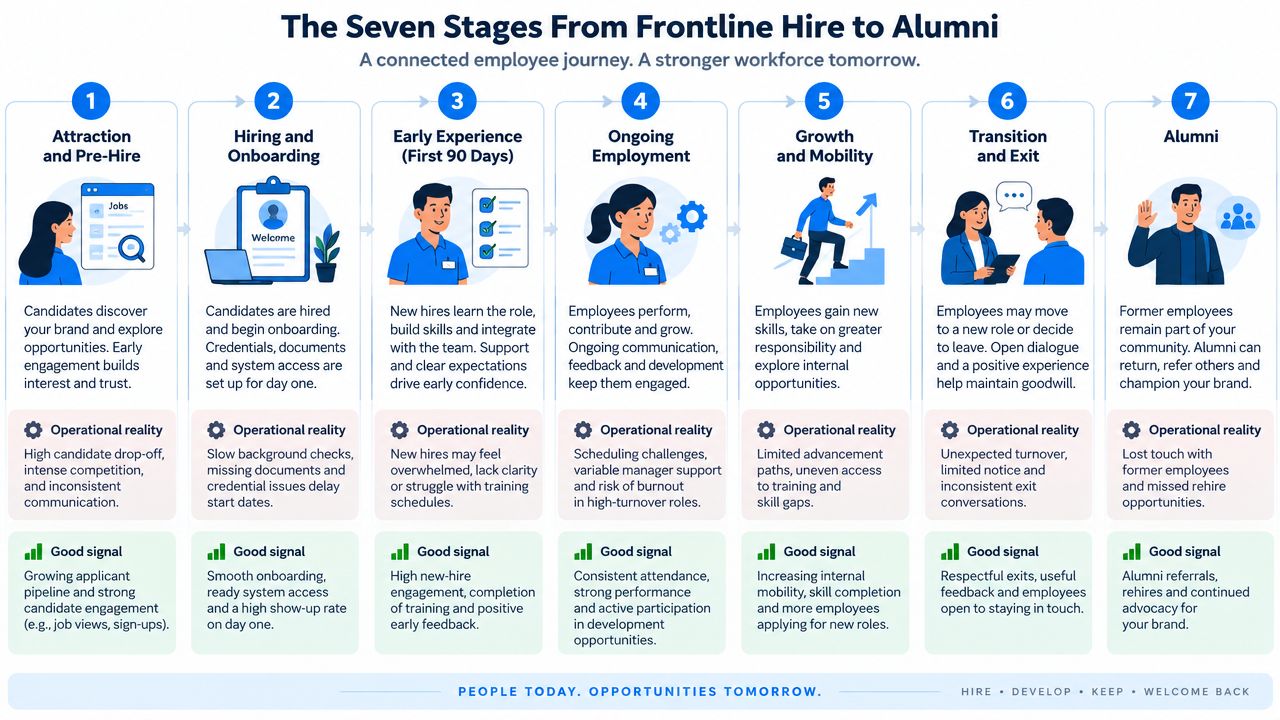
The Seven Stages From Frontline Hire to Alumni
A useful deskless employee lifecycle has seven connected stages. Each stage pairs an employee touchpoint with an operational signal that shows whether the experience is working.
-
Attraction and pre-hire. Frontline recruitment often happens through referrals, community channels, local events, job-fair kiosks, and store or site signage. A good signal is that candidates can understand the role, schedule expectations, location, pay process, and next step without navigating a corporate careers site designed for office roles.
-
Hiring and offer. Deskless hiring should support short forms, shared tablets, electronic signatures, and SMS offer confirmations. The signal is more than an accepted offer. It’s a confirmed start with the required documents, location, shift, and contact person understood.
-
Preboarding and day one. Credentials, badges, uniforms, equipment, and access permissions should be staged before arrival. The manager’s phone should show a day-one checklist, while the new hire receives clear directions through a mobile channel.
-
Onboarding and ramp. Frontline employee onboarding is complete when the worker can perform the role safely and independently, not when they’ve clicked through a policy module. Shift supervisors should track role-specific training, observed practice, and 30-60-90 milestones.
-
Development and retention. Employee training continues through microlearning, cross-training, coaching, shift huddles, and recognition. A visible skill pathway gives workers a reason to see the current role as part of a career rather than a temporary stop.
-
Transition and internal mobility. Promotions, transfers, temporary assignments, and schedule changes should be visible where workers already look. A mobile opportunity board can connect employees to career development without expecting them to search an office intranet.
-
Exit and alumni. Employee offboarding includes equipment return, final pay instructions, access removal, knowledge transfer, exit interviews, rehire eligibility, and references. Employee alumni programs can preserve relationships with workers who may later return.
These employee journey stages form a closed loop, not a linear funnel. A former employee may become a referral, a returning hire, or a candidate for internal mobility. A readiness gap discovered at exit may reveal a weakness in onboarding, management, or scheduling months earlier. Use employee journey mapping for frontline teams to connect those moments across locations and shifts.
Why the First 90 Days Decide the Rest of the Lifecycle
The first 90 days are the most critical part of the deskless employee lifecycle because early confidence, manager trust, schedule familiarity, and role readiness develop quickly or fail quickly. SHRM reports average turnover of 26% for deskless workers versus 16% for office-based workers, and 53% of HR professionals say the first year is the hardest period for retaining deskless employees. SHRM’s deskless retention research makes the practical implication clear: onboarding is a staged readiness system, not a one-time orientation.
The day-one design should remove blockers that depend on personal email or desktop access. Confirm the shift by SMS, provide a QR-coded onboarding packet, stage the badge and uniform, and let a supervisor witness required identity and access steps. In week one, assign a shift buddy, introduce the new hire during a huddle, and create an early recognition moment that peers can see.
At 30, 60, and 90 days, the frontline manager should hold a short check-in. Ask what’s clear, what blocks the work, and what support would make the next milestone achievable. HR should connect those responses to HRIS turnover data by cohort, site, and manager rather than treating survey completion as the outcome.
Early-Attrition Evidence and 90-Day Readiness Signals
The verified evidence supports an early-risk model, but it doesn’t provide industry-specific “typical 90-day attrition” figures. A responsible scorecard should therefore record the organization’s own cohort data instead of importing unsupported benchmarks.
| Industry | Typical 90-Day Attrition | Primary Drop-Off Point | Readiness Signal to Track | Manager-Led Action |
|---|---|---|---|---|
| Retail | Establish from local cohort data | First shifts and schedule confusion | Time to first solo shift | Confirm schedule, buddy, and task access |
| Hospitality | Establish from local cohort data | Preboarding and first week | First-week attendance and confidence check | Remove access, uniform, and training barriers |
| Manufacturing | Establish from local cohort data | Certification and early ramp | Role sign-off by milestone | Observe practice and escalate training gaps |
| Healthcare support | Establish from local cohort data | First assignments and manager contact | Assignment readiness and check-in completion | Pair the worker with an experienced supervisor |
| Logistics | Establish from local cohort data | Day one and first 30 days | Credentialing and safe-task validation | Verify equipment, route, and safety readiness |
For teams building a repeatable process, onboarding tips for small businesses can provide useful baseline ideas, but deskless employers need to adapt them for shift timing, shared devices, supervisor validation, and multilingual access. The outcome to watch is not a completed checklist. It’s whether the worker can perform the role, access help, and see a future with the team.
A practical next step is to connect the 90-day workflow to Turn On Work’s guidance on the first 90 days of employee experience.
Mobile-First Touchpoints That Replace Corporate Email
Corporate email fails frontline workers when it arrives before they have an account, during a shift when they can’t read it, or inside a process that requires a laptop they never use. Deskless communication works better when the channel matches the worker’s device, shift, location, language, and urgency.
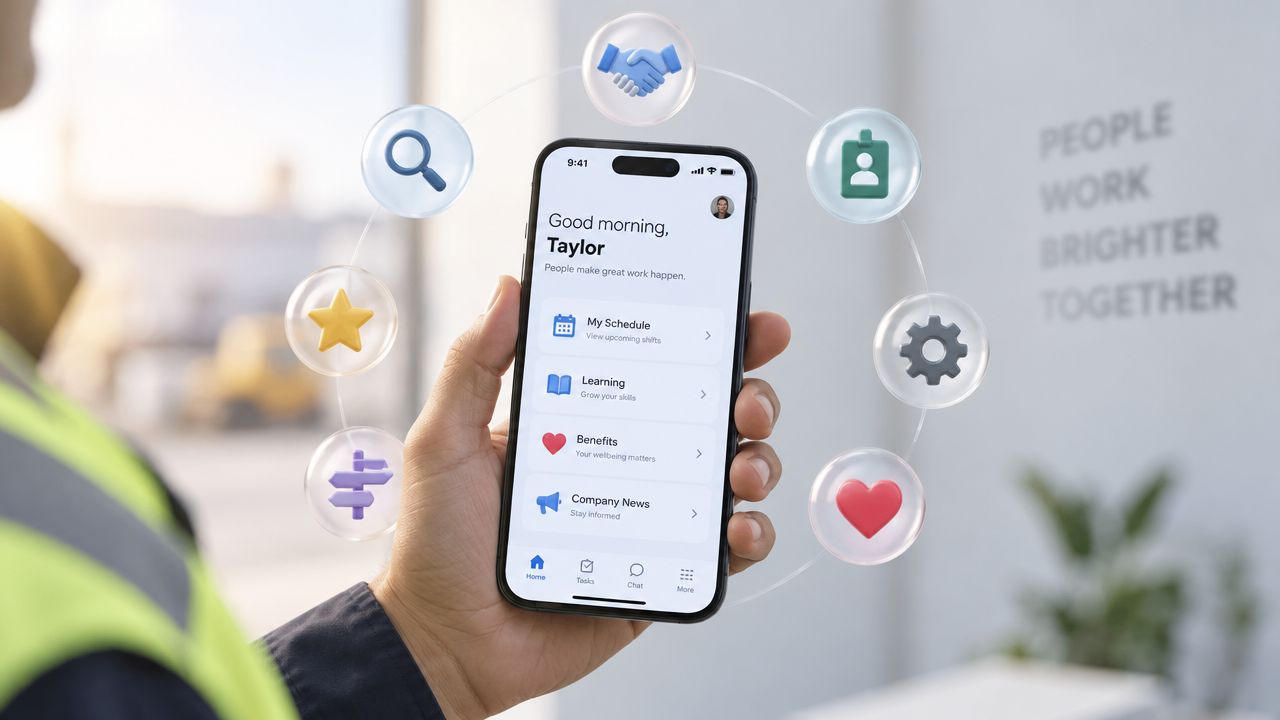
A mobile-first employee lifecycle can use SMS for reminders and confirmations, QR codes at time clocks for self-service, shared kiosks for forms and schedules, push notifications for urgent updates, digital signage for site-wide information, and manager-led communication for context and questions. Native mobile apps can bring together schedules, payslips, learning, recognition, feedback, and task information. An employee engagement platform can also provide a central mobile channel for communication, recognition, surveys, and employee resources, but adoption still depends on utility. Workers return when the tool helps them complete real work.
Skedulo’s deskless work survey found that 25% of workers cited insufficient technology and limited flexibility as a major obstacle. Workers with sufficient technology were twice as likely to be very satisfied and more than 50% more likely to stay for the next five years. The 2022 State of Deskless Work report supports treating workforce technology as a retention input, not merely an IT purchase.
Office Channels vs Deskless Channels by Lifecycle Touchpoint
| Lifecycle Touchpoint | Office Channel | Deskless Channel | Design Implication |
|---|---|---|---|
| Offer confirmation | Email and applicant portal | SMS and mobile link | Make the next action obvious |
| Day-one directions | Calendar invite | SMS, QR code, and manager call | Include location, parking, shift, and contact |
| Policy access | Intranet and PDF | Mobile search, kiosk, or QR code | Break long documents into task-level answers |
| Training | Desktop LMS | Mobile microlearning and coached practice | Support short sessions and offline sync |
| Recognition | Office platform post | Huddle, app, board, or push notification | Recognize the behavior near the moment it happens |
| Schedule changes | Email or workforce portal | App alert, SMS, and supervisor confirmation | Provide an auditable acknowledgment path |
Design every form for a small screen and a single clear action. If a 14-page PDF can become a 90-second mobile flow, make that change. Time notifications around shift breaks, support offline synchronization on warehouse floors, and give managers a fast way to confirm completion without duplicating data.
The channel rule is straightforward: use the lowest-friction channel that reaches the worker reliably, then add a human confirmation for safety, compliance, or sensitive employee matters. Turn On Work’s frontline super-app overview is relevant when evaluating whether one mobile layer can connect communication and daily operations.
Two Cultures and the Case for Role-Segmented Lifecycles
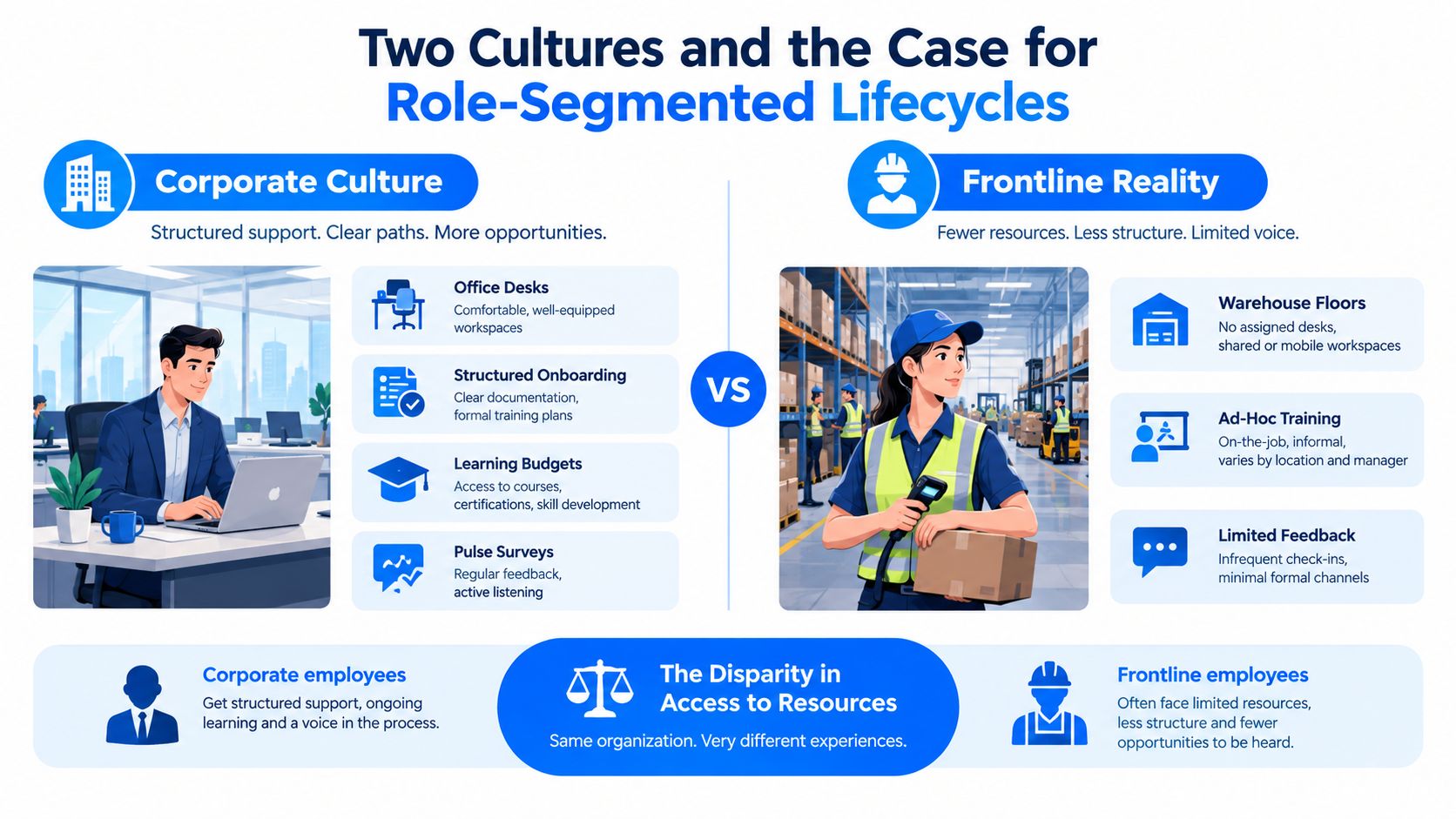
Many employers operate two employee experiences under one brand. Corporate workers receive structured onboarding, learning access, pulse surveys, and visible development pathways. Frontline workers may receive a clipboard, a short orientation, and instructions passed through several supervisors.
UKG’s 2025 to 2026 frontline research reports 76% burnout, 47% saying there are two cultures in their company, and 55% dissatisfaction with the overall employee experience. UKG’s frontline workforce research frames the problem as structural, not just a question of engagement messaging. A separate deskless workforce report found 49% perceive a cultural divide between frontline and corporate workers, while 42% feel treated as a number rather than a person. The deskless workforce report from Rippl provides additional context for why generic employee lifecycle management misses frontline reality.
Segment the journey by role
A production associate, store clerk, home health aide, and shift supervisor need different moments that matter. Their training gates, schedule pressures, manager relationships, safety requirements, and career pathways aren’t interchangeable. A single corporate lifecycle can provide shared principles, but the actual employee journey map should be role-specific and site-aware.
Three design levers have outsized practical value:
- Scheduling fairness: Show predictable shifts, swap transparency, overtime visibility, and the reason behind changes where possible.
- Floor-level recognition: Celebrate safety catches, customer saves, quality improvements, and peer coverage during the huddle or in the employee app.
- Visible progression: Show skills, certifications, open roles, and promotion requirements from the moment a worker joins.
Deskless employees account for roughly 80% of the global workforce, and research summarized by EMCAP found that 75% spend at least half of their working time using technology, while 60% are dissatisfied with the technology provided. More than 78% consider appropriate technology important when choosing a job. EMCAP’s deskless technology analysis reinforces the connection between frontline employee experience and the tools used to complete everyday work.
Role segmentation doesn’t mean building seven unrelated systems. It means using a shared data foundation while changing the channels, content, manager tasks, and readiness criteria for each frontline workforce segment.
The TurnOnWork Stage-Readiness Framework and Checklist
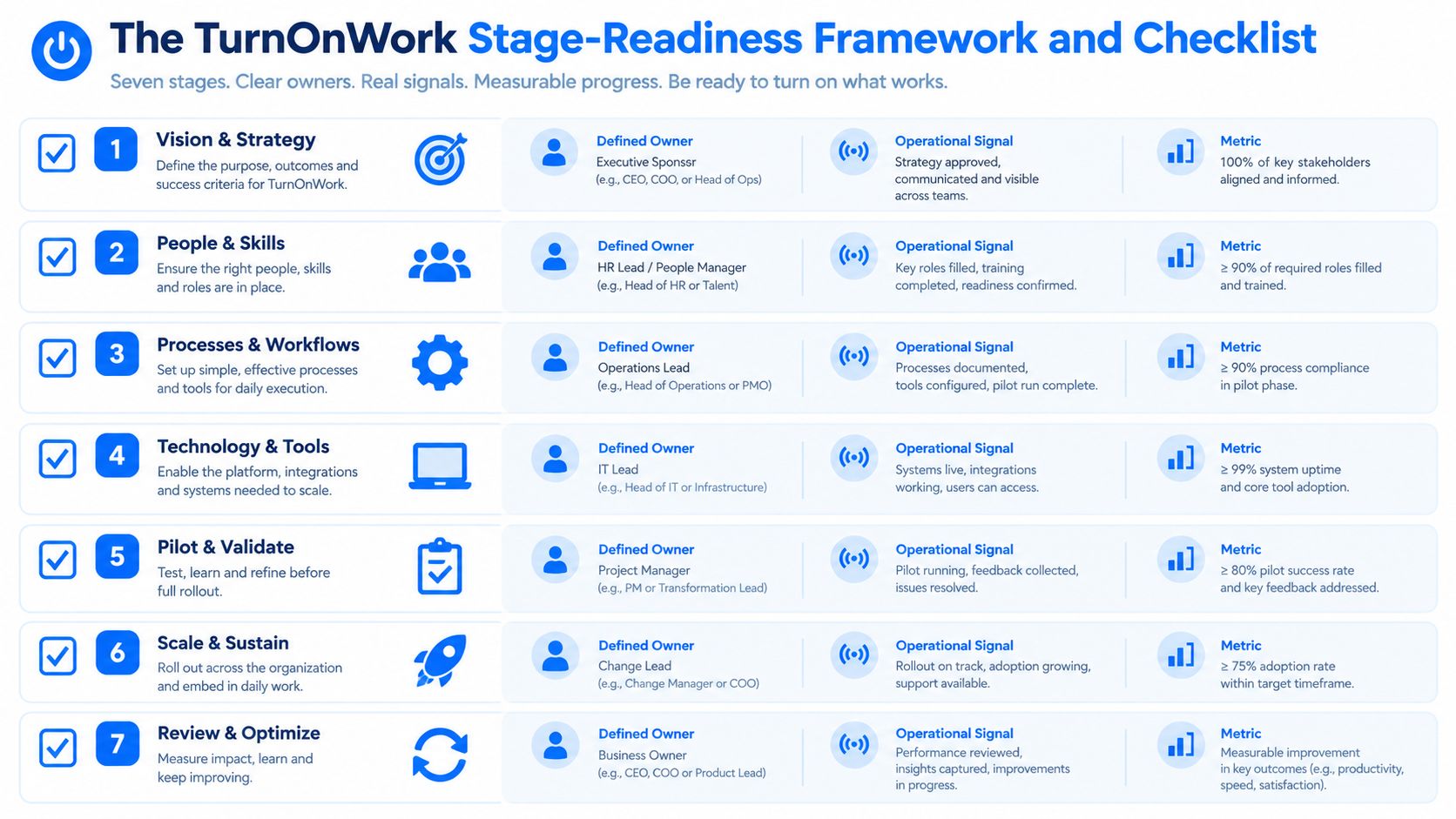
The TurnOnWork Stage-Readiness Framework is an editorial model, not an established industry standard. It defines a lifecycle stage as ready only when three elements are visible: an accountable owner, an operational signal, and a business metric. This prevents teams from declaring success because a message was sent or a course was completed.
| Stage | Accountable Owner | Leading Signal | Trailing Business Metric |
|---|---|---|---|
| Attract | Talent acquisition and site leader | Qualified applicants from relevant channels | Cost-to-serve |
| Hire | HR partner and hiring manager | Confirmed offer and document completion | Labor productivity |
| Onboard | Frontline manager and L&D | Readiness sign-off by role milestone | Safety incidents |
| Develop | L&D and operations lead | Certification and cross-training progress | Revenue per labor hour |
| Engage | Site manager and internal communications | Frontline listening and recognition participation | Voluntary quit rate |
| Transition | Operations lead and HR partner | Internal applications and transfer completion | Labor productivity |
| Alumni | HR and former manager | Rehire eligibility and referral activity | Cost-to-serve |
The model works because each owner has a decision to make. If a new hire’s credentials are pending, the manager acts. If training is complete but observed practice is missing, L&D and operations intervene. If recognition is high but voluntary quits remain high, leaders examine scheduling, pay communication, workload, and manager behavior rather than celebrating engagement scores.
A vendor and process checklist
Use this checklist when reviewing employee lifecycle management for frontline workers:
- Shared-device identity: Can workers authenticate safely on kiosks or shared tablets?
- Offline content sync: Can critical training and task information work during connectivity gaps?
- SMS fallback: Can the system reach employees without corporate email?
- Multilingual support: Can employees receive key content in the languages they need?
- Manager visibility: Are dashboards usable for managers with large spans of control, including above 15 direct reports?
- HRIS integration: Can employee status and cohort data move into the people system?
- Payroll connector: Can pay-related information connect without duplicate entry?
- WFM connector: Can schedules, attendance, and shift changes connect to the lifecycle?
- Learning records: Can certifications and observed readiness be distinguished from mere completion?
- Role templates: Can content differ by site, role, shift, and compliance requirement?
- Human escalation: Can AI route questions while managers retain judgment for sensitive decisions?
- Audit trail: Can leaders see who received, acknowledged, and acted on critical information?
- Security evidence: Does the vendor provide relevant controls and documentation, including SOC 2 where required?
- Content update SLA: Can compliance content be updated within 48 hours when the organization requires that service level?
AI can help search policies, summarize employee feedback, identify stalled onboarding tasks, and route questions. It shouldn’t decide whether a worker is ready for unsupervised work, resolve a sensitive employee complaint, or replace manager judgment.
Measuring Workforce Experience Across the Lifecycle
A useful measurement system connects five workforce experience pillars to operational outcomes: communication, engagement, technology, AI, and operations. The employee lifecycle deskless becomes measurable when each stage has a small set of signals that managers can act on during monthly operating reviews.
BCG’s 2024 research found that deskless workers who enjoy their work are 62% less likely to consider a new job than those who don’t. The same research says workers committed to staying spend nearly eight hours per week on toilful tasks balanced by 18 hours of joyful work. BCG’s analysis of enjoyment and deskless work supports a Turn On Work view of experience: reduce friction in daily execution, don’t rely on engagement campaigns alone.
Use three measurement tiers:
- Lagging indicators: 30-, 60-, and 90-day retention, regrettable attrition, first-year tenure, voluntary quit rate, and rehire eligibility.
- Leading indicators: Onboarding NPS, schedule stability, recognition-to-shift ratio, and mobile app DAU/WAU.
- Operational signals: Time to credentialing, shift-swap turnaround, training sign-off, manager check-in completion, and pulse response from shared devices.
The targets in the table should be set from your own baseline. For example, a program owner may define an internal goal of lifting 90-day retention from 58% to 78%, but those figures are an example target rather than a universal benchmark.
| Lifecycle Stage | Primary Metric | Secondary Signal | Owner | Target |
|---|---|---|---|---|
| Attraction | Qualified applicant flow | Source and role fit | Talent acquisition | Set from baseline |
| Hire | Offer-to-start conversion | Document completion | HR partner | Set from baseline |
| Onboard | 90-day retention | Time to credentialing | Frontline manager | Set from cohort baseline |
| Develop | Role readiness | Certification progress | L&D | Set by role |
| Engage | Voluntary quit rate | Recognition and pulse response | Site leader | Set by site |
| Transition | Internal mobility | Transfer completion time | HR and operations | Set from baseline |
| Alumni | Rehire eligibility | Referral activity | HR | Set from baseline |
The 2021 deskless-work report found that 92% of organizations said deskless jobs are regularly canceled, distributed across many locations, or involve many work types and certifications. Yet only 6% relied entirely on digital processes, while 44% still relied on paper-based processes at least half the time. Skedulo’s research on deskless work operations shows why measurement must include scheduling, task execution, and certification workflows, not just sentiment.
For employee listening that respects frontline access constraints, Turn On Work’s guide to measuring employee engagement for frontline teams offers a useful companion. Teams should also consider practical wellbeing and safety workflows for mobile and field workers, such as the Mobile Systems Limited wellbeing solutions overview.
A one-page scorecard can contain the stage, owner, baseline, current result, variance, action, due date, and next review. Review it monthly by site, role, shift, and manager. That cadence turns the employee journey from a survey topic into an operating system.
Employee Lifecycle Deskless FAQs
What is the employee lifecycle for deskless workers?
It’s the complete employee journey for workers who don’t spend their working day at a fixed desk. It covers attraction, hiring, preboarding, deskless employee onboarding, training, development, engagement, retention, transitions, offboarding, and alumni relationships through mobile, shared-device, manager-led, and site-based touchpoints.
What are the stages of the deskless employee lifecycle?
The seven stages are attraction and pre-hire, hiring and offer, preboarding and day one, onboarding and ramp, development and retention, transition and internal mobility, and exit and alumni.
How is an employee lifecycle different from an employee journey?
The employee lifecycle is the organization’s managed structure, including policies, systems, owners, and metrics. The employee journey is the worker’s lived experience across those stages and touchpoints. Employee journey mapping reveals friction that a process diagram can hide.
How do you onboard employees without corporate email?
Use SMS confirmations, QR codes, shared kiosks, mobile forms, manager checklists, short videos, multilingual content, and supervisor-witnessed readiness steps. Give new hires the information needed for arrival, access, safety, training, and support without requiring a laptop or corporate inbox.
Who owns the frontline employee lifecycle?
HR owns policy, data governance, and core employee processes. Operations owns execution and workforce planning. Frontline managers own many moments that matter, including day-one readiness, coaching, recognition, and 30-60-90 check-ins. The lifecycle fails when any one of those groups assumes another team will deliver it.
How can companies create consistency across locations and shifts?
Standardize the minimum experience, then allow role and site variation. Define common readiness gates, channel rules, ownership, data fields, and escalation paths. Let local managers adapt examples, huddle timing, and support while central teams monitor outcomes by location and cohort.
What should companies measure first?
Start with time to credentialing, first-shift attendance, role-readiness sign-off, 30-, 60-, and 90-day retention, manager check-in completion, schedule stability, and voluntary quits. Add engagement and technology-use signals after teams can act on the operational basics.
If your organization still runs the frontline employee lifecycle through email, paper forms, and disconnected spreadsheets, map one role from offer acceptance through the first 90 days. Identify every step that requires a device, a manager, a shift change, or a handoff, then assign an owner and measurable readiness signal. Use that map to redesign the experience before selecting more technology.