
In one regional rollout I watched, the store managers were already behind before the day started. One location had a delivery delay, another had a staffing gap, and a third was waiting on a compliance check that never made it off a paper list. That kind of breakdown is exactly why 91% of managers said they struggle to stay on top of team tasks and projects in a 2026 industry survey, a signal that frontline task chaos is a leadership problem, not a personal productivity problem (Breeze task management statistics).
Task lists fail when they live in a tool the store team never opens; pair the workflow with a frontline employee mobile app that already carries the shift comms.
Key takeaways
- Task management for frontline teams works best when work is assigned by role, skill, or shift, not tossed to whoever is available.
- Plain-language instructions, step-by-step tasks, and proof of completion reduce confusion across rotating crews.
- Dashboards, escalation rules, and integrated systems turn task lists into an execution layer.
- AI-enabled capture and prioritization can remove manual steps and improve completion across locations.
- Rollouts fail when training, handoffs, and system integration are treated as afterthoughts.
Introduction to Frontline Task Management
A district manager can walk into three stores before lunch and still not know which tasks are done. One team has a paper checklist, another uses text messages, and a third relies on a supervisor’s memory. The result is predictable, because task management for frontline teams involves making sure the right work reaches the right person at the right time, with enough context to do it well.
That matters because frontline execution sits at the intersection of employee experience, internal communications, HR technology, AI, and workforce operations. When those pieces don’t connect, managers spend their shifts chasing status updates instead of coaching people or fixing customer issues. When they do connect, task management becomes an operating layer that links corporate priorities to store, site, and shift-level execution.
A useful way to think about it is simple. Basic task lists ask, “What needs doing?” Strong frontline task management asks, “Who owns this, what does good look like, how do we prove it happened, and what happens if it slips?”
Modern implementations can shift that balance quickly. Nucleus Research found that mobile, engagement-focused task apps with AI for capture, prioritization, and assignment reduced project time by 20% to 50%, with some reaching 60% when manual processes were replaced, while unified systems lifted on-time completion by 48% and in some cases close to 95% on critical initiatives (Nucleus Research). That’s the practical promise behind better task management, less chasing, less ambiguity, and more consistent execution across locations.
The fastest way to improve frontline execution is usually not adding more tasks. It’s removing uncertainty about ownership, timing, and proof.
Understanding Task Management Challenges
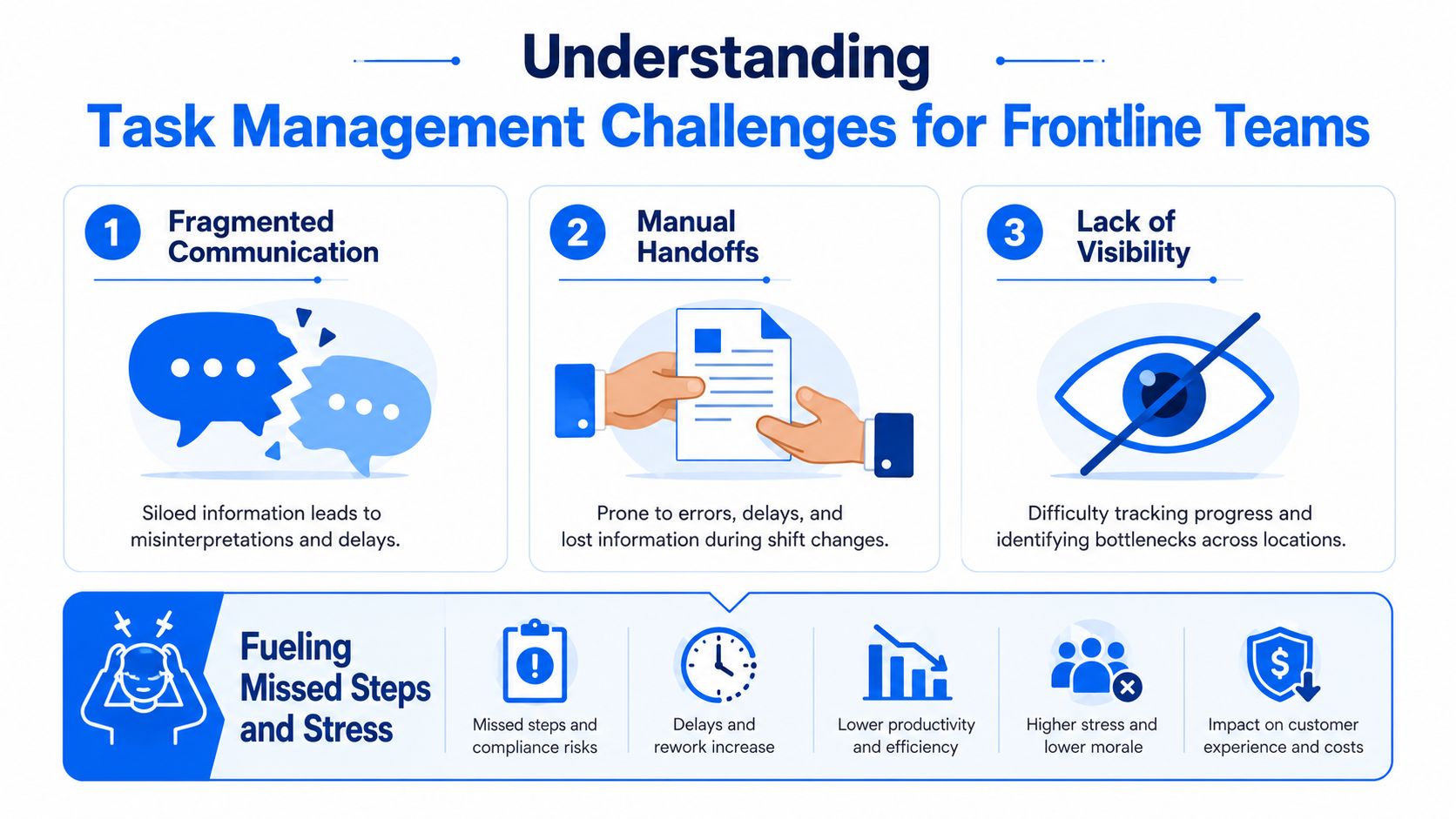
Frontline teams usually do not fail because the task itself was unclear. They fail at the handoff, the shift change, the missing context, or the supervisor who is juggling three priorities while the phone keeps going off. In that environment, fragmented communication turns small gaps into missed steps, especially when teams rotate by shift or location.
Why generic task lists break down
A plain checklist does not tell you who is qualified, who is on shift, or whether the task is still relevant after a customer issue or staffing change. That is why the main failure mode in multi-location teams is often unclear ownership, not lack of effort. A task gets logged, but nobody is sure whether it belongs to the opening team, the closing team, the floor manager, or a specialist with a specific skill.
That pattern shows up in retail when merchandising updates are assigned to one store but expected to be finished by a different shift. It also shows up in healthcare when a unit needs room prep, documentation, or supply checks across handoffs that happen quickly and under pressure. The operational cost is not just delay, it is inconsistency, stress, and extra work for managers who end up acting as human routers for every unresolved item.
Training gaps make it worse. Many organizations still do not give managers and frontline leads a shared method for assigning, sequencing, and reviewing work, so the system falls back to habit, memory, and escalation by text. That is where task management starts to look less like planning and more like improvised coordination.
What the breakdown looks like on the ground
A store supervisor may know the task list, but not which associate has the right product knowledge or which aisle is already being reset. A hospital charge nurse may know the task, but not which handoff is safest under a changing patient load. In both cases, the work is disconnected from the people and conditions required to finish it cleanly.
A frontline task system should make ownership visible and reduce the number of hidden decisions managers have to make. That is why assignment by role and clear handoffs matter so much, and why generic to-do lists so often create more coordination than control. For a broader operations lens, this aligns with workforce operations thinking, where coordination, staffing, and execution are managed as one system.
Practical rule: if a task can be handed off twice without losing context, the workflow is probably too vague to be reliable.
Designing a Role-Based Assignment Framework
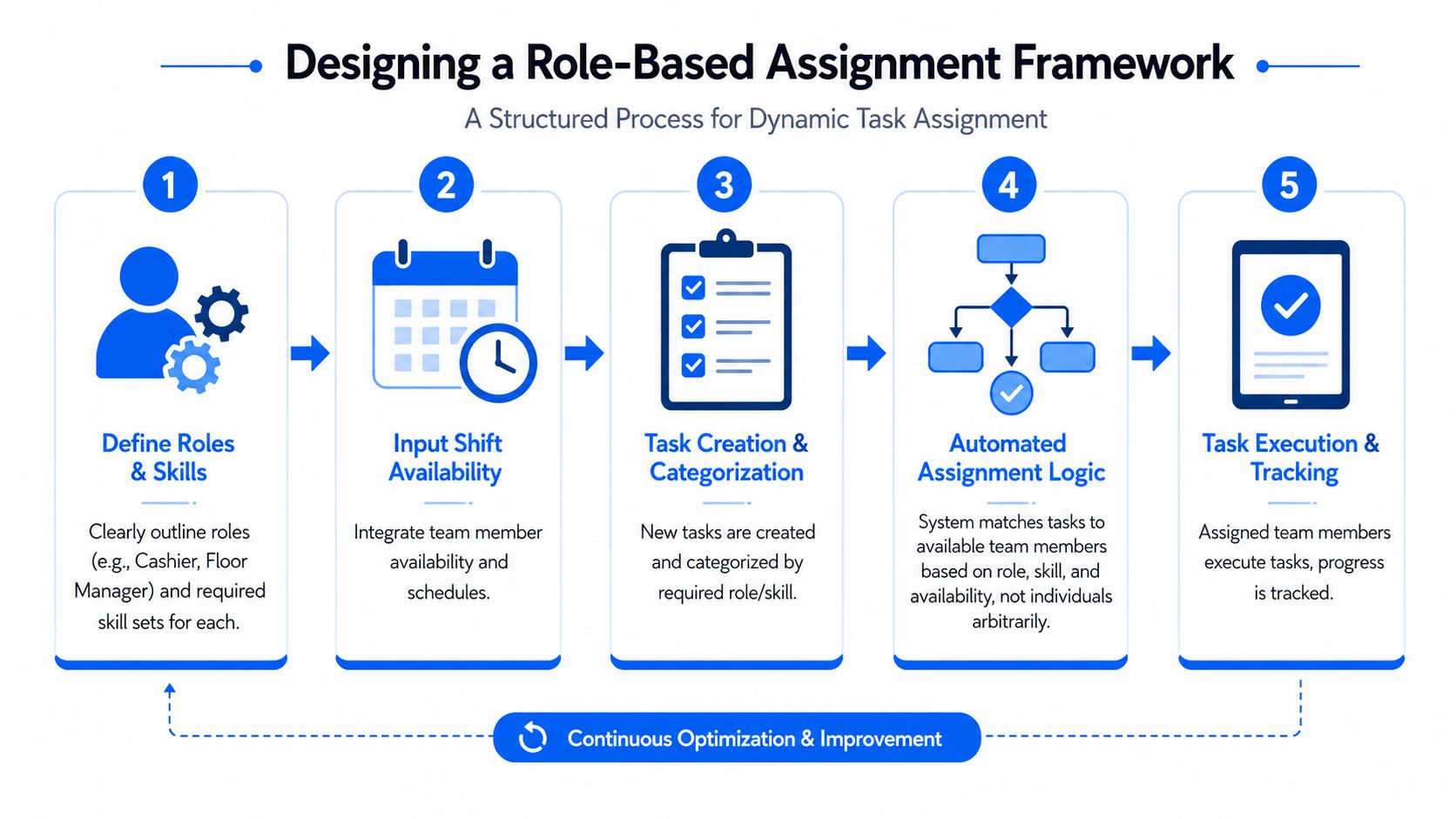
The cleanest frontline systems start with one decision. Assign the task to the role that can complete it, not to a person chosen at random. That shift sounds small, but it changes everything about accountability, staffing flexibility, and how quickly work moves across stores, sites, or shifts.
Define the ownership model first
Start by mapping roles, skills, and shift coverage together. A cashier, floor manager, nurse, or facilities lead may all touch the same workflow differently, so the system should know which role owns the task, which skills are required, and which shifts are eligible. That keeps the assignment logic grounded in operational reality instead of who happened to be online when the task was created.
Use plain language for recurring tasks. “Open register audit,” “room reset,” or “weekly refrigeration check” beats internal jargon every time, because the person doing the work shouldn’t need translation before they begin. If a task has multiple steps, split it into separate actions with one responsible person per action, which keeps tasks from becoming organizational orphans and makes escalation simpler when something stalls.
A good rule is to keep the handoff criteria explicit. If the opening shift completes a site inspection, the closing shift should know what was checked, what failed, and what needs follow-up. The goal is not more detail for its own sake, it’s fewer decisions left to memory.
Build assignment rules that fit the shift
Assignment by role works best when it also respects shift availability and skill level. A task that needs a certified nurse, a trained technician, or a supervisor approval should never be dumped into a generic queue. The more dynamic the location, the more important it is to match work to actual capacity and competence.
The Microsoft frontline guidance linked to the challenge section above is useful here, because it emphasizes planning work in advance, prioritizing objective tasks, and assigning people with the required skills. That approach also aligns with the practical observation that assignment by role and clear handoffs can cut execution errors by up to 40% compared with generic to-do lists (Microsoft frontline management guidance).
Use this framework as the starting point:
- Role definition: name who can own the task, not just who can see it.
- Skill mapping: list the capability required, such as certification, product knowledge, or floor access.
- Shift rule: define which shifts can receive the task and what happens if no one is available.
- Due-date buffer: build in review time so late handoffs don’t look like completed work.
- Escalation path: state who gets notified when the task is blocked or skipped.
When this is done well, recurring tasks stop bouncing between managers and become part of the operating rhythm. That’s the difference between a task list and a real assignment framework.
Implementing End-to-End Task Workflows
A good workflow doesn’t stop at assignment. It includes the checklist, the evidence, the review, and the escalation path, so a task can move from request to completion without disappearing into a chat thread or a supervisor’s memory. That’s especially important in hospitality, retail, and healthcare, where the cost of an untracked step shows up quickly in the customer or patient experience.

Build the workflow around the job, not the software
A strong workflow begins with the actual work sequence. For a guest room turn, the task can start with a room inspection checklist, move into linen and amenity replacement, then require photo proof for key conditions, and finish with a quality review if something looks off. That structure matters because it gives the housekeeper, supervisor, and quality checker a shared reference point instead of three separate interpretations of “done.”
SOPs should live inside the task flow, not in a separate binder nobody opens during a shift. Short videos help most when the task is visual, repetitive, or easy to perform incorrectly, such as a cleaning standard, equipment reset, or shelf-facing rule. The point is to reduce interpretation error, not to replace judgment.
Operational shortcut: if a task takes more than one handoff, each handoff needs a visible checkpoint.
Recurring tasks should also be scheduled by operational need, not by habit alone. If a daily audit, sanitation check, or opening routine is always late on one shift, the workflow should route reminders earlier or assign it to a different role with more capacity. That kind of adjustment is where task systems start saving time instead of just recording delay.
For communication discipline, keep frontline updates connected to a broader internal comms structure such as internal communications strategy, because a task workflow works better when the message, timing, and ownership all line up. Otherwise, staff receive one instruction in a message and a different expectation in the task tool.
Use proof and escalation as part of completion
Proof of completion should be lightweight but real. Timestamped or geo-stamped verification, photo uploads, and manager review are all useful when the task has compliance or quality implications. Those checks don’t need to be punitive, they just need to make completion visible enough that missed steps can be corrected before they spread.
Escalations should trigger on conditions, not vibes. If a task is overdue, missing evidence, or repeatedly skipped, the right people should be notified automatically. That keeps managers from manually checking everything and lets them focus on exceptions instead of surveillance.
The best workflows make it easier to do the right thing than to fake completion. That’s the standard to design for.
Measuring Success with KPIs and Dashboards
Frontline task systems need a few sharp metrics, not a pile of vanity numbers. Completion rate matters, but so do timing, missed steps, rework, and how much time managers spend coordinating work instead of getting it done. If the dashboard can’t show where execution is slowing down, it’s just a reporting screen.
A useful benchmark is coordination overhead. Teamwork recommends intervening when coordination exceeds 10% of total team time, which works out to about 4 hours per week on a 40-hour team (Teamwork task management). That’s a practical line in the sand, because once managers are spending that much time chasing tasks, they’re losing the ability to coach, adjust staffing, and fix upstream problems.
| Frontline Task Management KPIs | Description | Target |
|---|---|---|
| Completion rate | Share of assigned tasks finished within the expected window | Stable and rising over time |
| On-time delivery | Tasks completed by the due date or shift cutoff | Consistently high, with few misses |
| Missed steps | Checklist items skipped or left unverified | Low and trending down |
| Rework incidents | Tasks that need correction after review | Low and tied to root-cause follow-up |
| Coordination overhead | Time spent assigning, chasing, or clarifying work | Under the 10% threshold |
| Proof coverage | Tasks with valid photo, timestamp, or other evidence | High for quality-sensitive tasks |
Design the dashboard around decisions
The best dashboard answers three questions. What’s late, what keeps failing, and where do we need to change the assignment rule? If a store, ward, or site consistently misses the same task, the issue may not be effort. It may be the due date, the role, or the shift logic.
Dashboard ownership matters too. One person should own the definitions, one should review exceptions, and managers should know what action they’re expected to take when a metric moves. Without that structure, the dashboard becomes a passive report instead of an operational control.
A broader workforce experience platform becomes particularly relevant, because task data becomes much more useful when it sits beside communication, engagement, and staffing signals. A spike in overdue work means more when you can also see staffing pressure or a communication gap.
Good metrics don’t just measure productivity. They tell you whether the team can execute reliably without burning out the people closest to the work.
Leveraging Technology and AI Enhancements
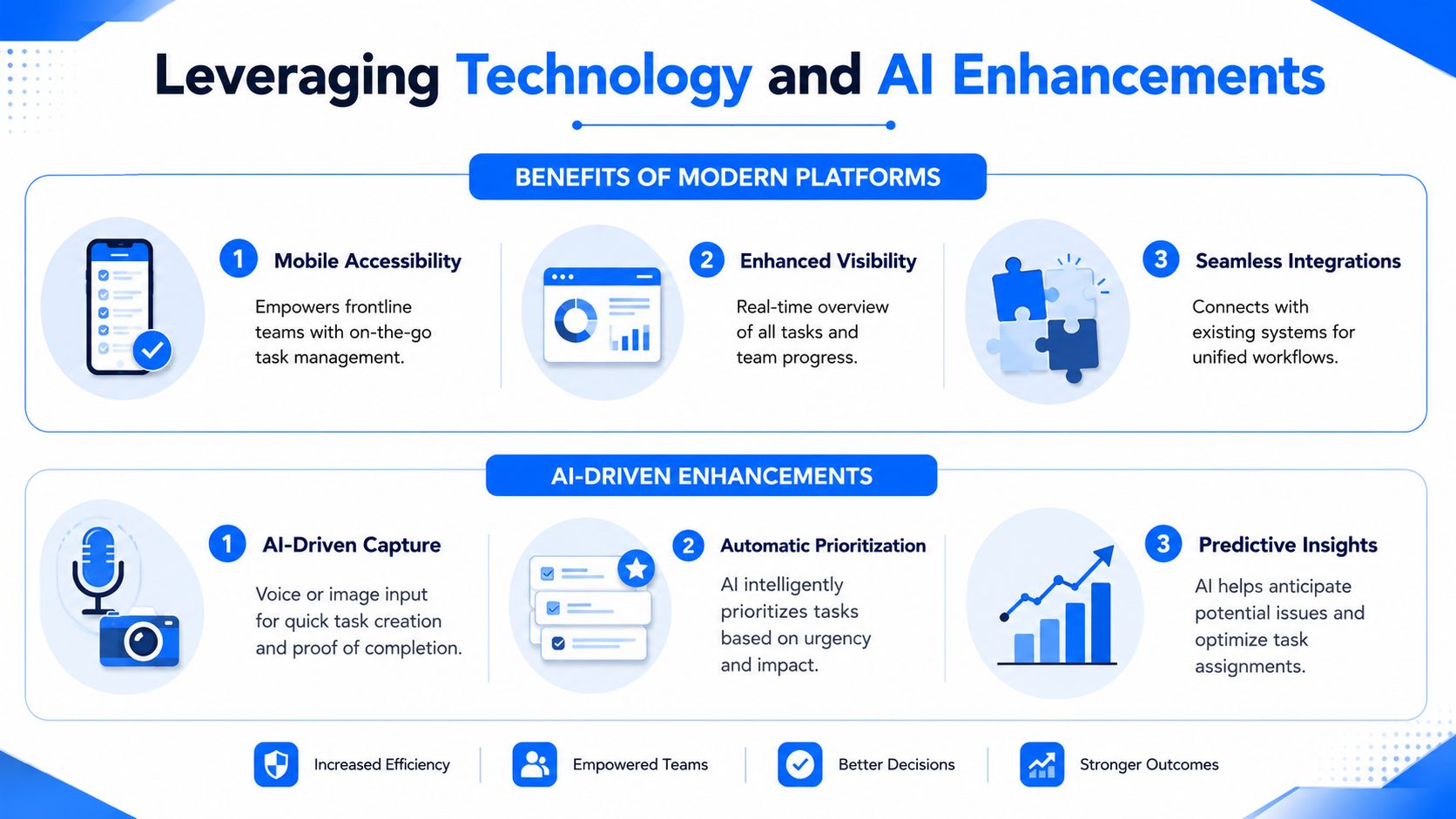
Frontline task management tools should make work faster to capture, easier to prioritize, and simpler to verify. Mobile access matters because the people doing the work are rarely at a desk, and the best systems let them create, receive, and close tasks where the work happens. AI adds the most value when it removes manual entry and helps managers sort what needs attention first, especially across shifts where ownership can change fast.
What to look for in a modern platform
A frontline platform should support mobile task views, clean assignment logic, and visible progress tracking. It should also connect with workforce management, POS, and HR systems so task context follows the shift, the employee, and the store instead of living in isolated tools. Without those links, managers still end up reconciling mismatched data by hand, and that slows down the exact teams the software is meant to help.
AI-enabled capture is especially useful for proof-heavy work. Voice or image input can reduce friction when an associate needs to log completion quickly or document an issue while staying on the floor. Automatic prioritization is equally valuable when the system can flag tasks tied to customer impact, compliance risk, or overdue follow-up. For a closer look at how AI is being used in employee-facing tools, see AI in HR practical use cases 2026.
The point is not to add more software. It is to give shift leaders a better way to assign work by role, check what was done, and keep proof attached to the task instead of buried in messages or paper notes.
Use AI to support, not replace, frontline judgment
The best AI features do not decide everything. They help teams capture tasks faster, prioritize more intelligently, and surface overdue work before it becomes a customer issue. A manager still needs to decide whether a task should be reassigned, paused, or escalated, especially when staffing, safety, or service conditions change during a shift.
AI can also help with verification. If a task requires a timestamp, photo, or location check, the system can make that evidence easier to capture and faster to review. That reduces back-and-forth between managers and frontline staff, which is often where execution gets bogged down. It also gives operations teams a cleaner audit trail when they need to confirm that work was completed by the right person, on the right shift, in the right place.
Modern platforms work best when they reduce clicks and remove guesswork. That is the practical test, whether the tool helps a store leader see who owns the task, what proof is missing, and whether the work is ready to close without chasing people across the floor.
Rollout and Common Pitfalls for Sustainable Execution
The safest rollout is the one that starts small and proves value before it scales. Pick one region, one store cluster, one ward, or one facility type, then test the role model, the task rules, and the proof requirements in a real operating environment. A pilot gives managers room to correct the workflow before it becomes policy everywhere.
A strong launch checklist usually includes these steps:
- Map the first use case: choose a task family with visible pain, such as audits, sanitation, or opening routines.
- Train by role: teach managers how to assign, review, and escalate, and teach staff how to complete and verify.
- Test handoffs: make sure shift changes, absences, and late assignments are handled cleanly.
- Review system fit: confirm the task tool connects with existing communication and workforce processes.
- Set a feedback cadence: collect issues weekly during the pilot, then adjust before broader rollout.
The most common pitfall is skipping shift handoffs. Another is underestimating coordination overhead, which makes a rollout look successful on paper while managers absorb the unrecorded extra work. Integration failures are the third trap, because even a well-designed workflow breaks if staff have to jump between disconnected systems.
Training should be practical and brief. Managers need scenario-based practice, while frontline staff need simple documentation, live examples, and reinforcement through internal messages. It also helps to tie task performance to recognition, because people tend to repeat the behaviors that are visible and valued.
A sustainable rollout treats task management as part of employee experience, not a separate admin project. When people can see the purpose, the ownership, and the follow-up, adoption sticks better. That’s also where frontline employee engagement becomes relevant, because recognition and clarity reinforce each other.
If you’re building or revising task management for frontline teams, start with one high-friction workflow, define role-based ownership, and connect the task process to communications and workforce data. For a practical next step, use this framework to audit one location this month, then adapt it across your other sites through Turn On Work’s workforce operations and frontline execution coverage.