Buying another frontline app rarely fixes frontline friction. Digital employee experience for frontline teams is the practical quality of how workers access information, complete tasks, communicate, use HR technology, and receive operational support during a shift. Strong DEX reduces digital friction and time-to-action, while connecting communication, engagement, tools, AI, manager behavior, and workforce operations.
Key Takeaways
- DEX is operational, not cosmetic. A login or mobile app doesn’t prove that workers can find and use what they need.
- Frontline access must be relevant and timed. Critical information should reach the right role, site, shift, and device without unnecessary searching.
- Trust and management behavior matter. Better software can’t compensate for poor scheduling, weak manager communication, or perceived disrespect.
- Measure friction, not downloads alone. Task completion, search success, support demand, and failed workflows reveal more than adoption totals.
- Scale carefully. Pilot simple use cases, secure endpoints, learn from workers, and expand only after the workflow works in practice.
Redefining Digital Employee Experience for Frontline Teams
A mobile app is only one component of digital employee experience for frontline teams. A good app can still produce a poor employee digital experience if workers must remember multiple passwords, search through irrelevant announcements, depend on a supervisor for basic information, or use a device that performs badly in the work environment.
Digital employee experience definition is easiest to understand through the work itself. DEX describes how employees experience the digital systems, devices, communications, workflows, knowledge, and support that help them perform their roles. For frontline and deskless employees, that experience is episodic rather than continuously connected. A retail associate may check a task before serving a customer. A healthcare worker may need a procedure during a shift. A warehouse employee may need an instruction while handling an order.
Access is not the same as enablement
Frontline DEX sits at the intersection of employee engagement, internal communications, HR technology, AI, frontline enablement, and workforce operations. The test isn’t whether an employee technically has access. The test is whether the employee can independently take the next correct action.
That distinction separates DEX employee experience from generic employee experience language. Employee experience includes the broader relationship people have with work, leadership, policies, pay, culture, and development. DEX focuses on the technology-mediated part of that relationship. For frontline teams, the two overlap because digital systems often carry schedules, training, task instructions, recognition, surveys, and self-service processes.
Practical rule: Treat every frontline digital workflow as part of the employee experience, not merely as an IT implementation.
A useful frontline DEX review asks four questions:
- Can workers reach it? Consider device ownership, connectivity, authentication, language, accessibility, and shared-device realities.
- Can they understand it? Use role-specific language, concise instructions, clear ownership, and current content.
- Can they act on it? Remove unnecessary steps between information and task completion.
- Can they recover when it fails? Provide support routes that work during a shift, not only through an office-hours ticket process.
Leaders who want broader context can pair this operational view with an employee experience guide for support, particularly when designing help, knowledge, and service journeys. The frontline standard remains simple: the digital workplace should make work easier to execute, not create another layer of work around it.
The Persistent Digital Divide Between Office and Deskless Workers
The frontline digital divide is an access architecture problem, not just an app shortfall. In a 2021 survey summarized by Step Two, 45% of respondents said office workers had good or very good digital experiences, compared with only 17% for frontline roles. 51% rated frontline digital experiences as poor or very poor, according to the frontline employee workplace survey.
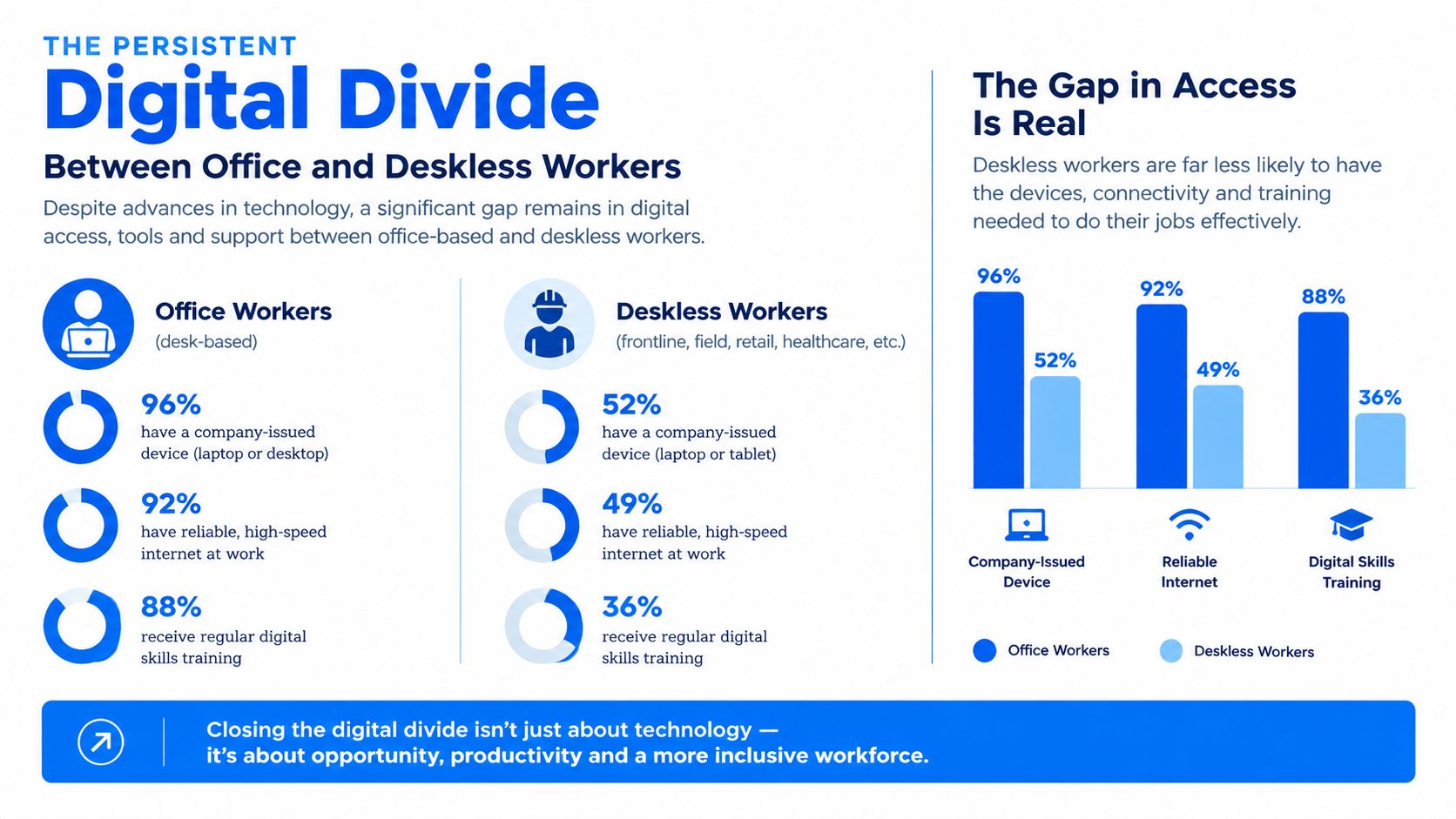
The same survey found that only 41% believed the pandemic improved frontline digital experience, the lowest score across five employee cohorts, and only 32% expected frontline DEX to improve further during the rest of 2021. These figures are historical, but they establish a useful baseline: frontline workers had less access to effective digital work and saw less momentum in improvement.
Current workplace conditions do not make that baseline irrelevant. JLL’s 2026 findings, used later in this article, show that organizations still need to connect technology investment with the daily realities of the workforce. The gap is therefore not only about whether a company has deployed a platform. It is about whether people can reach the right information, at the right moment, through a system they and their managers trust.
Why mobile-first often fails in practice
The phrase mobile-first can conceal a basic access problem. In the same 2021 frontline workplace survey, only 59% of frontline employees said they used mobile devices on the job, according to the Step Two analysis of frontline DEX. A workable mobile approach must account for personal and shared devices, rugged hardware, connectivity, charging, authentication, and the limited time available during a shift.
Training creates another fault line. Microsoft’s Work Trend Index found that 55% of frontline workers had to learn new technology on the fly without formal training or practice, while 46% felt pressure to adapt to new technology out of fear of losing their jobs, according to the Step Two frontline DEX resource. Deloitte’s research found that only 23% believed they had the technology needed to be productive, and 80% said their company provided few opportunities for connection at work, also summarized by Step Two.
The operational implication is direct. Frontline employee technology needs more than procurement approval. Devices, applications, and licenses become useful when workers can access them, learn them, trust the information, and act without unnecessary manager intervention. That architecture spans the employee lifecycle for deskless workers, from onboarding and training through scheduling, daily execution, feedback, and retention.
Why Technology Alone Cannot Fix Frontline Experience
Technology can remove friction, but it can’t repair a work system that communicates poorly or treats workers as interchangeable. The strongest frontline digital experience combines usable tools with credible managers, workable schedules, clear expectations, and visible respect.
Recent evidence points to a management-and-trust gap. Rippl’s 2025 report found that 51% of frontline employees felt regarded as expendable, 42% felt treated as a number rather than a person, and 49% perceived a cultural divide between frontline and corporate staff, according to the reported findings from Rippl. These figures don’t prove that every technology program will fail. They do show why a new app can’t be the whole intervention.
The trust test for a DEX initiative
Consider a scheduling rollout. The system may offer a clean mobile interface, but workers will judge it by practical questions:
- Does the schedule reflect reality? If changes arrive late or shift rules are unclear, convenience features won’t create confidence.
- Can workers raise a problem safely? A feedback button has limited value if employees believe managers will ignore or punish dissent.
- Does the tool reduce manager dependency? Self-service should give employees useful autonomy, not shift administrative work onto them.
- Does leadership follow through? Repeated surveys without visible action teach workers that participation has no consequence.
JLL’s 2026 global research reinforces the operational side of the problem. Across 3,411 frontline workers in 26 markets, 47% wanted access to flexible scheduling, while only 37% currently had it, a 10-point gap, according to JLL’s frontline workplace research. The same research reported that 45% didn’t consider their company a great place to work and 44% reported burnout. Scheduling and wellbeing therefore belong in a DEX conversation when digital tools influence how employees receive, request, or manage work.
A better interface can’t compensate for an operational promise the organization doesn’t keep.
The practical decision model is to diagnose before deploying. If the problem is missing information, improve architecture. If the problem is unreliable hardware, address endpoints and support. If the problem is unpredictable scheduling or dismissive supervision, fix management practice alongside the technology. DEX for frontline workers succeeds when the tool reinforces a better operating model.
Designing Information Accessibility Architecture for Deskless Teams
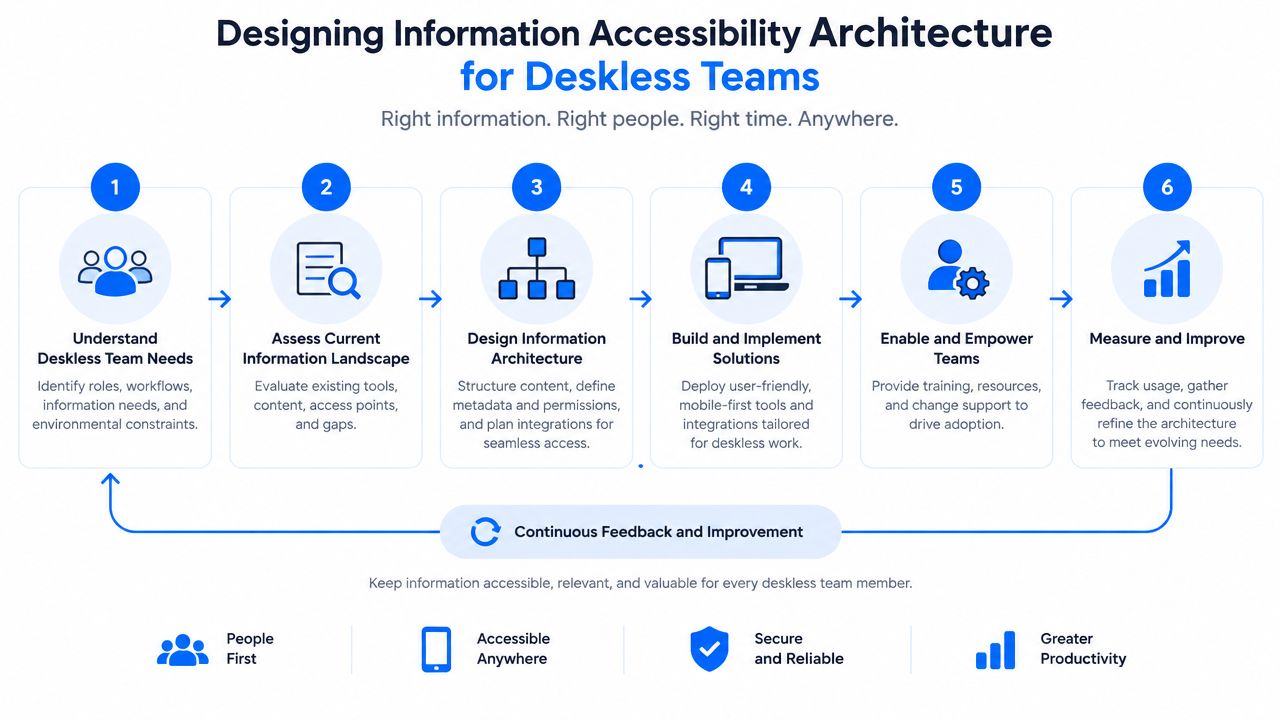
Information accessibility architecture is the deliberate design of where critical information lives, who receives it, how it is found, and what happens when the usual channel fails. It addresses the core problem behind many deskless communication failures: employees may have access to multiple channels but still can’t find the right answer in time.
A January 2025 survey of 1,000 U.S. deskless workers found that 69% of organizations relied primarily on email even though 54% of deskless workers had limited email access. The survey also found that 32% believed their organization communicated less effectively with them than with office workers, while 22% said there were too many places to look for information, according to HFS Research’s deskless workforce findings.
Build the architecture around action
Use this six-part operating model:
- Classify the information. Separate urgent alerts, shift instructions, procedures, HR services, learning, and culture content. Each category needs a different urgency and ownership model.
- Assign a primary home. Every important item should have one authoritative location. Secondary channels can point to it, but they shouldn’t create competing versions.
- Target the audience. Use role, location, shift, language, and employment context to reduce irrelevant content. Relevance is a form of accessibility.
- Design the fallback. If an employee lacks company email or a consistent device, define the alternative, such as SMS, signage, manager briefing, or a shared terminal. Fallbacks must still preserve version control.
- Make retrieval obvious. Use plain labels, task-based navigation, search synonyms, and prominent entry points for frequently needed processes.
- Audit the journey. Ask a worker to find a procedure, report an issue, check a schedule, and locate a policy without coaching. Record every point where a manager or colleague must intervene.
Governance prevents channel sprawl
Internal communications should own message quality and audience logic. Operations should define timing and task relevance. HR should protect policy accuracy and employee-service access. IT should manage identity, devices, permissions, reliability, and support.
A knowledge-sharing platform approach for frontline teams can help organizations organize this relationship between content and work. Accessibility also includes readable content, usable interaction patterns, and support for different abilities, so teams can use the Rendemo accessibility statement as a useful reference point when reviewing digital content and interface expectations.
Operational standard: If workers need a supervisor to locate routine information, the organization has designed an intermediary, not an accessible digital workplace.
Measuring What Matters with Frontline DEX Metrics
The best digital employee experience metrics show whether workers can complete important work with reasonable effort. Downloads, logins, and message impressions can indicate exposure, but they don’t reveal whether a worker found the right instruction or completed a task without friction.
A practical scorecard should connect employee technology experience metrics to operational outcomes without pretending that every outcome has a single cause. Track the journey from access to action, then combine system data with worker feedback and manager observation.
Frontline DEX Metrics Framework
| Metric Category | Vanity Metric (Avoid) | Operational DEX Metric (Track) |
|---|---|---|
| Access | Total accounts created | Successful access by role, site, device, and shift |
| Adoption | App downloads | Repeat completion of priority workflows |
| Communication | Messages sent | Timely reach and confirmed understanding of critical updates |
| Knowledge | Page views | Search success, answer usefulness, and current-content rate |
| Task execution | Feature usage | Completion time, abandoned steps, and rework |
| Support | Tickets closed | Repeated failure points, resolution quality, and escalation volume |
| Sentiment | General engagement score | Worker-rated ease, confidence, trust, and usefulness for specific journeys |
Build a balanced DEX KPI set
Choose a small set of digital employee experience KPIs for each priority workflow. For example, a shift-change process might need access success, time to confirmation, missed-change incidents, support contacts, and worker confidence. A training workflow might need completion, comprehension, repeat questions, manager coaching demand, and time until independent task performance.
Avoid treating adoption as proof of value. A worker may open an app because a manager requires it, then complete the actual task elsewhere. Conversely, a low login count may be acceptable for a process used only when a specific event occurs. Context matters.
Capture qualitative evidence alongside telemetry. Short pulse questions, structured interviews, observation, and open-text feedback explain why a metric moved. A focused employee listening strategy for deskless teams can connect those signals to action owners rather than collecting sentiment that no team can resolve.
Measurement rule: Every DEX metric should answer, “What decision will this change?”
Use a simple review cadence. Operations reviews workflow friction, IT reviews reliability and endpoints, HR reviews service access and equity, and internal communications reviews reach, relevance, and comprehension. Leaders then prioritize the problems that block work most often, not the dashboard tiles that look most impressive.
A Step-by-Step Framework for Frontline Digital Transformation
A workable digital employee experience framework starts small, protects the worker, and expands only after evidence from real shifts. Independent guidance recommends starting with pilot projects and simple use cases, then expanding iteratively, while ensuring endpoint management so devices are registered and secured to reduce data-loss risk if a device is lost, as described in this guidance on the digital workplace.
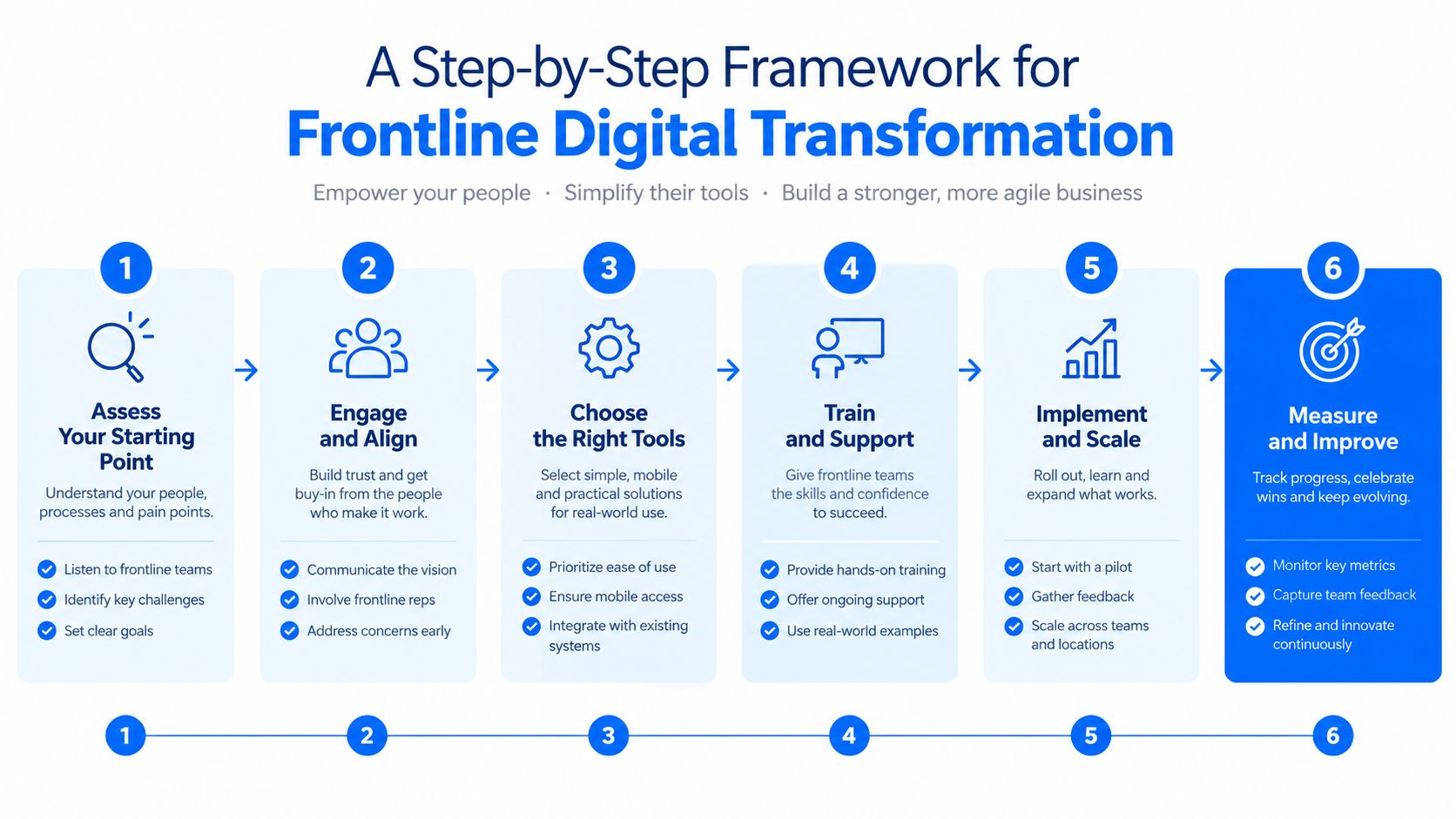
The TurnOnWork frontline DEX rollout model
- Choose one painful workflow. Start with a task workers perform often or one that generates avoidable questions, delays, or rework. Don’t begin with a promise to digitize everything.
- Observe the work in context. Visit the store, ward, plant, depot, or service location. Note interruptions, shared devices, connectivity, physical constraints, manager handoffs, and points where employees switch channels.
- Design the minimum useful experience. Give workers the shortest reliable path to the task, knowledge, or message. Remove features that don’t support the selected use case.
- Secure the endpoint. Register devices, manage access, protect data, define loss procedures, and test what happens when connectivity or hardware fails.
- Pilot across real conditions. Include different shifts, roles, locations, confidence levels, and device situations. A workflow that works only during an office-led demonstration isn’t ready.
- Review evidence before expanding. Compare friction, completion, support demand, worker feedback, and manager workload. Fix the workflow, then scale in stages.
Adoption deserves its own scrutiny. A useful discussion of why tech adoption matters helps separate ownership from meaningful use. The distinction is critical for frontline workforce digital transformation, where a device can sit unused if the process doesn’t fit the job.
Organizations evaluating an employee experience platform guide should apply the same test to vendors. Ask whether the platform supports mobile access, role-based delivery, task execution, knowledge governance, manager reinforcement, integrations, endpoint controls, accessibility, and measurable recovery when something goes wrong.
Common Mistakes to Avoid in Frontline DEX Strategy
Frontline DEX problems rarely begin with an obviously bad project plan. They surface during the shift, when a workflow meets a shared device, a busy supervisor, weak connectivity, or a worker who has had no chance to practise.
Mistake one, copying the office workflow
A corporate team converts a desktop form into a responsive mobile page and declares the work complete. The frontline employee still moves through several menus, types long answers on a phone, and chooses internal department names that mean little at the point of work.
Correction: redesign around the task. Use plain labels, short forms, sensible defaults, and role-specific entry points. A page that shrinks to fit a phone is not necessarily designed for mobile work.
Mistake two, assuming every worker has a personal device
Shared devices change both security and usability. Workers need quick sign-in and sign-out, clear session boundaries, privacy controls, charging arrangements, and a defined recovery process when a device fails.
Correction: document the actual device environment before selecting a tool. Account for personal phones, shared devices, rugged hardware, kiosks, and offline work where those conditions exist.
Mistake three, treating training as a launch email
A launch message cannot replace practical instruction. The training gap described in Step Two’s frontline DEX resource is a warning to design support around the work itself.
Show the workflow in a short demonstration, let employees practise it during a normal task, and give supervisors a simple way to reinforce the right steps. Put help inside the workflow where possible, with clear escalation for issues that cannot be solved at the work area. A training package that ends after the announcement leaves managers to improvise and workers to rely on peers.
Mistake four, measuring obedience instead of usefulness
Mandatory logins can create attractive adoption reports while hiding confusion and workarounds. Ask what employees were trying to complete, where they stalled, and whether the tool helped them finish the job. Review support requests and supervisor observations alongside usage data, then remove the friction instead of blaming the user. A tool earns continued use by reducing effort at the point of work.
Aligning HR, IT, and Operations for Workforce Experience
Frontline DEX needs one accountable operating rhythm, not a handoff between departments. HR understands employee services and trust. IT manages identity, endpoints, integrations, reliability, and support. Internal communications governs message clarity and reach. Operations knows the work, timing, staffing, safety, and manager realities.
Assign decisions to the team closest to the risk
Create a cross-functional DEX group with clear ownership:
- Operations chooses priority workflows and validates whether the design fits real work.
- HR checks policy, fairness, employee-service access, and listening loops.
- IT owns security, device management, technical performance, integrations, and incident response.
- Internal communications controls audience targeting, message hierarchy, content lifecycle, and channel governance.
- Managers reinforce usage, explain why a change matters, and report local friction rather than improvising unofficial workarounds.
The group should maintain a shared backlog. Rank items by worker impact, operational risk, frequency of failure, and feasibility. Don’t let the team prioritize only what a particular platform can configure easily.
Connect AI to human judgment
AI can improve search, summarize procedures, translate content, classify questions, and route requests. It shouldn’t become an ungoverned answer layer for safety-critical, policy-sensitive, or employment-related decisions. Every AI-assisted frontline workflow needs current source content, clear ownership, escalation to a person, and a way to report an incorrect answer.
A practical change management communication plan for frontline teams can help coordinate the announcement, manager briefing, training, launch support, feedback, and follow-up. That sequence matters because communication creates awareness, while managers and operations create usable behavior.
Digital Employee Experience Frontline FAQs
What is digital employee experience for frontline teams?
Digital employee experience for frontline teams is how workers experience the devices, applications, communications, knowledge, workflows, HR services, and support used during work. It includes access and usability, but also whether digital systems help employees act independently and complete tasks with less friction.
What does DEX mean in the workplace?
DEX means digital employee experience. It focuses on the technology-mediated parts of work, such as device reliability, application usability, access, search, communication, workflow completion, and technical support. For frontline employees, DEX must account for mobile, shared-device, shift, site, connectivity, and time constraints.
What is the difference between DEX and employee experience?
Employee experience covers the broader relationship between a person and their employer, including culture, leadership, pay, policies, development, wellbeing, and work design. DEX is the digital layer of that experience. The two interact closely when technology controls schedules, training, task instructions, employee services, or communication.
What is the difference between DEX and the digital workplace?
The digital workplace is the collection of platforms, systems, devices, and digital services an organization provides. DEX is the quality of the employee’s experience using those resources. A large digital workplace can still create poor DEX if information is fragmented, tools are unreliable, or workflows don’t match frontline work.
How do you measure digital employee experience for frontline workers?
Measure the complete path from access to action. Useful DEX metrics include successful access, workflow completion, abandoned steps, task time, search success, content usefulness, support demand, repeat failures, device reliability, worker confidence, and manager intervention. Combine system data with observation and targeted employee feedback.
What are the most important digital employee experience KPIs?
The most useful digital employee experience KPIs depend on the workflow, but they usually include task completion, time to action, error or rework signals, support escalation, information reach, search success, device availability, and worker-rated ease. Avoid using downloads or logins as the only measure of value.
How can companies improve frontline digital experience?
Start with one high-friction workflow. Observe workers in context, simplify the path, deliver role-relevant information through the right channel, provide practice and manager support, secure endpoints, and pilot across real shifts before scaling. Treat trust, scheduling, communication quality, and respect as part of the solution.
What tools improve digital employee experience?
Useful digital tools for frontline workers can include mobile workspaces, task management, knowledge systems, scheduling platforms, learning tools, employee self-service, surveys, recognition, targeted alerts, and AI-assisted search. The right choice depends on workflow fit, accessibility, device reality, integration, governance, security, and support. Turn On Work’s Frontline Superapp is one example of a mobile-first workspace designed to bring communication, schedules, tasks, training, knowledge, recognition, surveys, and employee self-service into one connected experience.
How should HR, IT, internal communications, and operations manage DEX?
They should share a workflow backlog and assign clear ownership. Operations validates task fit, HR protects employee access and trust, IT manages technology and security, internal communications governs information delivery, and managers reinforce behavior and report friction. A joint review should connect employee signals with operational evidence.
What mistakes should organizations avoid?
Avoid copying desktop workflows onto phones, assuming every worker has a personal device, relying on launch messages instead of practice, adding channels without governance, and treating forced logins as successful adoption. The most damaging mistake is deploying technology without changing the operational conditions that make the tool useful.
If your organization has a frontline workflow that still depends on email, manager relays, paper instructions, or repeated support questions, map it before buying another platform. Identify the worker, task, information, device, decision, and failure point at each step, then pilot a simpler experience with HR, IT, communications, and operations working together. That is the fastest practical route to a more accessible, trusted, and measurable frontline digital workplace.