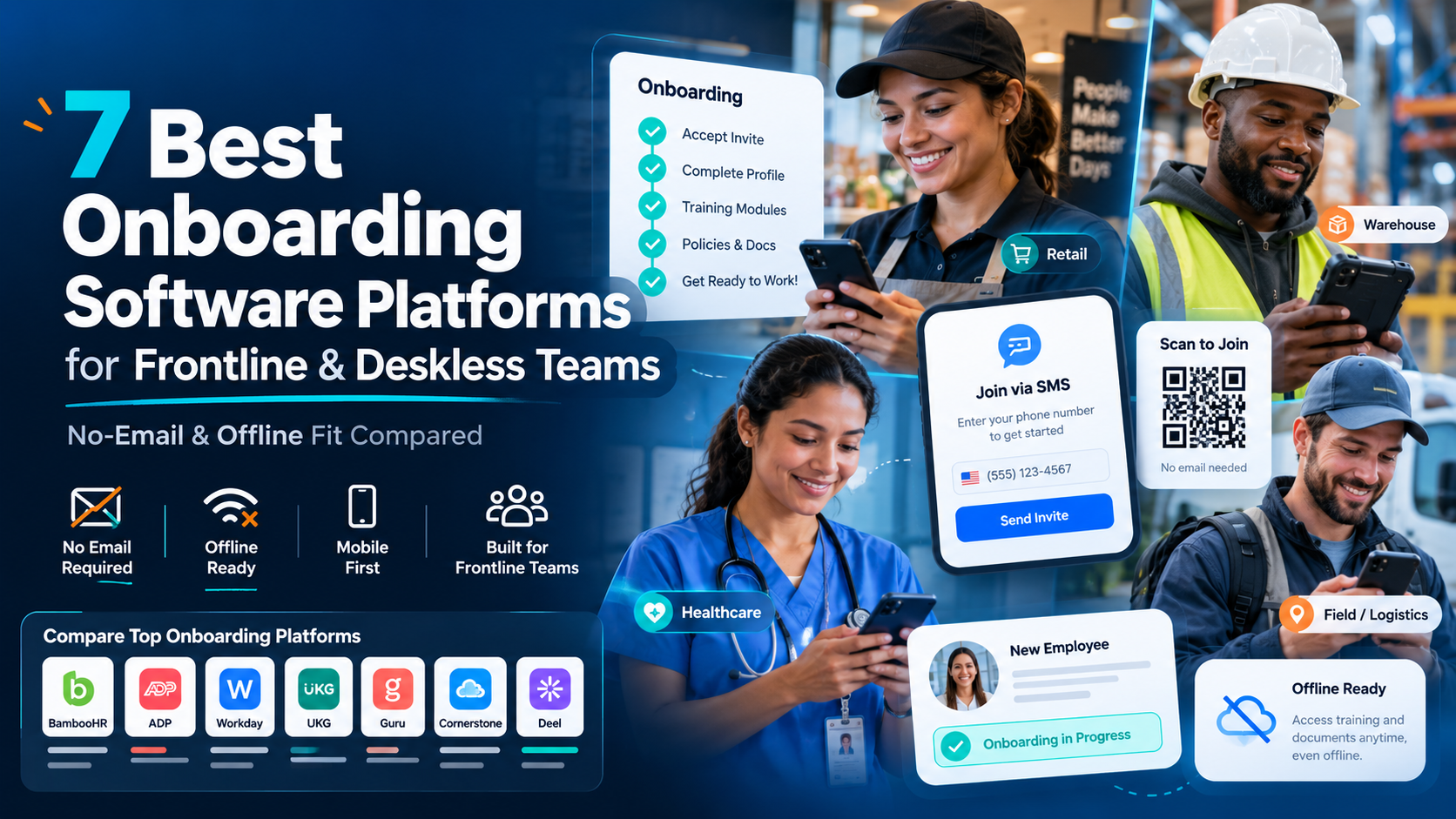
A café manager shouldn’t need three spreadsheets, a group chat, and a late-night phone tree to cover tomorrow’s shifts. The best job scheduling software in 2026 turns demand, availability, labor rules, time tracking, and employee communication into one operating workflow. The seven tools worth comparing are Deputy, When I Work, Sling, Connecteam, Shiftboard, Workforce.com, and ZoomShift. The right choice depends on frontline fit, shift complexity, and whether AI reduces planning time instead of adding noise.
Quick Answer and Key Takeaways
Deputy is the strongest all-rounder for multi-site frontline operations. When I Work and Sling suit smaller teams that need fast employee scheduling software without a heavy implementation. Connecteam is compelling when scheduling must sit beside frontline communication and task execution. Shiftboard fits complex, regulated staffing. Workforce.com is the better choice for broader workforce management. ZoomShift works well for straightforward shift planning with a lighter footprint.
- AI scheduling maturity varies widely. A useful AI tool should explain why it assigned people, expose rule conflicts, and let a manager override the draft. It shouldn’t produce a roster that looks complete.
- Mobile usability is a frontline requirement. Scheduling software for frontline workers must support availability, shift visibility, swaps, open shifts, notifications, and approvals without assuming employees sit at desks.
- Multi-location scheduling needs central control with local ownership. Area managers need consistent rules, while site managers still need to handle local demand and callouts.
- Labor cost guardrails matter as much as coverage. A schedule that fills every shift can still create overtime drift, poor skill coverage, or expensive overstaffing.
- Payroll and time tracking integrations earn their keep. If managers re-enter schedule, attendance, or employee data into separate systems, the supposed automation quickly becomes administrative work.
The market is no longer a niche back-office category. Workforce scheduling software was valued at USD 2.85 billion in 2024 and is projected to reach USD 6.73 billion by 2033, with cloud deployment representing 58% of global revenue in 2024 according to Workplace Management Software Industry Statistics. That growth makes selection discipline more important, not less. More vendors now offer AI, mobile apps, and labor controls, but those labels don’t tell you whether a tool will work during a busy lunch service, a hospital handover, or a last-minute absence.
What Job Scheduling Software Does in 2026
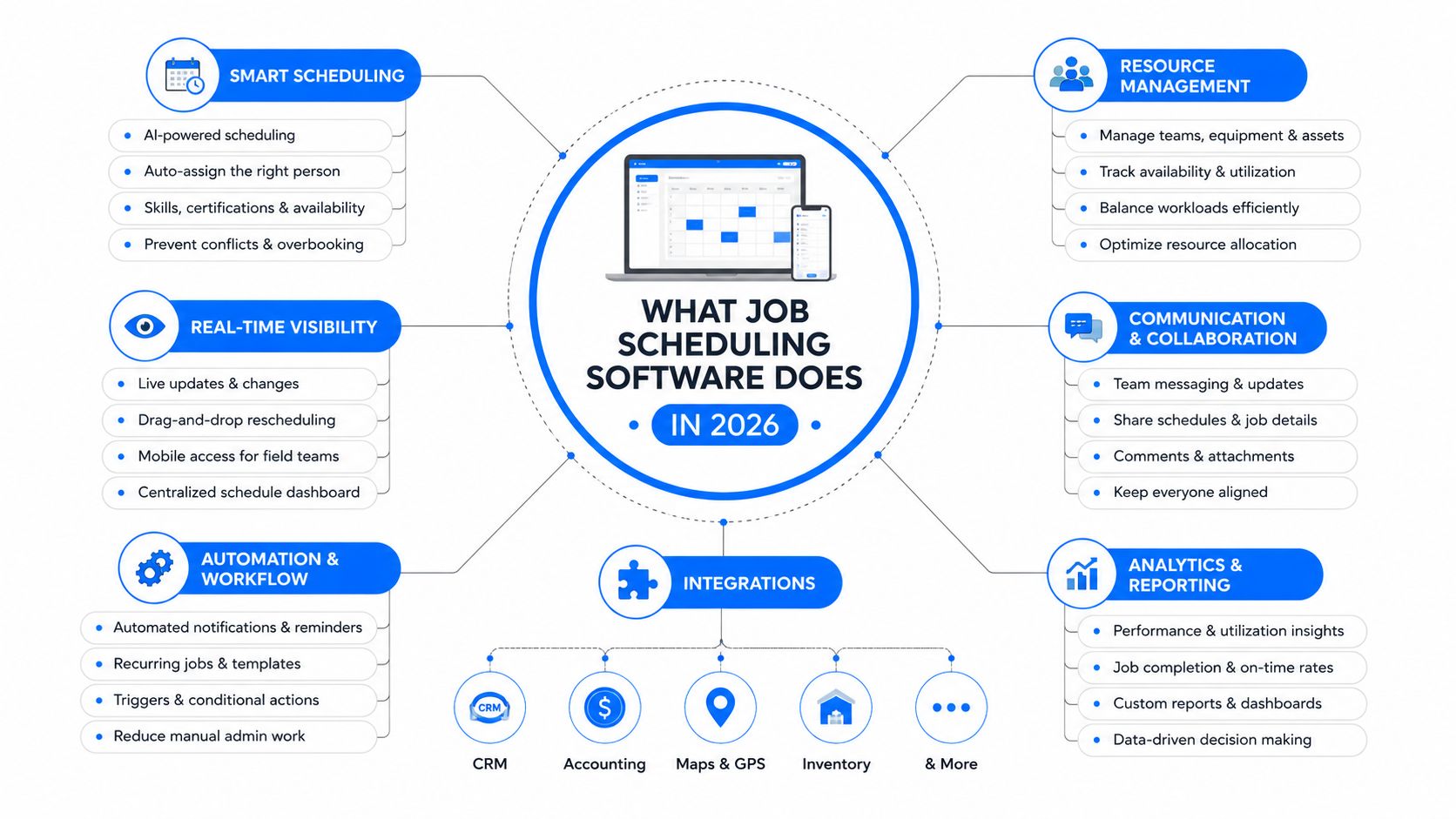
Job scheduling software builds, publishes, and adjusts rosters for hourly, deskless, and shift-based employees. In practical terms, it helps a manager assign the right person to the right shift, check availability and qualifications, handle swaps and time-off requests, identify coverage gaps, and communicate changes.
For a café manager, that means starting the morning with a demand-informed draft instead of copying last week’s rota. For a hospital unit coordinator, it means checking qualifications, fatigue risks, leave, and coverage before publishing. For a retail district manager, it means seeing whether several locations can cover an absence without losing control of labor spend.
Modern employee shift scheduling software also handles exceptions. Employees can request swaps, claim open shifts, update availability, or receive alerts when a manager changes a roster. Managers can set approval rules instead of relying on informal group texts. That combination makes scheduling a daily operating layer, not merely a digital calendar.
Job scheduling versus broader workforce systems
Staff scheduling software focuses on who works, when they work, and whether the roster meets operational rules. Workforce management software usually extends further into demand forecasting, attendance, time clocks, labor analytics, compliance, and sometimes performance or payroll workflows. An HCM suite can go further still, adding employee records, benefits, talent processes, and other HR functions.
The categories overlap, so buyers should start with the workflow rather than the label. If your immediate problem is replacing spreadsheets and texts, a focused shift scheduling software platform may be enough. If you need demand forecasts, real-time cost visibility, time capture, compliance reporting, and cross-site governance, you’re evaluating a broader workforce system.
That distinction also applies to IT. Traditional job scheduling can mean running automated tasks at set times or after dependencies complete, while workload automation coordinates more complex processes across platforms. Don’t buy an enterprise orchestration product for a simple staff rota, and don’t expect a lightweight roster tool to manage every workforce process. Teams exploring the AI layer should also examine AI workforce management as part of the broader operating model.
How We Picked the Seven Tools Worth Your Time
The shortlist uses a TurnOnWork editorial model, not an established industry standard. It scores the software against the conditions that cause frontline implementations to succeed or fail: whether employees can use it easily, whether managers can control exceptions, and whether the system connects scheduling to the rest of operations.
Communication deserves its own test. A schedule that employees can’t see, understand, or challenge becomes an engagement problem. A broader employee communication and engagement platform such as HubEngage can support frontline updates, notifications, surveys, and employee engagement alongside scheduling workflows. Use the same discipline when reviewing employee communication tools, because scheduling alerts and shift changes are part of the employee communication system.
The six-part scoring model
| Criterion | Suggested weighting | What to examine |
|---|---|---|
| Frontline mobile experience | 20% to 25% | Schedule visibility, availability, swaps, alerts, and ease of use |
| Shift rules and compliance | 15% to 20% | Breaks, overtime, qualifications, fatigue, agreements, and approvals |
| AI scheduling quality | 15% to 20% | Forecast inputs, explainability, exception handling, and manager control |
| Payroll and HR integrations | 15% to 20% | Time tracking, payroll exports, HR data, and integration reliability |
| Multi-location scalability | 10% to 20% | Shared templates, permissions, regional rules, and cross-site visibility |
| Pricing transparency below 500 employees | 10% to 15% | Public pricing, trial access, plan limits, and implementation friction |
The ranges reflect different buyer priorities. A small restaurant may weigh mobile access and transparent pricing heavily. A healthcare or logistics operator may give more weight to compliance and complex staffing. A multi-location business should increase the value assigned to shared rules, permissions, and labor-cost visibility.
The evidence buyers should collect
The review process should combine live demonstrations, customer reviews, public pricing pages, and free-trial limits. A demo reveals the polished path. A trial reveals the awkward path, especially when a manager needs to correct a shift, reject a swap, or publish a late change from a phone.
The cutoff is practical: tools had to show credible frontline mobile usability and offer either live or trial-based pricing visibility to make the list. That doesn’t mean every product is equally transparent, and it doesn’t replace your own validation. Buyers should test the exact workflows that create pressure at their sites.
Practical rule: Score the exception path, not the demo path. A roster that looks good in a presentation tells you less than how the system handles a callout ten minutes before a shift.
Communication deserves its own test. A schedule that employees can’t see, understand, or challenge becomes an engagement problem. Use the same discipline when reviewing employee communication tools, because scheduling alerts and shift changes are part of the employee communication system.
The Seven Job Scheduling Software Tools at a Glance
Read the table from left to right based on your buying pressure. Cost-sensitive managers should start with the starting price and trial access. Multi-location operators should jump first to AI, frontline fit, and the best-fit profile, then validate integrations and rule depth in a demo.
Because vendor plans and capabilities can change, treat pricing labels as a comparison prompt, not a purchase quote. The table deliberately avoids invented prices where the available evidence doesn’t establish a current figure.
Seven Job Scheduling Software Tools Compared
| Tool | Starting Price | Free Trial | AI Scheduling | Frontline Fit | Best For |
|---|---|---|---|---|---|
| Deputy | Verify current plan | Verify current offer | AI-assisted planning varies by plan and configuration | Strong mobile and multi-site orientation | Retail, hospitality, and distributed frontline teams |
| When I Work | Verify current plan | Verify current offer | Automation and scheduling assistance vary by plan | Simple mobile employee scheduling app experience | Small and growing shift-based teams |
| Sling | Verify current plan | Verify current offer | Scheduling automation varies by plan | Accessible for basic shift communication and swaps | Small businesses and service teams |
| Connecteam | Verify current plan | Verify current offer | Scheduling intelligence depends on configuration | Strong mobile-first frontline workflow | Deskless teams needing communication and tasks |
| Shiftboard | Verify current plan | Verify current offer | Built for complex demand and staffing scenarios | Strong fit for regulated and complex environments | Healthcare, manufacturing, and continuous operations |
| Workforce.com | Verify current plan | Verify current offer | Broader workforce planning and labor intelligence | Stronger for integrated workforce operations | Mid-market and enterprise operators |
| ZoomShift | Verify current plan | Verify current offer | Automation depth should be validated in demo | Straightforward mobile scheduling | Smaller teams seeking simple shift planning |
Deputy is the broad operational choice. Its appeal is the balance between scheduling, time, attendance, and multi-site administration. The trade-off is that buyers should confirm which advanced controls belong to the selected plan and whether the implementation feels proportionate to their organization.
When I Work prioritizes ease of adoption. It’s a sensible candidate when managers need to publish schedules, handle availability, and communicate quickly without building a large workforce technology program.
Sling is suited to teams that want a relatively approachable rota and communication workflow. It’s more attractive for straightforward coverage than for organizations with highly intricate labor models.
Connecteam stands out when the schedule must connect with frontline communication, tasks, forms, and operational follow-through. Buyers should test whether the broader platform improves execution or creates more configuration than managers can maintain.
Shiftboard belongs on the shortlist for complex staffing environments. Its value rises when demand, qualifications, labor rules, and coverage patterns are difficult to manage manually.
Workforce.com is the broader workforce management option in this group. It deserves attention from operators that want scheduling connected to labor data and operational controls rather than treated as an isolated roster.
ZoomShift is a practical candidate for smaller teams that want a focused scheduling experience. It’s less convincing when the buying requirement is advanced forecasting, complex compliance, or deep enterprise governance.
The deeper reviews below focus on trade-offs, not feature repetition.
What Each Tool Is Best For in Real Frontline and Shift-Based Settings
The best tool depends less on the longest feature list than on the shape of your work. A restaurant with frequent swaps needs a different product from a hospital with credential rules, and neither should copy the buying criteria of a field-service operation.
Shift-heavy deskless environments
Deputy is the strongest starting point for a retail or hospitality group with several locations, variable demand, and a need to connect schedules with attendance. A realistic first-90-day limitation is configuration discipline. If each site creates its own roles, rules, and templates, central reporting becomes less useful. It’s the wrong fit if you only need a very simple rota and won’t use its broader operational controls.
When I Work suits a growing café group that needs managers and employees to work from mobile devices. The early friction usually appears when one location’s approval rules differ from another’s, or when the organization needs more complex labor-cost governance. Choose another platform if cross-site compliance and advanced forecasting are the primary requirements.
Sling fits a small hospitality or service team that wants staff rota software for publishing shifts, communicating changes, and coordinating basic swaps. Within the first 90 days, managers may find that increasingly complex rules still require manual review. It’s a poor choice for a regulated workforce or a business that expects advanced AI scheduling to solve demand planning.
Connecteam works well for a mobile-first field team where scheduling, announcements, tasks, and forms belong in the same employee workflow. The limitation is breadth. A team may spend more time designing the wider operating environment than improving the rota. It’s the wrong fit if your only requirement is high-volume, highly complex shift optimization.
Multi-site and regulated operations
Shiftboard is the specialist choice for a healthcare, manufacturing, or continuous-operation environment where qualifications, demand, availability, and coverage rules interact. A manager’s first 90-day challenge may be data preparation, because poor role, skill, or availability data weakens every automated recommendation. Don’t choose it for a small team that has simple shifts and no need for complex staffing logic.
Workforce.com fits a mid-market operator that wants scheduling connected to time, labor analytics, and broader workforce management. The likely early limitation is implementation scope. Teams may need clear ownership across HR, payroll, operations, and site managers. It’s excessive for a single-site business seeking only a basic mobile schedule.
ZoomShift is a sensible option for a smaller retailer, restaurant, or service business that wants work scheduling software without a large transformation project. The first 90 days may expose limits around complex forecasting, enterprise permissions, or advanced compliance. It’s not the right fit when a multi-location operator needs deep central governance.
A practical decision shortcut
- Small team with simple shifts: Start with Sling, ZoomShift, or When I Work.
- Multi-site retail or hospitality: Compare Deputy with Workforce.com.
- Deskless operations needing tasks and communication: Test Connecteam.
- Regulated, credentialed, or complex staffing: Put Shiftboard first.
- Field service: Prioritize mobile access, location-aware workflows, availability, and task coordination over a flashy roster generator.
- Healthcare: Validate qualifications, fatigue controls, agreements, approvals, and auditability before discussing AI.
- Unionized environments: Test how the platform encodes agreements and how managers handle exceptions, rather than accepting a generic compliance statement.
Scheduling is only one part of the frontline operating day. The platform should connect with task management for frontline teams when employees need to know not only when they work, but what must happen during the shift.
Rolling Out Job Scheduling Software Without Breaking Frontline Workflows
A scheduling rollout fails when leaders treat it as a software launch instead of a change to daily work. Supervisors may have only brief windows between tasks, while many employees rarely open a desktop computer. The implementation has to fit those conditions.
Phase one starts with a short audit
Use the pre-rollout period to document the current workflow. Record where schedules live, how employees request changes, how often swaps and callouts create disruption, and where managers manually check rules. Don’t try to perfect the data before you understand the failure points.
Create a simple baseline for:
- Coverage: Where do unfilled or overfilled shifts occur?
- Administration: Which steps require duplicate entry?
- Compliance: Which rules are checked manually or inconsistently?
- Communication: How do employees receive schedule changes?
- Cost: Where do overtime and last-minute staffing decisions appear?
Phase two uses one controlled pilot
Choose one site, one shift type, and two weeks for the pilot. Define success before employees enter the system. Useful measures include schedule publication speed, unresolved coverage gaps, manager correction volume, employee adoption, and payroll or timekeeping errors.
Keep the pilot small enough to diagnose. If you launch across every location, you won’t know whether a problem comes from the software, the rules, the data, or local management behavior.
Phase three equips managers for exceptions
Give supervisors a one-page playbook covering trade requests, overtime triggers, last-minute callouts, approvals, and escalation. Include screenshots or short SMS-based instructions rather than sending a long policy document by email.
Phase four scales through frontline channels
Use floor posters, pre-shift huddles, brief mobile demonstrations, and feedback through shift supervisors. Employees need to know how to view schedules, confirm shifts, update availability, request time off, swap shifts, claim open work, and receive alerts. Those workflows also align with the capabilities described for the Turn On Work frontline superapp, which can place schedules and workforce communication in the same mobile experience.
Rollout checklist
- Clean the inputs: Confirm roles, locations, contracts, qualifications, availability, and pay categories.
- Set governance: Decide who owns templates, rules, approvals, and integrations.
- Test exceptions: Run swaps, callouts, overtime conflicts, and late schedule changes.
- Train by role: Give employees, supervisors, and administrators different instructions.
- Review weekly: Compare the tool’s output with manager judgment and payroll results.
Watch for warning signs. In week one, look for login failures, missed alerts, and managers publishing outside the system. In week three, look for manual workarounds, rejected swaps, and rising employee questions. By week six, investigate if managers still rebuild schedules elsewhere or if payroll corrections remain common. Use the rollout plan alongside a clear workforce operations ownership model.
Where Scheduling Fits in the Workforce Experience Stack and What Comes Next
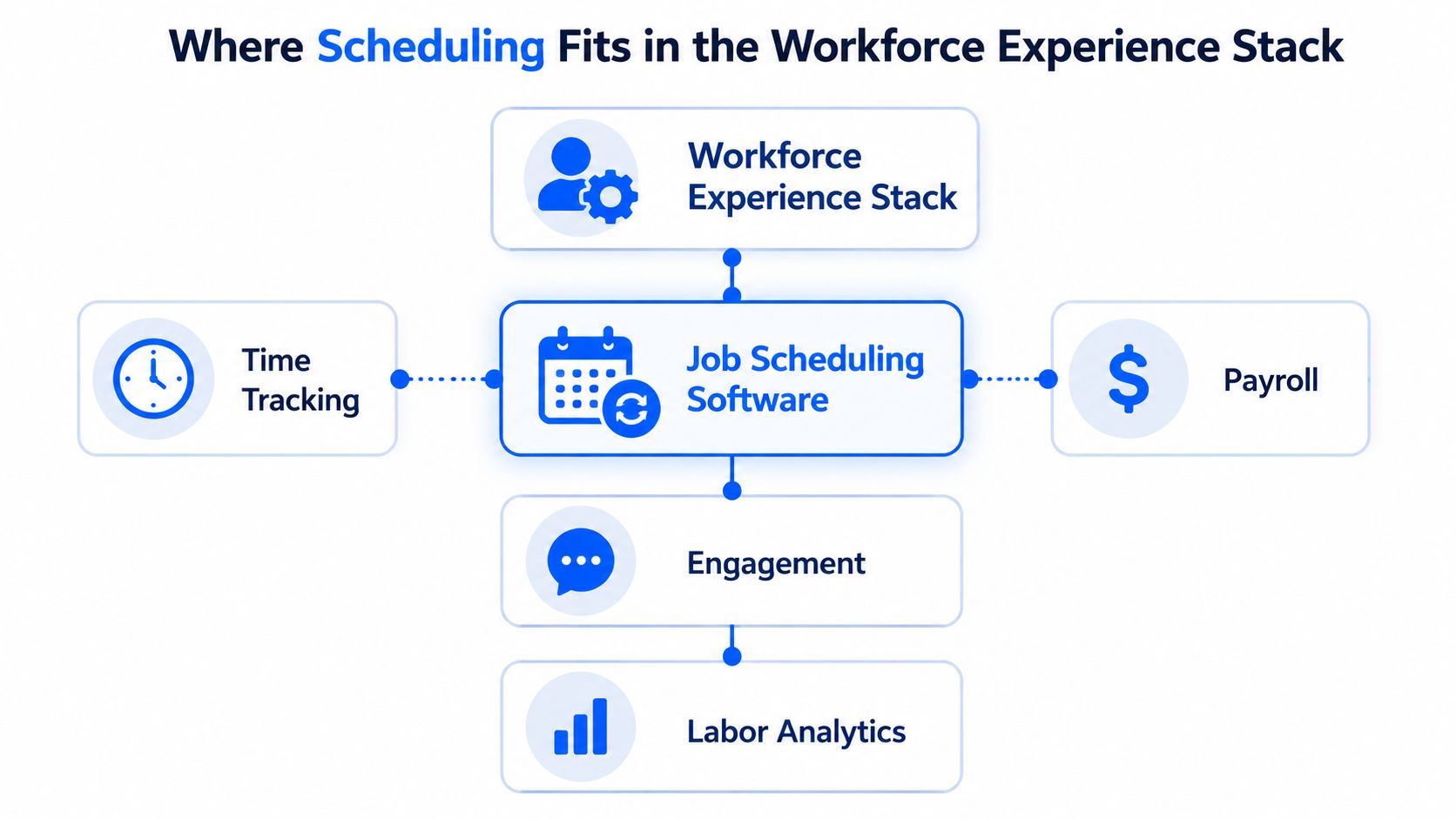
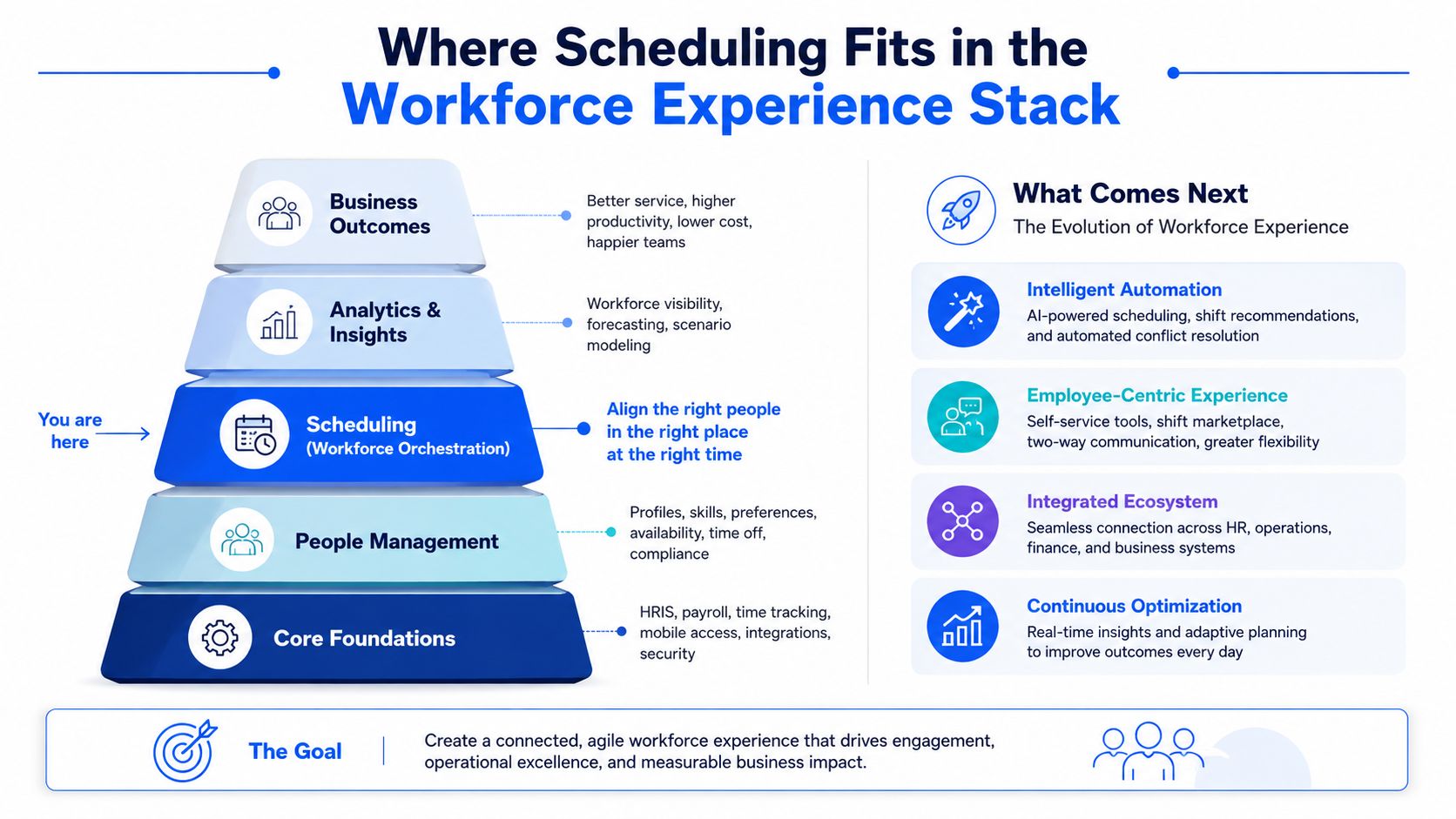
A schedule is where frontline expectations meet operational execution. It uses availability, qualifications, demand, labor rules, and budget constraints, then passes decisions into time tracking, payroll, employee communication, self-service, compliance reporting, and labor analytics. For deskless and multi-location teams, that connection determines whether managers can act on one reliable operating picture.
A disconnected tool can still produce a roster, but managers must reconcile the result elsewhere. One system publishes shifts, another records actual hours, messages explain changes, and a spreadsheet tracks labor cost. Employees face confusion, while leaders work with data they cannot fully trust. Evaluate scheduling software by how well it connects these workflows, not by how many features appear on its product page.
Three developments to watch
Agentic AI assistants will draft and rebalance schedules as demand, absences, and preferences change. Use them only when they show their inputs, explain trade-offs, and request approval for decisions affecting cost, fairness, qualifications, or employee trust. An assistant that changes shifts without a clear explanation creates another management problem.
Predictable scheduling pressure keeps compliance on the buyer’s checklist. Look for checks covering labor laws, union agreements, fatigue thresholds, overtime limits, breaks, qualifications, and award or agreement conditions before a roster is published, as described in current shift and schedule compliance coverage.
Vendor consolidation can reduce the number of systems, but a broad platform may conceal weak workflows. Test whether the combined product makes data easier to use and exceptions easier to handle. Fewer logos do not automatically mean better frontline operations.
The TurnOnWork editorial verdict
Invest when managers still depend on spreadsheets, group messages, manual rule checks, or repeated schedule entry. The business case is strongest when schedule quality connects to labor cost, time accuracy, communication, and employee control. Reported follow-up research found a 66% relative-risk reduction in low control over shift scheduling, alongside lower risks of short sleep and poor workability, when employees had meaningful input into scheduling workflows, according to the reported follow-up research.
Wait for a better release if the current system already handles coverage, integrations, exceptions, and employee self-service reliably. Replace or reconfigure it when managers bypass the tool, employees miss changes, compliance checks happen elsewhere, or AI recommendations need more correction than manual planning. Treat scheduling as part of the workforce operating system, not an isolated calendar.
Job Scheduling Software FAQs
What is the best job scheduling software in 2026?
There isn’t one universal winner. Deputy is the strongest all-round choice for many multi-site frontline teams, Shiftboard suits complex and regulated staffing, Workforce.com fits broader workforce operations, and When I Work, Sling, Connecteam, or ZoomShift may be better for smaller or more focused deployments.
Which employee scheduling software is best for frontline workers?
Choose software with a reliable mobile experience, schedule alerts, availability updates, time-off requests, shift swaps, open-shift claiming, and manager approvals. Connecteam is attractive when communication and tasks belong beside scheduling, while Deputy and When I Work are strong candidates for straightforward frontline scheduling workflows.
How does workforce scheduling software work?
It combines employee availability, shift requirements, skills, locations, labor constraints, and demand information to create a draft roster. Managers review conflicts, approve exceptions, publish the schedule, and monitor changes through time tracking, notifications, and reporting.
Can job scheduling software automate shift planning?
Yes, it can automate repetitive planning and produce AI-assisted drafts. The manager should still review exceptions involving overtime, qualifications, fatigue, agreements, budget, fairness, and unusual demand. Automation should reduce administrative effort, not remove accountable judgment.
What features should job scheduling software include?
Look for mobile self-service, availability management, time-off requests, shift swaps, open shifts, notifications, rule checks, qualifications, overtime controls, time tracking, payroll integration, reporting, permissions, and multi-location support. AI is useful only when it works with those controls.
What is the difference between job scheduling software and workforce management software?
Job scheduling software concentrates on creating and managing shifts. Workforce management software usually adds forecasting, time and attendance, labor analytics, compliance, and broader operational controls. A small business may need only scheduling software, while a distributed enterprise may need the wider workforce management layer.
What is the best shift scheduling software for small businesses?
Start with Sling, ZoomShift, or When I Work if your needs are basic coverage, employee communication, availability, and swaps. Compare implementation effort and mobile usability before paying for advanced workforce management features you won’t operate.
How much does employee scheduling software cost?
Pricing varies by vendor, plan, employee count, modules, integrations, and implementation requirements. Ask for the complete cost of scheduling, time tracking, payroll connectivity, support, and rollout. Don’t accept a low entry price without checking which frontline workflows are excluded.
What is the best scheduling software for multi-location teams?
Deputy and Workforce.com are sensible starting points for multi-location operators, while Shiftboard deserves attention where staffing complexity and compliance are central. Validate shared templates, local permissions, cross-site transfers, labor-cost reporting, and regional rule handling in a live workflow.
How does AI improve employee scheduling?
AI can compare demand, staffing requirements, availability, preferences, productivity information, budget constraints, and labor standards more quickly than a manager working manually. The improvement comes from better inputs and controlled review. AI creates noise when data is incomplete or the system can’t explain its recommendations.
Which scheduling software suits retail, hospitality, healthcare, and field service?
Retail and hospitality teams often need mobile swaps, open-shift handling, communication, and multi-site visibility. Healthcare needs stronger qualification, fatigue, agreement, and coverage controls. Field service teams need mobile access tied to locations, tasks, availability, and operational communication. The best product is the one that matches those workflows without forcing managers to maintain parallel systems.
If your current rota still depends on spreadsheets, group texts, or manual overtime checks, shortlist three tools from this guide and run the same pilot workflow in each one. Test a real week of availability, swaps, callouts, labor rules, payroll handoff, and employee communication before signing a contract. That evidence will tell you more than any feature page.