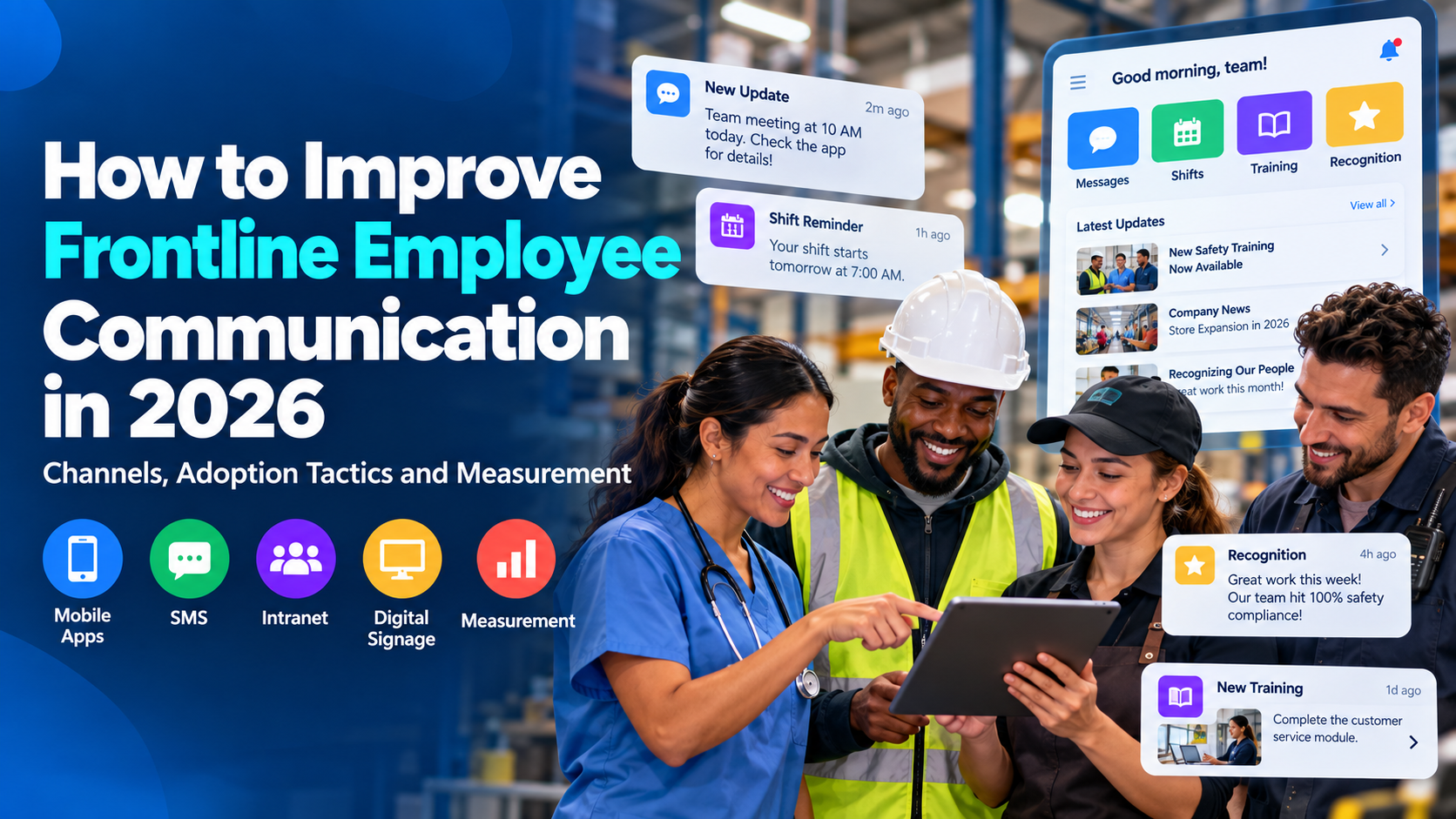
Strong employee app push notifications earn opt-in through a clear value exchange, stay short and action-first, and arrive when people can respond. They go only to the segments that need them, respect frequency caps, and get judged on opens plus completed actions rather than on how many messages you sent. Treat them as an operational channel inside the employee communication app, not as a consumer marketing blast.
Key Takeaways
- Permission is the reach limit. A nominal headcount is not a reachable audience, and iOS and Android consent rules are not the same.
- Write the action first. Lock screens truncate, so the required step, deadline, and deep link have to sit at the front.
- Time sends to local shifts. One company-wide clock fails people on nights, weekends, and other time zones.
- Cap frequency by urgency. Critical safety alerts can interrupt. Culture notes should not.
- Measure action completion. Opens matter, but a schedule acknowledged or a form submitted is the outcome operations needs.
What Effective Employee Push Notifications Look Like
Push notification best practices for employee apps start with workforce experience, not campaign volume. Internal communications, HR technology, and frontline operations meet on the lock screen. A missed shift change, a safety hold, or a benefits deadline is an execution problem. A generic “check the app” ping is noise.
That is why employee push notifications should sit inside a deliberate channel plan. Teams that choose the right workplace communication channels before they automate alerts avoid using push for every announcement. Push is the interrupt. The app, a manager huddle, or a posted schedule is the record.
For deskless crews, the employee communication app is often the only channel that travels with the person. Frontline employee communication fails when alerts are either absent or constant. The workable middle is earned permission, a short action, and a send window that does not collide with the task in front of them.
Practical rule: If the employee cannot act on the message in the next few minutes, it probably should not be a push.
Earning Opt-In Permission from Employees
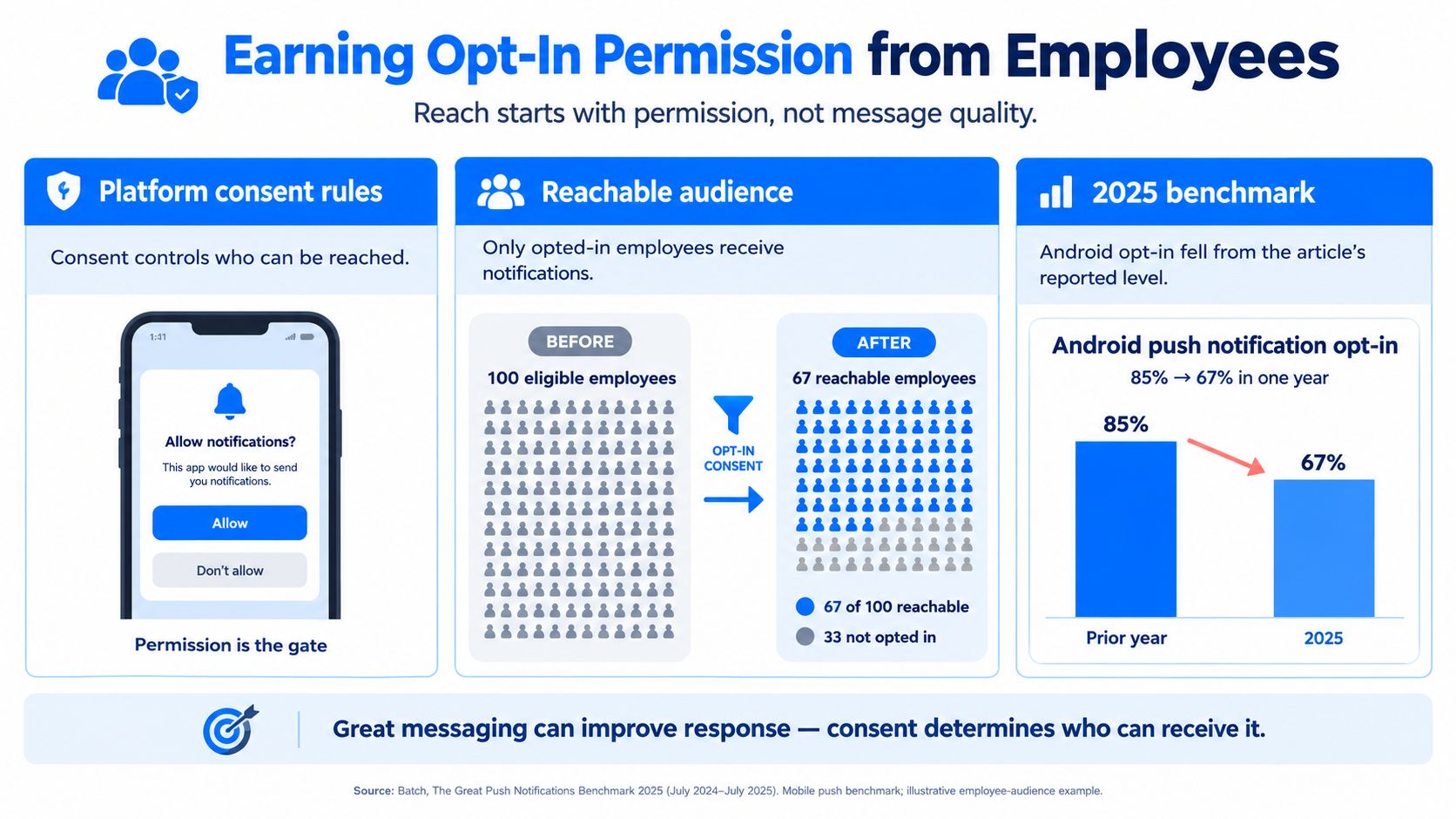
Reach starts with permission, not with sharper copy. Platform consent rules decide who can even see an internal communication push notification.
What the 2025 consent shift changed
Batch’s 2025 benchmark reported that Android opt-in fell from 85% to 67% in one year after Android 13 required an explicit consent prompt, an 18-point drop. iOS opt-in moved from 58% to 56%, and the combined average landed at 61%. A delivery dip after that kind of platform change is often a smaller authorized audience, not proof that the wording suddenly got worse.
Older iOS data points the same direction. In a 2014 Urban Airship study of 2,946 apps and more than 93 billion notifications, the median iOS app opted in 43% of users. High performers cleared 50% in every industry and 70% in several, and they ran 45% higher than medium performers. Retail slipped from 46% to 37% in a year. Android was left out because download then meant automatic opt-in. The lesson that still holds: permission is an earned relationship, and a blended average hides which platform is failing.
When to ask, and what to do after a no
Ask in context, after the employee has seen the job the alert will do.
- Shift-swap and schedule changes: “Get a push when your shift moves, so you are not relying on a group text.”
- Safety notices: “Allow alerts for site closures and hazard holds. These are rare and time-critical.”
- Personal status: “We will ping you only when your PTO request or payroll item needs a response.”
A cold system prompt on first launch wastes the one clean ask many phones give you. If someone declines, do not loop the same dialog. Reach them in the app after a real moment, such as a missed schedule update, and explain the specific alert they would have received. Track opt-in by platform, site, and segment. A warehouse on Android and a clinic on iPhones will not share one target.
A frontline employee who turns alerts off may lose the primary information channel for the shift. That is an operations risk, not a marketing metric. Separate targets for iOS and Android keep that risk visible.
How to Write Employee Push Notifications That Get Read
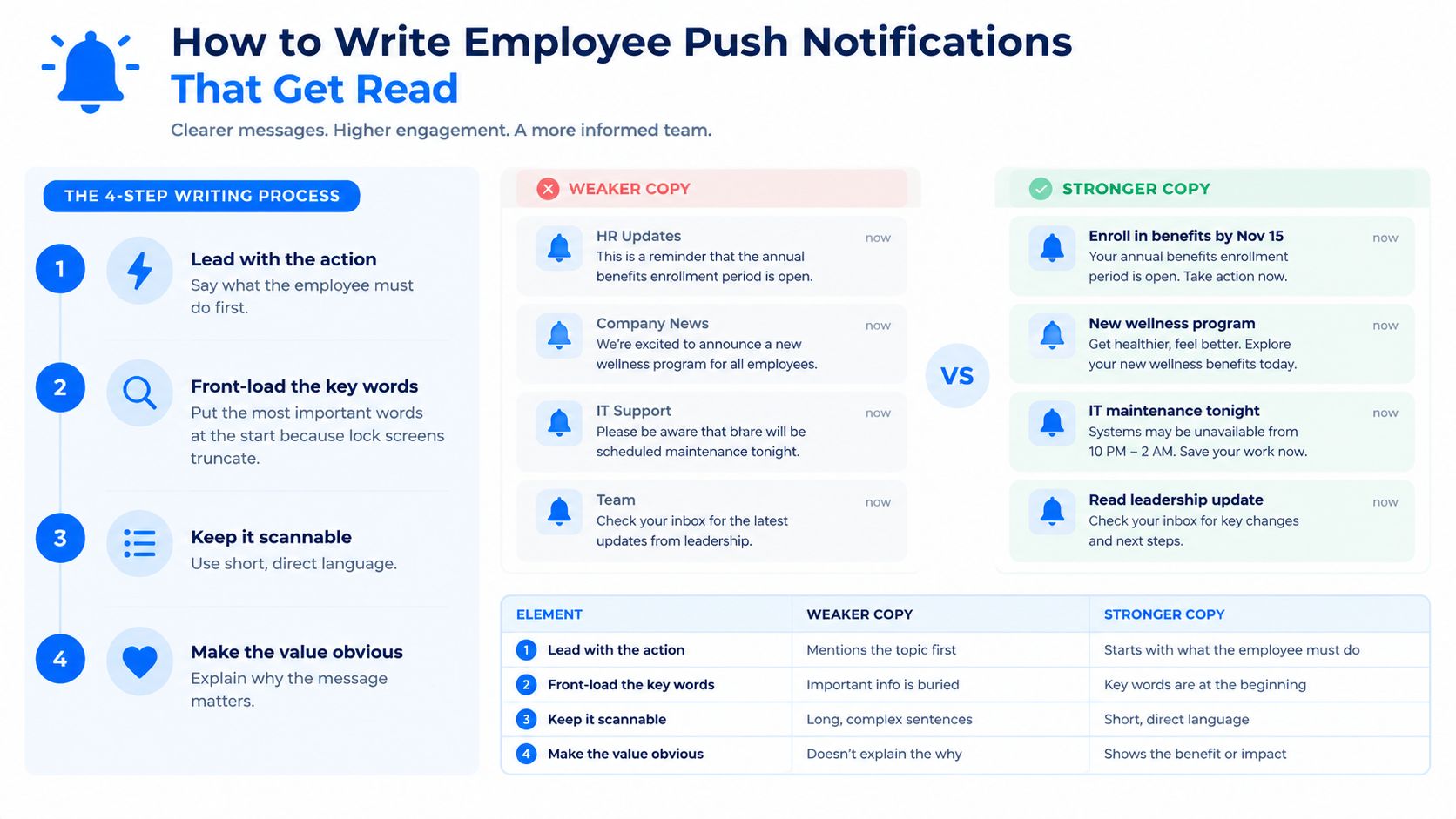
Effective employee push notification messages lead with the action, survive truncation, and land on the exact screen.
A five-step writing pass
- Name the action in the first words. “Confirm Thursday 6 a.m. start” beats “Important schedule update inside.”
- Front-load what the lock screen will keep. Character counts differ by OS version and device, so test on a real iPhone and Android phone. Do not trust a desktop preview.
- Hold to one idea. A benefits deadline and a wellness fair do not belong in the same alert.
- State the deadline or required step. “Reply by 3 p.m. local” or “Acknowledge before you clock in.”
- Deep-link to the exact screen. The tap should open the shift, the form, or the policy, not the home feed.
Employee push notification examples
Benefits enrollment: “Enroll in medical by Friday 5 p.m. Open your benefits task.”
Shift-change confirmation: “Your Friday close moved to 4 p.m. Tap to accept or request a swap.”
Severe-weather closure: “Site B is closed today. Do not travel in. See the status note.”
Safety acknowledgment: “New lockout step for Line 3. Read and confirm before the next start.”
Recognition: “Your crew hit zero recordable incidents this month. Open the note from your manager.”
Routine alerts can be warm and specific. Security prompts cannot be vague. Research on authentication for blind and visually impaired users found that screen readers may announce the newest notification, so an attacker-generated prompt can cover a real one, and repeated prompts create MFA-spam fatigue. Every approval should show application, location, device, and action, with accessible labels, number matching or an equivalent check, rate limits, and a non-push path such as a hardware key or an accessible code.
Approval copy is not engagement copy. If the prompt does not say who is asking, from where, and for what, do not send it.
Do this, skip that
- Do write like a supervisor giving a clear instruction.
- Do match language to the audience, including a second language where the crew needs it.
- Don’t use countdown hype, all-caps, or “you won’t believe.”
- Don’t stack three asks, emojis, or a link that dumps people on a generic intranet home.
For more patterns that sound like the floor, not a campaign, see internal communication examples for frontline employees.
Choosing the Right Timing and Frequency
One send time for the whole company misses anyone not on that clock.
A study of 1,255 participants over 89 days tested daily pushes at six times from 8:30 a.m. to 8:30 p.m. and found the strongest result at 12:30 p.m. on weekends, with a suggestion that about one notification a day can support engagement (Tilburg University repository). That setting was not a workplace, so do not copy 12:30 p.m. as a corporate default. Use the mechanic: people respond when they can act, and a single daily touch outperforms a pile of reminders.
Shift-aware windows
Schedule in each employee’s local time. A 9 a.m. headquarters blast is midnight, a peak service rush, or a driving window for someone else.
- Pre-shift: schedule changes, staffing gaps, and site access notes, with enough lead time to act.
- Shift change: handoffs, incomplete tasks, and safety acknowledgments tied to the role ending or starting.
- Breaks: training nudges and non-urgent HR items, never while someone is on a safety-critical task.
- Quiet hours: no culture or benefits reminders overnight. Critical safety and stop-work alerts are the exception, and they need an owner.
A six-week comparison of Headspace and 7Mind logged 143 incoming pushes. Headspace sent two partly personalized notes a day. 7Mind sent one repetitive note. Both relied on static clocks rather than an event such as a missed task (IJMAT). For crews, an event trigger (shift change, incomplete form, safety issue) usually beats a standing daily broadcast.
Caps before fatigue shows up
Set a cap per person per day and per week for non-urgent pushes. Batch informational items into one digest. Keep an escalation path for urgent messages so they are not stuck behind the cap.
Watch three warning signs: opt-outs rising at a site, open rates falling after you increased volume, and acknowledgments that used to come back now sitting ignored. Those are fatigue, not “people don’t read.” Pair the cap with shift scheduling so the alert matches when the person is on the clock.
Segmenting Messages and Setting Urgency Levels
Relevance moves employee app engagement more than extra sends. Dynamic Yield’s push guidance reports a 14.4% open rate for segmented campaigns and up to a fourfold lift in opens versus generic messages. For workforce communication, adapt by role, location, department, shift pattern, language, or task. Do not mail the same sentence to every badge.
Personalization here is an editorial choice about who needs the fact. It is not a reason to track individual employees beyond what the job requires. Skip surveillance-style targeting. A nurse needs the unit closure. She does not need a score of how fast she tapped last Tuesday.
For teams managing employees across different locations and shifts, tools like HubEngage can help deliver more relevant updates. The platform supports employee segmentation, scheduled push notifications, and communication acknowledgments, so organizations can target messages to the people who actually need them rather than notifying everyone.
Three urgency tiers
Classify the message before you schedule it. The same words can be critical at one site and noise at another.
| Urgency tier | Example messages | Timing rule | Audience targeting | Frequency guidance |
|---|---|---|---|---|
| Critical | Evacuation, stop-work, system outage that halts service, severe-weather closure | Send immediately in local time, including quiet hours | Only people exposed: site, shift on duty, affected role | No daily cap. Still ban repeats that are not new information |
| Important | Shift change, benefits deadline, required training due this week, payroll action | Next actionable window: pre-shift, break, or before the deadline | Role, location, and people with the open task | Count toward the daily cap. One reminder, then stop |
| Informational | Recognition, culture note, optional event, general policy refresh | Digest only, never during safety-critical work | Broad, but still by language and region | Weekly at most, folded into one digest |
Critical alerts belong in the crisis communication plan, with a named sender and a fallback if push opt-in is low. Important items carry a deadline and a deep link. Informational items lose little if they wait for the digest.
If you cannot name the tier in one sentence, you are not ready to hit send.
Managers still own the message. A push does not replace a huddle when the crew shares devices or the stakes need a conversation. Segmentation decides who is interrupted. The tier decides whether the interrupt is justified.
Measuring Performance and Putting It Into Practice
A push program is healthy when opted-in people receive the alert, open it, tap through, and finish the job. Vanity send counts do not show that.
The metrics that change decisions
- Opt-in rate by platform: iOS and Android stay on separate lines, with site and role cuts where volume allows.
- Delivery rate: tokens that no longer reach a phone are an audience problem, not a copy problem.
- Opens: useful, but easy to inflate with vague subject lines.
- Push notification click-through rate: the tap into the deep link.
- Action completion: schedule acknowledged, training finished, form submitted, safety step confirmed.
- Operational outcome: fewer missed handoffs, faster closure notices, fewer “I never saw it” escalations.
A PLOS ONE study assigned 77 participants to intelligent notifications, daily notifications in set windows, or occasional notifications in those windows. Intelligent timing showed no meaningful edge, and location- or movement-based timing did not reliably raise response. Do not assume an AI send-time model will lift engagement. A/B test it against a plain local-time schedule, and judge delivery, opens, completed actions, and the operational result.
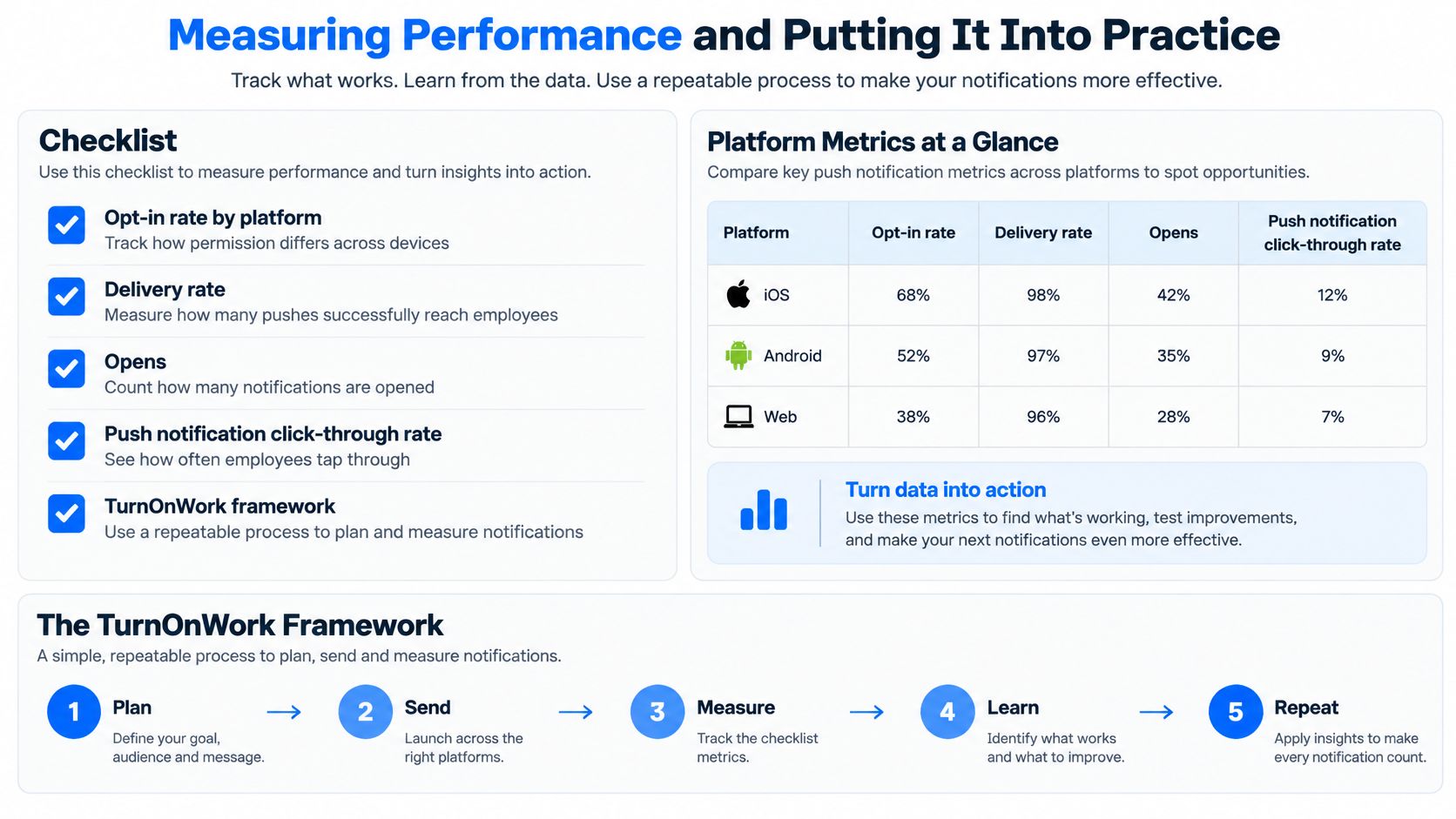
TurnOnWork Employee Push Notification Checklist
This is a TurnOnWork editorial model, not an industry standard. Run it before a new alert type goes live.
- Permission: The prompt names a concrete benefit, and opt-in is reported by platform and site.
- Wording: Action first, one idea, deadline visible, deep link correct, security prompts fully labeled.
- Timing: Local time, shift-aware window, quiet hours set, safety-critical work left alone.
- Tier: Critical, important, or informational, with the matching audience and cap.
- Measurement: Owner, success event, and a review date are written down. Fold the numbers into your internal communications metrics.
Next step: pull the last 30 days of employee app notifications and mark each one against the five lines. Kill or digest anything that fails wording, tier, or timing. Keep anything tied to a completed action.
Push Notification Best Practices FAQs
How do push, SMS, and email compare for internal updates?
Push is the interrupt for people who installed the employee communication app and opted in. Email fits longer policy and anything people must file. SMS reaches a phone number without the app, which helps closures and call-outs, but it costs more, is easier to ignore as spam, and is a poor home for sensitive detail. Use push for time-bound action, email for the record, and SMS when the person may not have the app open or installed.
What if frontline staff will not or cannot install the app?
Shared devices, locked-down phones, and consent worries are common in plants, hospitals, and stores. Offer a kiosk or shared-device mode with a short session and no personal notification history left on screen. Keep a non-app path for critical alerts, such as a supervisor call tree or SMS, and do not punish someone for declining phone tracking. Document who is unreachable by push so operations does not assume the alert landed.
Should employees choose which alert categories they get?
Yes for informational and most important categories. A preference center that separates schedules, safety, pay, and culture lets someone mute the picnic note without muting a stop-work alert. Critical safety categories can stay mandatory if policy says so, and that rule should be visible at opt-in. Choice is what keeps a frustrated employee from turning the entire channel off.
How should unionized or regulated teams adapt?
Alert rules may sit in a contract, a works-council agreement, or a compliance procedure. Review new categories, quiet hours, and any required acknowledgment with labor relations or counsel before you automate them. Keep an audit trail for safety and credential prompts. Do not add location-based triggers or productivity scoring unless that use is explicitly allowed. When in doubt, send less, and route the sensitive notice through the channel the agreement already names.
Pull the last 30 days of pushes from your employee communication app, label each one critical, important, or informational, and drop anything informational that went out as its own interrupt. Then fix the next schedule or safety alert so the action is in the first line, the send uses local shift time, and you can see whether people completed the step, not only whether the message left the server.